What if the reason your sublimation sales feel busy but not profitable isn’t your designs… it’s your math?
Most sublimation crafters underprice without realizing it, until a simple calculator shows where the money is actually going.
This is where sublimation craft calculators become your secret weapon. These specialized tools help you factor in every expense, giving you the confidence to set prices that support your business goals.
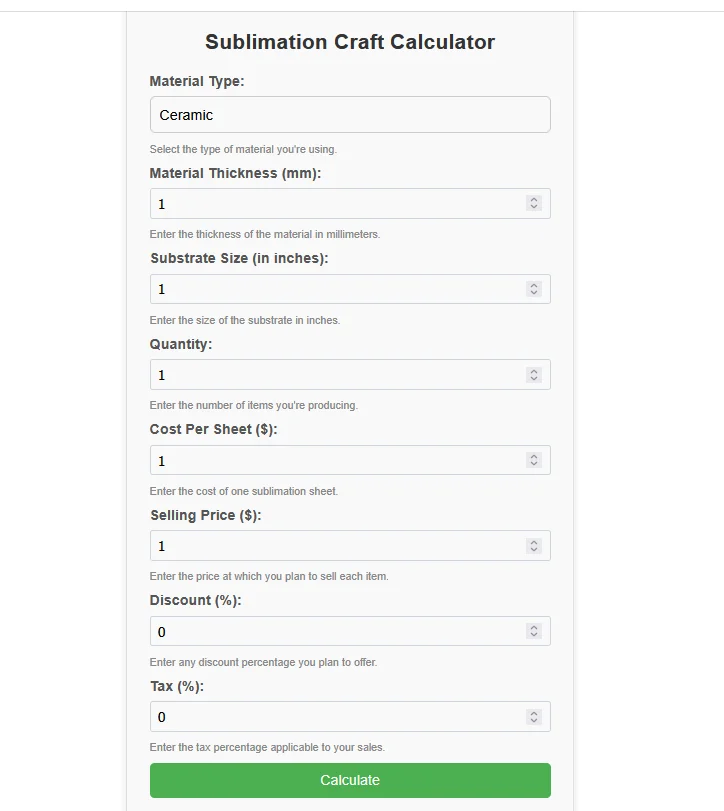
Sublimation Craft Calculator
Select the type of material you’re using. Enter the thickness of the material in millimeters. Enter the size of the substrate in inches. Enter the number of items you’re producing. Enter the cost of one sublimation sheet. Enter the price at which you plan to sell each item. Enter any discount percentage you plan to offer. Enter the tax percentage applicable to your sales.Results:
Total Cost: $0.00
Total Revenue: $0.00
Profit Margin: $0.00
Profit Margin (%): 0.00%
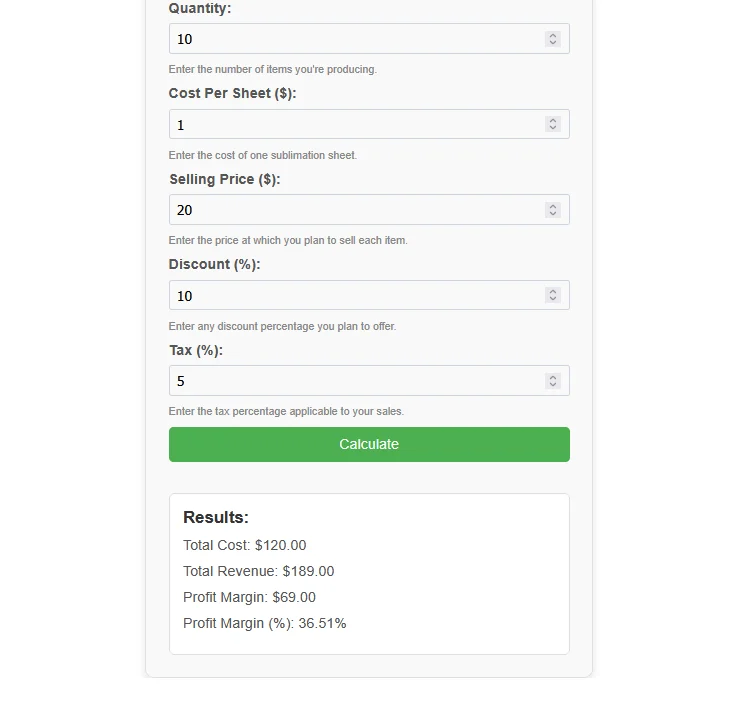
A sublimation craft calculator pulls multiple variables into one clear result.
Typical inputs include:
- Material type
- Material thickness (mm)
- Substrate size (inches)
- Quantity produced
- Cost per sublimation sheet
- Selling price per item
- Discount percentage
- Sales tax percentage
Tools like the Sublimation Craft Calculators from Subli Genius Print are designed specifically for these workflows.
Results You Should Expect
Once values are entered, the calculator shows:
- Total cost
- Total revenue
- Profit amount
- Profit margin percentage
This makes pricing decisions faster and removes second-guessing.
What a Sublimation Craft Calculator Really Does
A sublimation craft calculator breaks down the true cost per item so you’re not guessing your prices.
Instead of mental math or rough estimates, a calculator helps you see:
- What each product actually costs to make
- How discounts and taxes affect profit
- Whether your selling price is sustainable
If you’re new to cost tracking, this fits naturally alongside the basics covered in our guide on getting started with sublimation.
What Factors Affect Sublimation Project Costs?
Accurate pricing starts with understanding where the money goes.
Supplies
- Substrates
Mugs, shirts, tumblers, phone cases, and panels all vary in base cost. Material choice plays a big role, especially when working with different blanks explained in the sublimation blanks and substrates guide. - Transfer paper
Used once per print and easy to overlook. - Sublimation ink
Ink usage depends on image size and color coverage. - Protective paper
Butcher paper or Teflon sheets help prevent reprints and damage.
Equipment
- Sublimation printer
Ink refills and maintenance add ongoing costs, especially if you’re scaling with higher-volume printers discussed in the sublimation printer guide. - Heat press
Larger presses consume more power and space. - Design software
Free tools save money, paid tools save time.
Labor
Your time counts, even if you’re a one-person shop:
- Design setup
- Printing
- Pressing
- Cooling and packing
Ignoring labor is one of the biggest pricing mistakes.
Overhead
Often forgotten, but still real:
- Electricity
- Workspace expenses
- Equipment wear
How to Use a Sublimation Calculator
A calculator simplifies the process, but accuracy starts with good inputs.
Example: Custom Sublimation Mug
Here’s a realistic breakdown:
- Blank mug: $2.50
- Sublimation paper: $0.35
- Ink usage: $0.40
- Labor estimate: $2.00
- Overhead allocation: $0.50
True cost per mug: $5.75
Now compare pricing:
- Sell at $10
- Profit: $4.25
- Margin: ~42%
- Sell at $12
- Profit: $6.25
- Margin: ~52%
This same approach works even better when paired with tools like the Sublimation Pricing Calculator, especially for bulk or wholesale orders.
Why Profit Margin Matters More Than Price
Two sellers can charge the same amount and walk away with very different results.
A calculator helps you:
- Spot underpriced bestsellers
- Adjust pricing for bulk discounts
- Test promotions without losing money
- Prepare for rising material costs
Staying busy isn’t the same as staying profitable.
Unlock the full potential of your sublimation projects with our easy-to-use Sublimation calculator apps. Click now and elevate your printing game!
When You Should Recalculate Your Costs
Revisit your numbers whenever:
- Blank or ink prices change
- You upgrade equipment
- You offer discounts or bundles
- Order volume increases
- You move into wholesale pricing
If you’re managing multiple variables, combining this with a broader sublimation cost estimator can save serious time.
Where Sublimation Costs Are Increasing
Customer Willingness to Pay for Personalization
How to Price Handmade Items (Without Guessing or Underselling)
Pricing handmade items gets messy when emotion replaces math. You put time, care, and skill into every piece, but none of that pays bills unless it’s priced correctly.

Here’s a clean way to price handmade products so they stay profitable long-term.
Step 1: Know Your True Cost Per Item
Before setting any price, lock in your real cost.
That includes:
- Blanks or raw materials
- Ink, paper, or consumables
- Packaging
- Your time, even if it’s just minutes
- Basic overhead like electricity
If you’re unsure how all those numbers add up, using a structured tool like a sublimation cost estimator helps prevent missed expenses that quietly eat profit.
Step 2: Set a Margin That Protects You
Handmade pricing isn’t about what’s left over. It’s about choosing a margin intentionally.
Typical ranges:
- 40–50% for simple, repeatable items
- 50–65% for personalized or custom work
- Higher margins for low-volume or high-skill pieces
Margins protect you when materials rise, mistakes happen, or discounts are applied.
Step 3: Remove Emotion From the Price
This is where most handmade sellers struggle.
- Enjoying the work doesn’t make your time free
- Affordable doesn’t mean underpaid
- Customers pay for results, not your internal effort
If people regularly say “that’s cheap,” it’s often a signal that pricing is too low.
Step 4: Price for Repeatability, Not One Sale
A good price should work again and again.
Ask yourself:
- Can I repeat this price 50 times without stress?
- Does it still work with a small discount?
- Can it scale to bulk or wholesale orders?
If not, the price needs adjustment.
Tools like a dedicated sublimation pricing calculator make it easier to test prices before committing to them.
Step 5: Use a Simple Formula You Can Reuse
A reliable formula keeps pricing logical:
Selling Price = Total Cost × (1 + Target Margin)
Example:
- Total cost: $8
- Target margin: 60%
- Price: $12.80
Round to a clean number that fits your market.
Step 6: Revisit Pricing as You Grow
Handmade pricing isn’t static.
Review prices when:
- Material costs change
- You become faster or more efficient
- Demand increases
- You introduce bundles or wholesale options
Small updates prevent big losses later.
Average Sublimation Profit Margins by Product Type
Not all sublimation products perform the same, even when priced similarly. Knowing typical margin ranges helps you spot underpriced items fast.
| Product Type | Avg Cost per Item | Common Selling Price | Typical Profit Margin |
|---|---|---|---|
| Mugs | $5–6 | $12–15 | 45–60% |
| Polyester T-Shirts | $6–8 | $18–25 | 40–55% |
| Tumblers | $9–12 | $25–35 | 50–65% |
| Phone Cases | $4–6 | $15–22 | 55–70% |
| Photo Panels | $7–10 | $20–30 | 45–60% |
If your margins fall well below these ranges, the issue is usually pricing inputs, not demand.
Quick Self-Check: Are You Accidentally Underpricing?
Answer honestly, yes or no.
- Do you use the same price for different sizes?
- Do you skip labor because “it’s just a few minutes”?
- Do you estimate ink instead of calculating it?
- Do discounts come straight out of profit?
- Do you price based on competitors instead of costs?
If you answered yes to two or more, a sublimation calculator isn’t optional, it’s necessary.
Expert Tip: Where Most Profit Leaks Happen
Expert Tip:
Most sublimation businesses don’t lose money on materials. They lose it on ignored labor, reprints, and “small” costs that never get tracked.
Even one mispriced item can quietly drain profit over time. Calculators protect margins by forcing every cost into view, even the ones that feel insignificant.
What a $2 Pricing Mistake Really Costs
Small pricing errors add up faster than most people expect.
Example scenario:
- Underpriced by $2 per item
- 50 items sold per month
- $100 lost monthly
- $1,200 lost per year
That’s money already earned by your effort, designs, and time, but never collected.
Accurate calculators stop this bleed before it starts.
Profit Stability by Pricing Method
Guessing vs Calculator-Based Pricing
| Pricing Method | Accuracy | Stress Level | Long-Term Profit Control |
|---|---|---|---|
| Guessing | Low | High | Unstable |
| Manual Notes | Medium | Medium | Inconsistent |
| Calculator-Based | High | Low | Predictable |
Guessing feels faster, but calculator-based pricing scales better and protects profit as order volume grows.
FAQs
Remember, pricing is a dynamic process. As your skills grow, or material costs fluctuate, revisit your calculations with the help of your trusty calculator.
Let Subli Genius Print be your partner in this journey, providing tools and resources to unlock your sublimation business potential.