
Sublimation printing problems can ruin an otherwise great transfer. One small issue with heat, pressure, moisture, ink, or materials can lead to faded colors, ghosting, blurry designs, or uneven prints.
The good news is that most sublimation problems are predictable once you understand the cause.
This sublimation troubleshooting guide walks through the most common sublimation printing issues, why they happen, and how to fix them step by step. You’ll also learn how to prevent repeat problems so your workflow becomes more consistent.
If you are new to sublimation, start with this complete sublimation printing guide to understand the full process.
What Causes Sublimation Printing Problems?
Most sublimation issues come down to four key areas:
- Incorrect heat press settings
- Poor material selection
- Printer or ink issues
- Movement during transfer
If even one of these is off, your final print will show defects.
If you’re unsure where to start, this complete sublimation troubleshooting guide walks through the full workflow.
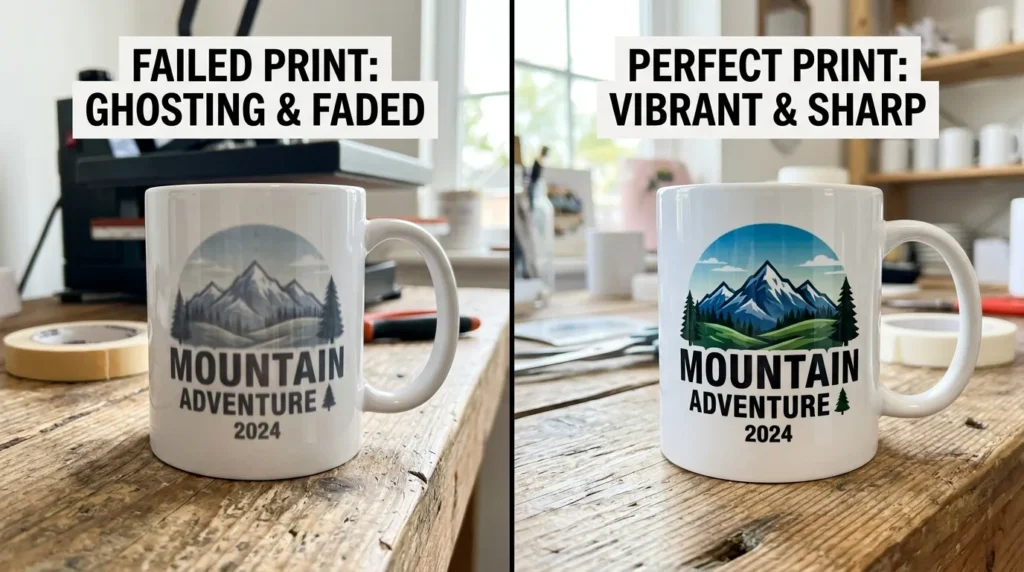
What Causes Most Sublimation Problems?
Most sublimation transfer issues come from one of these areas:
- Incorrect heat press settings
- Poor pressure consistency
- Wrong sublimation paper or materials
- Moisture inside blanks or fabric
- Printer maintenance problems
- Incorrect ICC color profile setup
- Transfer paper movement during pressing
The faster you identify which category caused the problem, the easier it becomes to fix.
Quick Sublimation Troubleshooting Checklist
Before troubleshooting deeper issues, check these first:
- Verify heat press temperature
- Confirm pressing time
- Check pressure consistency
- Inspect sublimation paper alignment
- Run a printer nozzle check
- Confirm you are using polyester or coated blanks
- Check humidity or moisture in materials
- Verify your ICC profile settings
This quick checklist solves many sublimation printing problems before wasting materials.
Faded or Dull Sublimation Colors
What it looks like
Your design looks washed out, weak, or lacks vibrancy after pressing.
Why it happens
This usually happens because of:
- Low heat press temperature
- Insufficient pressing time
- Low polyester content
- Incorrect ICC profile
- Weak ink saturation
- Moisture in substrate
How to fix faded sublimation prints
- Increase temperature slightly within recommended range
- Extend pressing time by 5–10 seconds
- Use polyester or polymer-coated blanks
- Install the correct ICC profile
- Print using high-quality print settings
- Pre-press fabric to remove moisture
For deeper color correction help, follow this guide on fixing sublimation color problems.
How to prevent dull colors
- Use quality sublimation blanks
- Avoid low-polyester fabrics
- Store paper in dry conditions
- Maintain consistent heat press settings
Image suggestion:
Comparison of dull sublimation colors versus corrected vibrant colors on a tumbler.

Ghosting in Sublimation Prints
What it looks like
A blurry duplicate image or shadow appears around the design.
Why ghosting happens
Ghosting occurs when transfer paper shifts during pressing or while removing the substrate.
How to fix ghosting
- Secure transfer paper with heat-resistant tape
- Open the heat press slowly
- Avoid moving the substrate while hot
- Let the blank cool briefly before removing paper
How to prevent sublimation ghosting
- Use proper pressure settings
- Stabilize large transfers carefully
- Avoid sudden press movement
- Use protective paper during pressing
If ghosting continues, review your heat press sublimation settings.
Banding or Lines in Sublimation Prints
What it looks like
Horizontal white lines or streaks appear across the design.
Why banding happens
Banding is commonly caused by:
- Clogged print heads
- Low ink flow
- Draft print settings
- Air bubbles in ink lines
How to fix banding
- Run a nozzle check
- Perform 1–2 cleaning cycles
- Print in high-quality mode
- Check ink tank levels
- Inspect dampers or ink lines if using converted printers
How to prevent print banding
- Print weekly to prevent clogs
- Perform regular maintenance
- Keep printer covered when not in use
For maintenance help, follow this guide on cleaning a sublimation printer.
Image suggestion:
Close-up comparison of a banded sublimation print beside a clean corrected print.
Blurry Sublimation Prints
What it looks like
Your transfer lacks sharp detail and appears soft or pixelated.
Why blurry sublimation happens
- Low-resolution artwork
- Paper movement during pressing
- Incorrect printer settings
- Excess moisture
How to fix blurry transfers
- Use artwork at 300 DPI
- Print in high-quality mode
- Secure paper firmly
- Reduce moisture before pressing
- Avoid stretching fabric during pressing
Best practices for sharp sublimation prints
- Use vector artwork when possible
- Avoid enlarging small images
- Keep paper flat during transfer
For sharper output, review how to get sharp sublimation prints every time.
Uneven Color or Patchy Transfers
What it looks like
Some areas appear lighter or darker than others.
Why uneven transfers happen
- Uneven pressure
- Cold spots in heat press
- Worn heat press pads
- Incorrect substrate positioning
How to fix uneven sublimation transfers
- Adjust pressure evenly
- Check heat press calibration
- Replace damaged pads
- Ensure flat pressing surface
- Preheat the press before production
How to prevent patchy transfers
- Test pressure regularly
- Avoid overloading the press
- Use quality pressing mats
Bleeding or Ink Spreading
What it looks like
Ink spreads outside the edges of the design.
Why sublimation ink bleeds
- Excessive heat
- Too much pressure
- High humidity
- Over-saturated print settings
How to fix ink bleeding
- Reduce temperature slightly
- Lower ink saturation settings
- Pre-press blanks for 5–10 seconds
- Store blanks in dry conditions
How to prevent bleeding issues
- Control humidity levels
- Avoid over-pressing
- Use recommended settings for each substrate
Sublimation Color Mismatch
What it looks like
Printed colors look different from your monitor.
Why colors do not match
- Incorrect ICC profile
- RGB and CMYK conversion differences
- Monitor calibration issues
- Mixed ink brands
How to fix sublimation color mismatch
- Install the correct ICC profile
- Calibrate your monitor
- Use consistent ink brands
- Print color swatches before production
- Disable duplicate color management settings
Learn more about ICC profiles for sublimation printing.
Image suggestion:
Monitor displaying one color while the printed sublimation transfer shows a different shade.
Heat Press Problems That Ruin Transfers
Heat press issues cause many sublimation failures.
Common symptoms include:
- Faded transfers
- Scorch marks
- Uneven pressing
- Transfer peeling
- Ghosting
Common heat press troubleshooting fixes
- Verify actual platen temperature
- Check pressure consistency
- Replace worn pads
- Use protective paper
- Preheat garments before pressing
You can also review these common heat press mistakes and fixes.
Printer Maintenance Problems
Poor printer maintenance often leads to recurring sublimation print defects.
Signs your printer needs maintenance
- Missing colors
- Banding
- Weak saturation
- Ink flow issues
- Nozzle gaps
Maintenance best practices
- Print something every week
- Run nozzle checks regularly
- Use quality sublimation ink
- Keep printers dust-free
- Avoid letting ink sit unused
For deeper maintenance guidance, review how to unclog a sublimation printer.
Troubleshooting Different Sublimation Materials
Polyester Fabrics
- Use at least 65% polyester
- Pre-press to remove moisture
- Avoid heavy textured fabrics
Hard Sublimation Blanks
- Use coated substrates only
- Apply even pressure
- Protect surfaces with butcher paper
Tumblers and Mugs
- Ensure full wrap contact
- Avoid uneven heating
- Tape edges securely
Advanced Sublimation Troubleshooting Tips
If problems continue after basic troubleshooting:
- Check room humidity levels
- Update printer drivers
- Test alternative sublimation paper
- Verify heat press calibration with a thermometer
- Run multiple small test prints before large production
Small workflow adjustments often solve recurring issues.
How to Prevent Sublimation Problems Long Term
Consistency is the key to reliable sublimation printing.
Best practices include:
- Maintain consistent heat settings
- Use trusted sublimation blanks
- Avoid switching ink brands often
- Perform routine printer maintenance
- Keep materials dry and clean
- Test settings before large production runs
A stable workflow reduces wasted materials and improves print quality.
If your printer suddenly stops producing ink, this guide on why sublimation printers print blank pages walks through clogged print heads, EcoTank ink flow issues, and step-by-step recovery solutions.
Frequently Asked Questions
What are the most common sublimation printing problems?
The most common issues include ghosting, faded colors, banding, blurry prints, and uneven transfers.
Why are my sublimation colors dull?
Dull colors usually come from low temperature, poor ICC profile setup, moisture, or low polyester content.
Can humidity affect sublimation printing?
Yes. Excess humidity can cause bleeding, ghosting, and faded transfers.
What temperature works best for sublimation?
Most sublimation projects work between 380°F and 400°F depending on the material.
How do I stop ghosting in sublimation?
Secure transfer paper with heat tape and avoid moving the substrate during or immediately after pressing.
Professional Sublimation Printing & Wholesale Custom Products
Looking for high-quality sublimation printing for apparel, drinkware, and promotional items? Subli Genius Print delivers vibrant color, sharp detail, and long-lasting results for businesses, brands, and resellers across the U.S.