
Heart Text Generator For Sublimation (Updated)
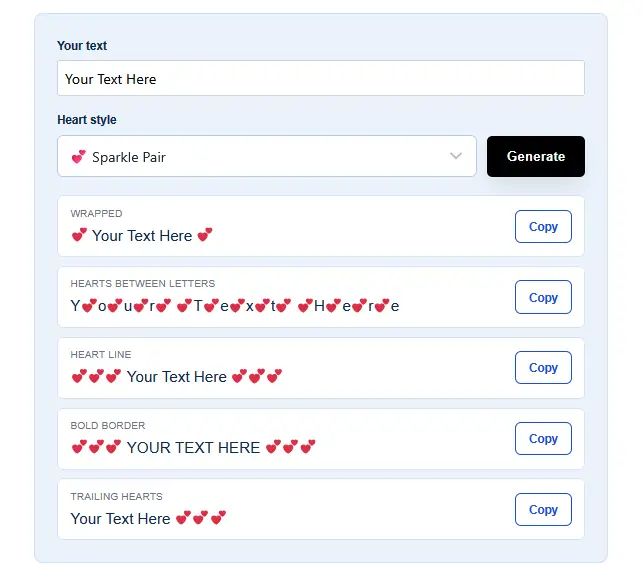
Create heart-styled names, short phrases, and love-themed text you can copy into your sublimation design workflow. Try different heart styles for mugs, shirts, tumblers, gift tags, Valentine designs, and personalized gifts.
The generator creates Unicode text, not a finished sublimation transfer. After copying your text, you can style, size, and prepare it in your preferred design software before printing.
How to Use the Heart Text Generator
You only need a few steps to turn regular text into heart-styled text:
- Type a name, word, or short phrase.
- Choose the heart style you want.
- Preview the generated versions.
- Copy your favorite result.
- Paste it into Canva, Cricut Design Space, Affinity Designer, Photoshop, Illustrator, or another design program.
- Adjust the design for your sublimation blank before printing.
For example:
Sarah → ♡ Sarah ♡
MAMA → M♡A♡M♡A
Love You → ♥ Love You ♥
The text can also be pasted into captions, gift tags, messages, labels, and other text fields.
Using Heart Text in Sublimation Designs
Heart text works best as a small personalized element rather than replacing the entire design. Names, short sayings, dates, and initials are especially easy to combine with existing artwork.
| Sublimation Project | Heart Text Example |
|---|---|
| Mug | ♡ Best Mom ♡ |
| Tumbler | Sarah ♥ |
| Shirt | MAMA ♡ |
| Couple shirts | His ♡ / Hers ♡ |
| Ornament | Our First Christmas ♡ |
| Dog tag | Bella ♥ |
| Gift | Made With ♥ |
| Valentine design | Be Mine ♡ |
You can also combine the generated text with photos, flowers, monograms, patterns, or other sublimation designs for shirts, jerseys, and tumblers.
Best Heart Text Styles for Different Sublimation Projects
A heart style that looks good on a screen can become crowded when printed small. Match the amount of decoration to the available print area.
Sublimation Mugs
Simple wrapped hearts are usually easiest to read on mugs:
♡ Best Mom ♡
♥ Love You ♥
Sarah ♡
Avoid putting a heart between every letter when your phrase is already long. The design can become difficult to read once it wraps around the mug.
Sublimation Shirts
Shirts give you more room, so both simple and decorative styles can work:
MAMA ♥
♡ LOVE ♡
Be Kind ♡
S♡O♡P♡H♡I♡A
For larger shirt graphics, treat the heart text as one part of the overall composition rather than filling the entire design with symbols.
Sublimation Tumblers
Names and vertical-style text work particularly well on tumblers:
S♡A♡R♡A♡H
Emma ♥
♡ Coffee First ♡
Before building the final artwork, check the printable area of your specific sublimation tumbler blank.
Personalized Gifts
Heart text can also work well for:
- Valentine’s Day gifts
- Mother’s Day gifts
- Wedding favors
- Anniversary gifts
- Bridesmaid tumblers
- Couple mugs
- Memorial keepsakes
- Teacher gifts
- Family ornaments
- Personalized pet tags
Keep the wording short enough that the name or message remains the main focus.
How to Turn Heart Text Into a Sublimation Design
Copying the text is only the first step. You still need to prepare the completed artwork for printing.
1. Copy Your Heart Text
Choose the version that fits the project.
Example:
♡ Emma ♡
2. Paste It Into Your Design Software
Paste the text into the program you normally use for creating sublimation artwork.
This might include:
- Canva
- Cricut Design Space
- Affinity Designer
- Adobe Photoshop
- Adobe Illustrator
- Other graphics software
3. Check Every Heart Character
Look closely at the pasted text.
If a heart turns into a blank square, question mark, or unexpected symbol, the selected font may not contain that Unicode character.
Try another font or switch to a simpler heart such as:
♡
♥
❤
4. Size the Design for Your Blank
The generator doesn’t determine your physical print dimensions.
Set the final width and height according to the shirt, mug, tumbler, ornament, or other blank you’re decorating.
5. Finish the Artwork
Adjust:
- Font
- Font size
- Letter spacing
- Heart spacing
- Color
- Alignment
- Design placement
Then prepare the file using your normal sublimation printing workflow.
Heart Symbols You Can Copy and Paste
You don’t always need a full generated style. Sometimes a single heart added before, after, or between words looks cleaner.
| Heart Style | Symbol |
| Outline heart | ♡ |
| Solid heart | ♥ |
| Heavy heart | ❤ |
| Heart exclamation | ❣ |
| Rotated heart | ❥ |
| Decorative heart | ❦ |
| Decorative heart | ❧ |
| Curved heart-style symbol | ღ |
Try copying these ready-made combinations:
♡ LOVE ♡
♥ MOM ♥
❥ Forever ❥
ღ Sarah ღ
♡ Made With Love ♡
♥ Mama ♥
Emma ♡ 2026
A ♥ J
For sublimation artwork, simpler symbols are often easier to control than emoji-style hearts because their appearance is more closely tied to the selected font.
Heart Text Ideas for Sublimation
Not sure what to type? Short phrases usually work best.
Valentine’s Day Heart Text
- ♡ Be Mine ♡
- XOXO ♥
- My Valentine ♡
- Love You More ♥
- Forever Yours ♡
- You + Me ♥
- Always ♡
Mother’s Day Heart Text
- Mama ♡
- Best Mom Ever ♥
- Mama Bear ♡
- Mom ♥ Est. 2020
- Love You Mom ♡
- World’s Best Mama ♥
Couple Heart Text
- Mr. ♥ Mrs.
- His ♡
- Hers ♡
- Better Together ♥
- You + Me ♡
- Forever ♥
- A ♥ J
Personalized Name Designs
- ♡ Olivia ♡
- A♥L♥E♥X
- Emma ♥
- Sophia ❥
- ♡ Isabella ♡
- J ♥ K
- The Smiths ♡
These can be combined with your own graphics, photos, monograms, or other creative sublimation ideas.
Will Heart Symbols Print Correctly With Sublimation?
Yes, heart symbols can be part of a sublimation design as long as they display correctly in your design software and are included properly in the final artwork.
The main issue isn’t the sublimation process itself. It is usually how the font or software handles the Unicode character.
Before printing, check that:
- Every heart is visible.
- No character has changed into a box.
- The design looks correct at final print size.
- The text hasn’t changed after exporting.
- Emoji-style characters haven’t changed appearance unexpectedly.
For predictable text-based designs, simple symbols such as ♡ and ♥ are often easier to work with.
Unicode Heart Text vs Heart Graphics
Heart text and heart graphics can produce similar-looking designs, but they work differently.
| Unicode Heart Text | Heart Graphic |
| Copy and paste quickly | Inserted as artwork |
| Easy to edit as text | Edited as an image or vector |
| Appearance can depend on font | Appearance stays consistent |
| Good for names and phrases | Better for detailed heart artwork |
| Easy to change wording | Better control over shape and placement |
| Useful for simple personalization | Better for complex compositions |
Best choice: use Unicode hearts for quick text personalization. Use an SVG, PNG, or other graphic when the heart itself is an important visual element.
If you’re working with vector-style artwork, see our guide to SVG cut files for Cricut and Silhouette.
Do You Need to Mirror Heart Text for Sublimation?
If the heart text is part of a standard sublimation transfer that will be placed face-down against the blank, the completed design normally needs to be mirrored before printing.
Don’t flip each heart or individual letter separately.
Build the entire design first, then mirror the finished artwork according to your printing workflow.
This is especially important when your design contains names, dates, or phrases because unmirrored text can transfer backward.
See how to print sublimation images for more guidance on preparing a transfer.
Common Heart Text Problems in Design Software
Most problems happen after the text is pasted into another program rather than inside the generator itself.
| Problem | What to Check |
| Heart becomes □ | Change to a font that supports the symbol |
| Heart appears as ? | Try another Unicode heart |
| Emoji changes appearance | Use a simpler symbol such as ♡ or ♥ |
| Text prints backward | Check whether the completed transfer needs mirroring |
| Hearts look crowded | Increase spacing or use fewer hearts |
| Small text is hard to read | Simplify the style |
| Design looks blurry | Check the quality and size of the finished artwork |
| Exported text looks different | Review the exported file before printing |
A quick test print can save a blank when you’re using an unfamiliar font or character for the first time.
Heart Text vs Heart Fonts
A heart text generator and a heart font aren’t exactly the same thing.
Heart text uses actual Unicode characters such as ♡, ♥, ❥, and ❣ around or between your normal letters.
For example:
♡ EMMA ♡
A heart or dingbat font can assign decorative shapes to regular keyboard characters. The appearance depends on that specific installed font.
Heart text is usually faster when you only need a small symbol around a name. A dedicated font or graphic gives you more control when the hearts are a major part of the design.
Creative Ways to Use Heart Text in Sublimation
Small changes can make a simple name feel much more personalized.
Try using heart text to:
- Put a heart between two names:
Emma ♥ Jake - Wrap a name:
♡ Sophia ♡ - Separate initials:
A ♥ J - Add an anniversary date:
♥ 06.14.2024 - Add a heart under a monogram
- Create matching mug and shirt text
- Add names to family ornaments
- Personalize pet tags
- Add a small heart beside a photo
- Create short Mother’s Day or Valentine’s phrases
For more project inspiration, browse our sublimation crafts resources.
Frequently Asked Questions
Is the Heart Text Generator free to use?
Yes. It runs in your browser with no account, download, or payment required.
Can I use the generated text on products I sell?
Yes. The heart symbols are standard Unicode characters, so there’s no licensing restriction on how you use the text itself.
Why don’t the hearts show up right in my design software?
Some fonts don’t include every heart character. If a symbol doesn’t display correctly, use one of our free heart dingbat fonts instead, since they’re built for exactly this use.