How to Create a Print Shop Workflow That Reduces Production Errors

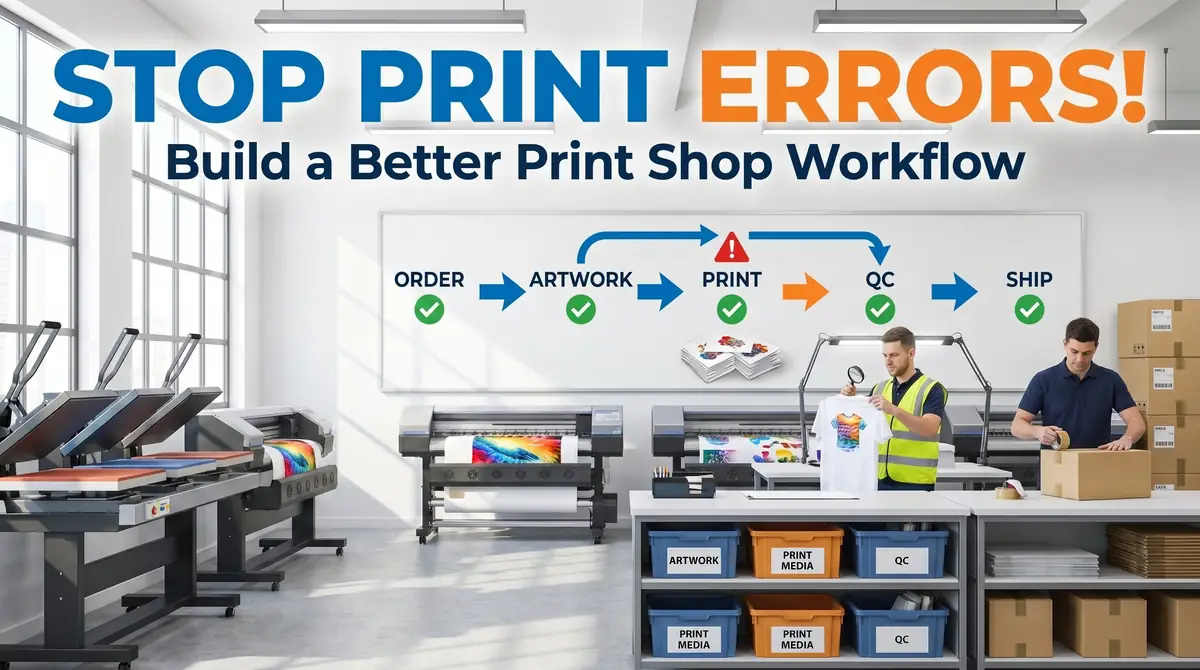
Creating a print shop workflow that reduces production errors is not about adding more complexity. It’s about building a repeatable system that keeps every order moving smoothly from start to finish.
Start by mapping your current workflow, documenting standard procedures, and adding quality checkpoints where mistakes are most likely to occur. Once your process is consistent, introduce automation to eliminate repetitive manual tasks and improve communication across your business.
Remember that workflow improvement is an ongoing process. Review your performance regularly, listen to employee feedback, and refine your procedures as your business grows. Small improvements made consistently will produce fewer production errors, happier customers, and a more profitable print shop over time.
What Is a Print Shop Workflow?
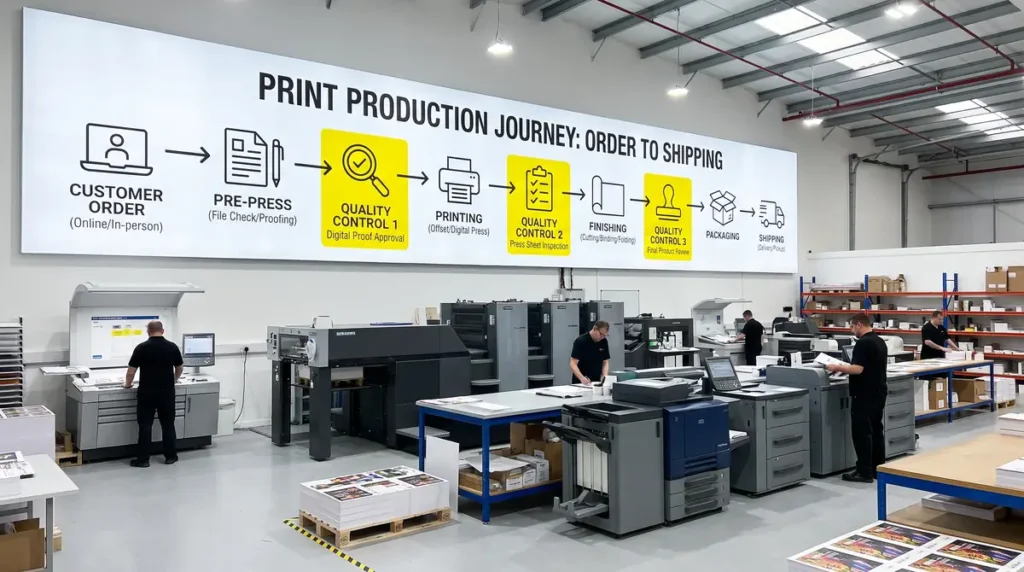
A print shop workflow is the complete process used to move an order from the first customer inquiry to final delivery. Instead of treating each order differently, every project follows the same sequence of tasks, making production predictable and easier to manage.
Although every shop operates differently, most successful workflows include the same core stages:
- Customer inquiry
- Quote approval
- Order entry
- Artwork review
- File preparation
- Production scheduling
- Printing or decoration
- Quality inspection
- Packaging
- Shipping
- Customer follow-up
Following a standardized workflow helps prevent skipped steps, improves communication between departments, and creates accountability throughout the production process. Industry best practices consistently recommend mapping the entire workflow before introducing automation so bottlenecks and recurring mistakes can be identified first.
As your shop begins handling more daily orders, spreadsheets and handwritten notes become difficult to manage. Dedicated production management software keeps artwork, customer information, production schedules, and job statuses in one place. If you’re comparing platforms, our guide to Printavo vs ShopVOX: Best Order Management for Print Shops explains the strengths of each system and which type of shop benefits most from them.
Why Every Print Shop Needs a Standardized Workflow
Many production mistakes happen because employees complete the same task differently. One person checks artwork before printing, another assumes it has already been approved, and someone else packages the finished order without verifying personalization. These inconsistencies often result in wasted materials, delayed deliveries, and dissatisfied customers.
A standardized workflow removes uncertainty by giving everyone clear procedures to follow. Instead of relying on individual experience, your business operates using documented systems that produce consistent results regardless of who is working on the order.
Implementing consistent procedures offers several advantages:
- Reduce reprints and wasted materials.
- Improve production scheduling.
- Train new employees more efficiently.
- Maintain consistent print quality.
- Reduce customer complaints.
- Increase on-time deliveries.
- Support business growth without adding unnecessary complexity.
Think of your workflow as the operating manual for your shop. When every order follows the same process, finding and fixing problems becomes much easier.
The Most Common Production Errors and What Causes Them
Before improving your workflow, it’s important to understand where mistakes usually happen. Most production errors are not isolated incidents. They are signs that one or more stages of your workflow need improvement.
Artwork and File Errors
Receiving incorrect artwork is one of the most common causes of production delays. Low-resolution images, missing fonts, incorrect dimensions, and outdated file versions often go unnoticed until production has already started.
Establish a mandatory artwork approval process before every order enters production. Every design should be checked for file format, image resolution, sizing, bleed requirements, and customer approval before it reaches the printer.
Incorrect Products or Materials
Using the wrong garment, tumbler, mug, or substrate wastes both materials and production time. These mistakes usually occur because inventory is poorly organized or production tickets lack enough detail.
Clear product labeling, standardized SKU numbers, and organized inventory storage make it much easier for employees to select the correct blank every time.
Color and Print Quality Issues
Color inconsistency remains one of the biggest frustrations for both customers and production staff. Incorrect printer settings, outdated ICC profiles, incompatible substrates, or inconsistent heat press settings can all affect the final result.
Creating documented color management procedures ensures every operator follows the same setup rather than making individual adjustments that produce inconsistent prints.
Communication Breakdowns
Many missed deadlines begin long before production starts. Orders wait for customer approvals, artwork revisions, or missing information because there is no structured communication process between sales, design, and production.
Using centralized production software allows everyone to see the current status of every order without relying on emails or handwritten notes.
Packaging and Shipping Mistakes
A perfectly printed product can still result in an unhappy customer if it is shipped to the wrong address or packaged incorrectly.
Adding a final verification checklist before every shipment helps confirm:
- Customer information
- Product quantity
- Personalization details
- Shipping address
- Packing slip
- Tracking information
These simple checks prevent many avoidable customer service issues.
Map Your Current Workflow Before Making Changes
One of the biggest mistakes shop owners make is purchasing new software before understanding how work currently moves through their business.
Technology cannot fix an inefficient process. If unnecessary steps already exist, automation simply allows those problems to happen faster.
Instead, document every stage of your production workflow from beginning to end. Walk through a typical order and record each handoff, approval, department, and production step.
A typical workflow might look like this:
- Customer requests a quote.
- Sales prepares the estimate.
- Customer approves the quote.
- Order enters the management system.
- Artwork is reviewed.
- Print-ready files are prepared.
- Materials are gathered.
- Production begins.
- Finishing processes are completed.
- Quality control inspection.
- Packaging.
- Shipping.
- Customer receives tracking information.
For every stage, ask these questions:
- Who owns this task?
- What information is required?
- Which software or tools are used?
- Where do delays usually happen?
- Which mistakes occur most frequently?
- How can this step be simplified?
This exercise often reveals duplicate work, unnecessary approvals, and manual processes that create production delays. Mapping your workflow before introducing automation is widely recommended because it helps identify the real causes of recurring production errors.
Create Standard Operating Procedures for Every Process
Once you’ve mapped your workflow, the next step is documenting it. Standard Operating Procedures (SOPs) ensure every employee performs each task using the same proven process.
Instead of relying on verbal instructions, create written procedures for every recurring activity, including:
- Customer communication
- Quote preparation
- Artwork approval
- File preparation
- Printer setup
- Production
- Quality inspection
- Packaging
- Shipping
Every SOP should clearly explain:
- The purpose of the task
- Required software or equipment
- Step-by-step instructions
- Quality checkpoints
- Common mistakes to avoid
- When the issue should be escalated
As your business grows, the right software can simplify daily operations. See our guide to Best Quoting Software for Wholesale Apparel and Drinkware Orders to compare estimating solutions for print businesses.
If you sell products online, choosing the right platform makes order management easier. Compare both options in Shopify vs WooCommerce for Selling Custom Sublimation Products.
Build Quality Control Checkpoints Throughout Production
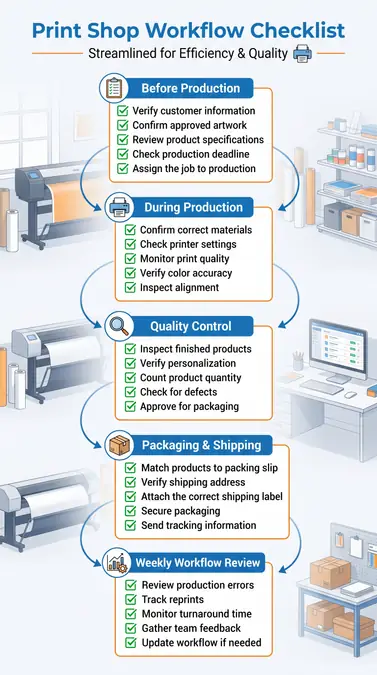
Don’t wait until the end of production to check for mistakes. Adding quality control at key stages helps catch problems early, reducing waste, reprints, and customer complaints.
1. Review the Order Before Production
Verify that the order includes:
- Correct customer information
- Approved artwork
- Product specifications
- Production deadline
2. Monitor Quality During Production
Check the following throughout the production run:
- Print alignment
- Color accuracy
- Printer settings
- Correct materials
If you spot a problem, stop production and fix it before continuing.
3. Inspect Finished Products
Before packaging, confirm:
- Print quality
- Personalization
- Product condition
- Order quantity
4. Verify Every Shipment
Before sealing the package, check:
- Shipping address
- Packing slip
- Correct products
- Shipping label
Following these four checkpoints helps reduce production errors and keeps orders moving smoothly from start to finish.
| Workflow Stage | Quality Check |
|---|---|
| Order Entry | Customer details and specifications verified |
| Artwork Review | Print-ready file approved |
| Production Setup | Correct materials and settings confirmed |
| Printing | Color, alignment, and print quality checked |
| Packaging | Quantity and personalization verified |
| Shipping | Address and tracking confirmed |
Automate Repetitive Tasks Instead of Manual Processes
Manual data entry slows production and increases the chance of mistakes. Every time employees copy information between systems, they create another opportunity for errors.
Look for repetitive tasks that can be automated first. Order creation, artwork approvals, shipping notifications, invoice generation, and production updates are all excellent candidates.
Automation also improves communication. Customers receive updates automatically while employees spend less time answering status requests. Industry recommendations consistently encourage reducing manual intervention because automation improves accuracy and production efficiency.
If you want customers to receive automatic status updates without manual follow-up, read How to Automate Order Tracking for a Sublimation Print Business. It explains how automated tracking keeps customers informed while reducing administrative work.
The goal is not to automate everything. Start with repetitive administrative tasks that consume time every day, then expand automation as your business grows.
Organize Artwork and Production Files
Poor file organization is one of the easiest ways to create production errors. Employees waste time searching for artwork, and outdated files can accidentally reach production.
Create one consistent folder structure for every customer. Store original artwork, approved designs, print-ready files, and completed jobs in clearly labeled folders. Everyone should know exactly where to find the latest approved file.
File names should also follow a consistent format. Include the customer name, product, approval status, and version number instead of generic names like “final” or “new.”
Version control is equally important. Never overwrite approved artwork. Save revisions separately and archive previous versions. This simple habit prevents many unnecessary reprints.
Use Software That Supports Your Workflow
As order volume increases, managing production with spreadsheets becomes difficult. Dedicated print shop software keeps customer information, production schedules, artwork, inventory, and shipping in one place.
Instead of asking where an order is, your team can immediately see its current production stage. This reduces communication delays and keeps every department working from the same information.
If you’re comparing management platforms, our guide to Printavo vs ShopVOX: Best Order Management for Print Shops explains how each system handles production scheduling, inventory, and order management.
For shops with a retail counter or showroom, choosing the right POS Systems for Print Shops: Top 5 Compared by Price and Features can further improve inventory accuracy, payment processing, and production coordination.
Choose software that supports your workflow rather than forcing your team to change how they work.
Connect Your Website, Orders, and Production
Disconnected systems often create duplicate work. A customer places an order online, then employees manually copy the information into production software, accounting tools, and shipping platforms. Every manual transfer increases the chance of mistakes.
Connecting these systems allows orders to move automatically through production. Customer information stays consistent, production begins sooner, and employees spend less time on administrative tasks.
If you’re building an online store, choosing the right platform makes integration much easier. Our comparison of Shopify vs WooCommerce for Selling Custom Sublimation Products explains how both platforms support print businesses with different needs.
Wholesale shops can also reduce manual work by using dedicated quoting software. Our guide to Best Quoting Software for Wholesale Apparel and Drinkware Orders compares tools that generate accurate estimates and transfer approved quotes directly into production.
When your website, quoting system, production software, and shipping tools work together, your team spends less time entering data and more time producing quality products.
Train Your Team to Follow the Same Workflow
Even the best workflow will fail if employees follow different methods. Every team member should understand exactly how an order moves through production and what their responsibilities are at each stage.
Create a structured onboarding process instead of relying on verbal instructions. New employees should complete the same training before handling customer orders independently.
Your training program should cover:
- Order entry procedures
- Artwork approval process
- File management standards
- Production setup
- Quality control inspections
- Packaging requirements
- Shipping verification
Training should also continue after onboarding. Review procedures regularly and update them whenever you introduce new equipment, software, or production methods.
Monitor Workflow Performance Using Key Metrics
A workflow should never remain static. Measuring performance helps you identify bottlenecks before they become costly problems.
Track a few key metrics consistently rather than trying to measure everything.
Important KPIs include:
- Production accuracy rate
- Reprint percentage
- Average turnaround time
- On-time delivery rate
- Customer complaints
- Order completion time
- Material waste
- Employee productivity
Review these numbers every month and look for trends. If one metric starts declining, investigate the affected stage of your workflow before it impacts customer satisfaction.
Common Workflow Mistakes That Increase Production Errors
Many print shops unknowingly create extra work by following outdated processes. Eliminating these habits can improve productivity almost immediately.
Avoid these common mistakes:
- Skipping artwork approval
- Entering customer information multiple times
- Using inconsistent file names
- Storing artwork in multiple locations
- Relying on handwritten production notes
- Performing quality control only at the end
- Failing to document procedures
- Not reviewing workflow performance regularly
Small improvements in these areas often produce significant long-term savings.
A 30-Day Action Plan to Improve Your Print Shop Workflow
Improving your workflow doesn’t require a complete business overhaul. Focus on one stage at a time and build momentum through small improvements.
Week 1: Map Your Existing Workflow
Start by documenting every step from customer inquiry to shipping.
Tasks to complete:
- List every production stage.
- Identify recurring mistakes.
- Find unnecessary manual tasks.
- Document communication gaps.
Week 2: Standardize Your Processes
Turn your workflow into repeatable procedures.
Focus on:
- Creating SOPs
- Standardizing file names
- Organizing artwork folders
- Defining quality checkpoints
Week 3: Introduce Automation
Once your workflow is standardized, automate repetitive tasks.
Good starting points include:
- Online order collection
- Customer notifications
- Artwork approvals
- Inventory updates
- Shipping labels
If you’re evaluating software that can support this transition, compare Printavo vs ShopVOX: Best Order Management for Print Shops to determine which platform best fits your production process.
Week 4: Measure and Improve
The final week focuses on continuous improvement.
Review:
- Production errors
- Reprints
- Delivery times
- Customer feedback
- Team observations
Make one improvement each month instead of changing everything at once. Continuous optimization creates a more stable and scalable workflow.
Frequently Asked Questions
What is the most important part of a print shop workflow?
The most important part is having a standardized process that every employee follows consistently. Clear procedures reduce confusion and make production more predictable.
How can I reduce production errors in my print shop?
Focus on four key areas:
- Document every process.
- Add quality control checkpoints.
- Automate repetitive tasks.
- Measure workflow performance regularly.
What software is best for managing print shop orders?
The best solution depends on your business size and production needs. Compare features, automation capabilities, and integrations in our guide to Printavo vs ShopVOX: Best Order Management for Print Shops.
How do online stores improve print shop workflows?
Connecting your ecommerce platform directly to production software reduces manual order entry and minimizes data entry errors. If you’re deciding which platform to use, read Shopify vs WooCommerce for Selling Custom Sublimation Products to compare their strengths.
Is workflow automation worth it for a small print shop?
Yes. Even small shops benefit from automating repetitive tasks like order tracking, customer notifications, and quoting. Automation reduces administrative work and allows your team to spend more time on production.