Shopify vs WooCommerce for Selling Custom Sublimation Products: Which Is Better?

Shopify is better for sublimation sellers who want a simple, beginner-friendly store that works quickly.
WooCommerce is better for sellers who want more customization, ownership, and content control.
For most new sellers, Shopify reduces the learning curve.
For long-term brand builders who want complete flexibility, WooCommerce is often worth the extra setup.
The best platform is the one that supports your actual sublimation workflow without adding unnecessary complexity.
Shopify vs WooCommerce: Quick Comparison
| Feature | Shopify | WooCommerce |
|---|---|---|
| Ease of setup | Very beginner-friendly | Requires more setup |
| Startup cost | Predictable monthly pricing | Flexible depending on hosting/plugins |
| Maintenance | Shopify handles most technical work | You manage updates/security |
| Customization | App-based customization | More design and feature control |
| Product personalization | Easy with apps | Advanced with plugins |
| SEO flexibility | Good basic tools | More control through WordPress |
| Ownership | Hosted platform | Full website ownership |
| Scaling | Simple for ecommerce growth | Highly customizable |
| Best for | Fast store launches | Long-term control |
Shopify is usually better if you want the easiest way to start selling.
WooCommerce is usually better if you want more ownership, customization, and control over your website.
What Sublimation Sellers Actually Need From an Online Store
Selling sublimation products is different from selling basic items because many orders include personalization.
A good sublimation store needs:
- custom text options
- image upload features
- product variations
- color and size choices
- mockup displays
- smooth checkout
- shipping management
- customer communication tools
For example, selling a standard shirt is simple.
Selling a custom sublimation shirt where customers choose a design, upload a photo, add a name, and select sizing requires a more flexible workflow.
If you are still building your production process, understanding the complete sublimation printing workflow can help you create a smoother customer experience before launching your store.
Shopify for Sublimation Products: How It Works
Shopify is a hosted ecommerce platform. This means most technical parts like hosting, security, and updates are handled for you.
A typical Shopify sublimation workflow looks like:
- Create your Shopify store.
- Add your sublimation products.
- Install product customization apps.
- Connect payment and shipping.
- Start accepting orders.
Many beginners like Shopify because they can focus more on creating products instead of managing website settings.
Advantages of Shopify for Sublimation Sellers
Easy Store Setup
Shopify’s biggest advantage is simplicity.
You do not need to install software, choose hosting, or manage complicated settings.
For a new sublimation seller making:
- custom tumblers
- personalized mugs
- shirts
- gifts
Shopify removes many technical barriers.
Simple App Integrations
Shopify has many apps for:
- product personalization
- reviews
- email marketing
- print-on-demand workflows
- shipping automation
This makes it easier to add features without rebuilding your website.
Less Technical Maintenance
With Shopify, you do not need to worry as much about:
- website security
- plugin updates
- hosting problems
That extra simplicity can save time when you are also handling printing, pressing, packaging, and customer service.
Disadvantages of Shopify for Sublimation Sellers
Shopify is convenient, but there are limitations.
Common disadvantages include:
- monthly subscription costs
- extra app expenses
- less backend control
- dependency on Shopify’s system
A common mistake beginners make is only calculating the base Shopify plan.
Extra apps for personalization, upsells, reviews, or advanced features can increase monthly expenses.
WooCommerce for Sublimation Products: How It Works
WooCommerce is an ecommerce plugin built for WordPress.
Instead of renting a complete hosted system, you create your own website and add ecommerce features.
A typical WooCommerce setup includes:
- Buying hosting and a domain.
- Installing WordPress.
- Adding WooCommerce.
- Choosing themes and plugins.
- Creating product pages.
WooCommerce requires more setup but gives you more freedom.
WooCommerce’s official comparison with Shopify
Advantages of WooCommerce for Sublimation Sellers
More Website Ownership
WooCommerce gives you more control over your online store.
You control:
- hosting
- website structure
- design
- plugins
- customization options
This appeals to sublimation sellers building a long-term brand instead of only a basic product shop.
Better Advanced Customization
WooCommerce works well when you need complex product setups.
Examples:
- multiple personalization fields
- custom order forms
- special pricing structures
- unique product builders
A sublimation shop offering hundreds of personalized products may appreciate this flexibility.
Strong Content and SEO Control
WooCommerce runs on WordPress, which gives strong control over content marketing.
This helps if your strategy includes:
- gift guides
- sublimation tutorials
- product education
- blog traffic
Many sublimation businesses grow by teaching customers and showing product ideas, not only listing products.
Disadvantages of WooCommerce for Sublimation Sellers
WooCommerce requires more responsibility.
Possible challenges include:
- choosing reliable hosting
- updating plugins
- fixing compatibility problems
- managing security tools
It gives you more control, but that control requires more involvement.
Shopify vs WooCommerce Cost: Which Is Cheaper?
The cheaper option depends on how your store is built.
Shopify Costs
Typical expenses may include:
- monthly Shopify plan
- paid themes
- premium apps
- transaction/payment costs
The advantage is predictability.
You usually know your monthly platform expense.
WooCommerce Costs
WooCommerce itself is free, but you may pay for:
- hosting
- domain name
- premium themes
- paid plugins
- maintenance tools
WooCommerce can start cheaper, but advanced stores can still become expensive.
The better question is not:
“Which platform costs less?”
Ask:
“Which platform gives my sublimation workflow what it needs without unnecessary tools?”
Which Platform Handles Custom Sublimation Product Options Better?
Both platforms can handle personalized sublimation products.
The difference is how they do it.
Example:
A customer orders a tumbler and wants:
- their name added
- a photo uploaded
- a specific font choice
- gift packaging
Shopify handles this through apps.
WooCommerce handles this through plugins and custom settings.
Shopify is usually faster to configure.
WooCommerce usually provides deeper customization.
Shopify vs WooCommerce for Print-on-Demand Sublimation
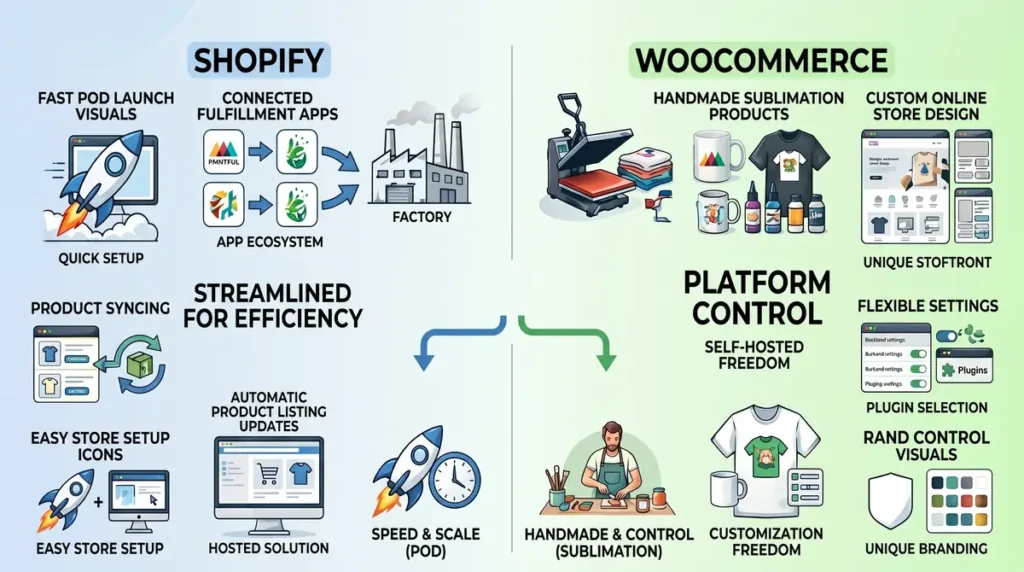
If you use print-on-demand services, Shopify often has an easier setup.
Many POD businesses choose Shopify because connecting products and fulfillment tools is straightforward.
WooCommerce also supports POD, but setup may require more configuration.
For handmade sublimation sellers printing products themselves, both platforms work well.
Your process matters more:
Small handmade shop → either platform works.
Fast POD launch → Shopify may be easier.
Highly customized brand → WooCommerce may fit better.
Which Platform Is Better for SEO and Getting Sublimation Customers?
Both platforms can rank in search engines.
Shopify provides:
- simple SEO settings
- product optimization tools
- easy store structure
WooCommerce provides:
- deeper content control
- more blogging flexibility
- advanced WordPress SEO options
If your growth plan includes creating guides about designs, products, and customer questions, WooCommerce gives more flexibility.
If you mainly rely on ads and social media traffic, Shopify’s simplicity may be enough.
Which Platform Is Easier for Beginners?
Choose Shopify if you:
- want a simple setup
- dislike technical work
- want to launch quickly
- prefer built-in support
Choose WooCommerce if you:
- want full control
- enjoy customizing websites
- plan heavy content marketing
- want long-term flexibility
Neither choice guarantees success. Your products, pricing, designs, and customer experience matter more than the platform alone. For related planning, see Product Liability Insurance for Custom Apparel Sellers Explained.
Common Mistakes Sublimation Sellers Make When Choosing a Platform
Avoid these mistakes:
Choosing Only Based on Price
The cheapest platform is not always the best.
A cheap setup that slows down your workflow can cost more time later.
Ignoring Order Management
As your sublimation business grows, tracking jobs becomes harder.
Managing:
- customer approvals
- artwork files
- production stages
- deadlines
can become difficult with only basic ecommerce tools.
Larger shops may eventually compare dedicated systems like this Printavo vs ShopVOX comparison to organize print shop workflows beyond a basic online store.
Forgetting About Personalization Features
Before choosing a platform, test how customers will submit custom details.
A beautiful store still creates problems if orders arrive incomplete.
Action Plan: Choosing the Right Platform for Your Sublimation Business
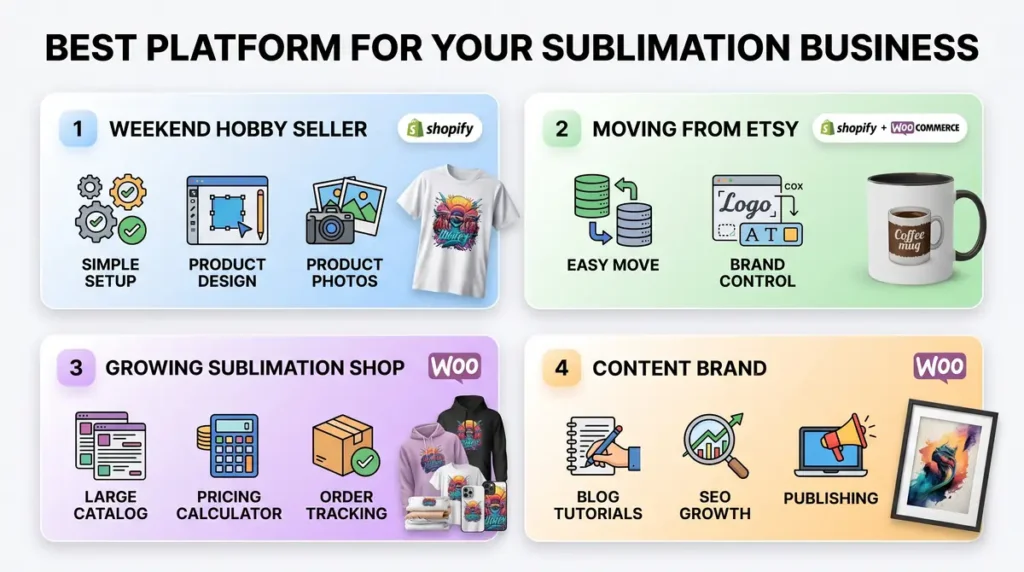
Weekend Hobby Seller
Recommended: Shopify
Why:
You can start faster without spending weeks learning website management.
Focus on:
- testing designs
- improving product photos
- getting your first customers
Etsy Seller Moving to Your Own Website
Recommended: Shopify or WooCommerce
Choose Shopify if you want a simple transition.
Choose WooCommerce if you want stronger control over your brand website.
Growing Sublimation Business
Recommended: WooCommerce
A larger catalog with many custom options often benefits from more flexibility.
Also review your:
- pricing structure
- production time
- order tracking process
A tool like a sublimation pricing calculator can help estimate costs before setting product prices.
Content-Focused Sublimation Brand
Recommended: WooCommerce
If tutorials, guides, and organic search are major parts of your strategy, WordPress gives more publishing flexibility.
F A Qs
Is Shopify or WooCommerce better for selling sublimation products?
Shopify is better for beginners who want a fast setup. WooCommerce is better for sellers who want more control and customization.
Is WooCommerce cheaper than Shopify?
WooCommerce can be cheaper at the beginning, but costs depend on hosting, themes, plugins, and maintenance needs.
How much does Shopify take from a $100 sale?
The exact amount depends on your Shopify plan, payment processor, and transaction setup. Always check your current payment settings before calculating profit.
What are the disadvantages of WooCommerce?
The biggest disadvantages are the learning curve, maintenance responsibility, plugin management, and technical setup.
Can you make serious income selling sublimation products online?
Yes, some sellers build profitable sublimation businesses, but income depends on product demand, pricing, marketing, quality, and consistency.
Should I use Shopify, WooCommerce, or Etsy first?
Etsy can help beginners test demand. Shopify and WooCommerce are better when you want your own branded store.
Can I switch from Shopify to WooCommerce later?
Yes. You can migrate platforms later, but moving products, designs, and customer data requires careful planning.