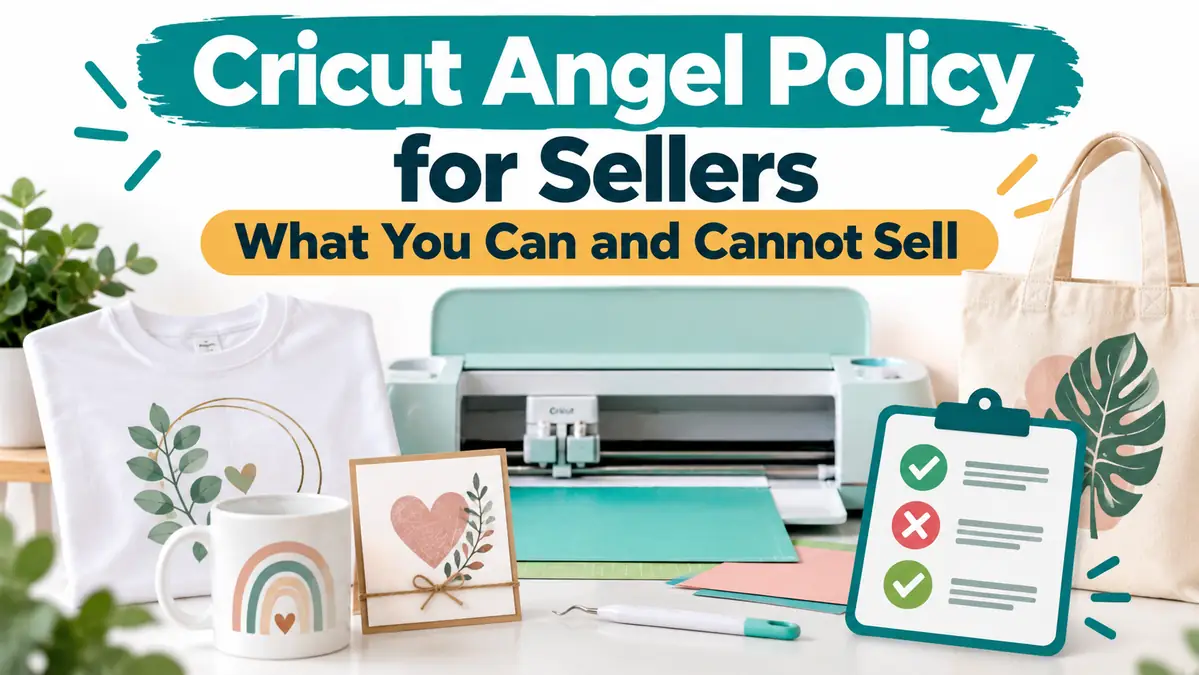
Cricut Angel Policy for Sellers: What You Can and Cannot Sell

Selling products made with a Cricut is allowed in some situations, but owning a Cricut machine or paying for Cricut Access does not give you blanket permission to sell every design you can open in Design Space.
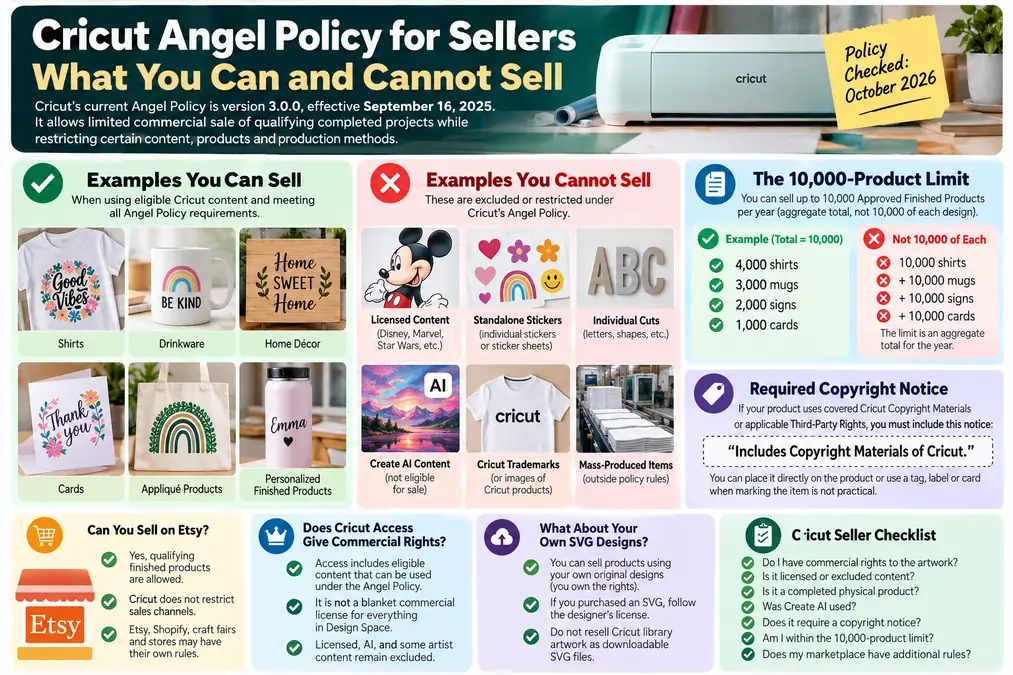
Cricut’s current Angel Policy gives users limited permission to sell certain completed physical projects made with eligible Cricut content. The current policy is version 3.0.0, effective September 16, 2025.
The main restrictions involve licensed content, individual cuts, standalone stickers made from Design Space content, some third-party artist content, Cricut trademarks, AI-generated content, mass production, and product labeling.
Policy checked: October 2026. This page is a practical explanation of Cricut’s published rules, not legal advice. Cricut can change or terminate the Angel Policy, so check the current policy before committing to a large product run.
What the Cricut Angel Policy Actually Covers
Cricut calls products that meet its commercial-use requirements Approved Finished Products. Under the current policy, the item must be a completed physical project that uses eligible content, is made with multiple cuts or compatible machine functions, permanently incorporates the design into a new finished item, follows Cricut’s Terms of Use, and stays within the policy’s quantity and production rules.
A shirt with an eligible design permanently applied to it can fit this model. A completed card, decorated drinkware item, home décor piece, or appliqué project may also qualify. Selling the underlying Cricut image, an individual cut, or another unfinished component is different because the policy focuses on finished physical products.
What You Can Sell Under the Cricut Angel Policy
Products made with eligible Cricut content can potentially be sold when the finished item meets every requirement in the policy. Cricut’s own examples include cards, T-shirts, décor, appliqué products, and other completed craft projects.
| Product | Angel Policy position |
|---|---|
| Finished shirt using eligible Cricut content | Potentially eligible |
| Completed card using eligible content | Potentially eligible |
| Finished home décor item | Potentially eligible |
| Appliqué product using eligible content | Potentially eligible |
| Finished drinkware decorated with eligible content | Potentially eligible |
| Individual cut letters or shapes sold for another person to use | Not covered |
| Standalone Design Space sticker sheets | Not covered |
| Product containing excluded licensed content | Not covered |
| Product using Create AI-generated artwork | Not covered |
“Potentially eligible” matters. The product type alone does not decide whether you can sell it. You still need to check the exact image, font, design, or other digital content used in the project.
What You Cannot Sell Under the Angel Policy
The current policy excludes or restricts Licensed Digital Content, Cricut Contributing Artist Program content, Cricut content containing Cricut trademarks or representations of Cricut products, content generated by Cricut’s AI-powered features such as Create AI, individual cuts, standalone stickers or sticker sheets made from Design Space content, and mass-produced products as Cricut defines that term.
This is why checking only whether a design appears inside Design Space is not enough.
Can You Sell Disney, Marvel, Star Wars, or Other Licensed Cricut Designs?
No, not under Cricut’s Angel Policy.
Cricut specifically states that its commercial permission does not include Licensed Digital Content, even when you paid to access that content. Cricut’s current FAQ gives examples such as Disney, Hello Kitty, Marvel, Peanuts, Sesame Street, Star Wars, and Warner Bros. Entertainment.
Paying for Cricut Access, buying an individual design, or having access to a licensed image inside Design Space does not automatically give you the right to sell products containing that artwork.
For a broader explanation of intellectual-property issues, read our guide to avoiding copyright problems when selling printed products.
Can You Sell Cricut Sticker Sheets or Individual Stickers?
Cricut does not authorize selling individual stickers or sheets of stickers made with Design Space images or content under its Angel Policy. Cricut treats those stickers as individual cuts rather than a new finished product.
There is an important distinction. Cricut says a sticker may be used when it has been permanently attached to a completed project that becomes a new item. Cricut gives decorated drinkware as an example.
| Example | Policy result |
|---|---|
| Design Space images cut into a sticker sheet and sold as stickers | Not authorized under Angel Policy |
| Individual Design Space stickers sold by themselves | Not authorized under Angel Policy |
| Eligible Cricut sticker permanently added to a completed tumbler or other new finished item | May qualify if all other rules are met |
If the artwork is entirely your own intellectual property, the rights question is different because you are relying on your ownership rather than Cricut’s permission to commercialize Cricut content.
Can You Sell Projects Made With Cricut Create AI?
No. Cricut currently states that images generated with Create AI are for personal use and are not eligible for limited commercial sales under the Angel Policy.
Cricut makes a separate distinction for images that started as your own material. If you upload a photo or image that you own, or have appropriate licensing rights to use, and a Cricut AI-powered feature merely enhances or stylizes it, Cricut says the resulting output may be eligible for Angel Policy treatment. Cricut does not guarantee that an AI-enhanced output will be free from third-party intellectual-property claims.
See Cricut’s current AI commercial-use guidance before selling a project that used one of its AI-powered features.
Does Cricut Access Give You Commercial Rights?
A Cricut Access subscription can give you access to content that falls within the Angel Policy, but Cricut Access is not a blanket commercial license for everything you see in Design Space.
Cricut says eligible Subscription Digital Content can be part of its Angel Policy permission. Licensed Digital Content remains excluded. Content tied to other third-party rights can also have additional restrictions, so the source of the image matters more than the subscription badge alone.
- Is it standard Cricut content?
- Is it Licensed Digital Content?
- Does another artist or third-party right apply?
- Does it contain Cricut trademarks or pictures of Cricut products?
- Was it generated with Create AI?
- Does the finished item meet the Angel Policy’s production requirements?
If you are building a larger Cricut workflow, our Everything Cricut resource hub collects the site’s machine, Design Space, SVG, and sublimation tutorials in one place.
What If You Upload Your Own SVG or Original Design?
Uploading your own design changes the rights question. Cricut’s Terms require users to have the necessary rights, licenses, clearances, or permissions for content they upload.
If you created the artwork yourself and own the rights, the Angel Policy is not what gives you ownership of that design. Your rights come from your ownership of the artwork.
If you bought an SVG from another designer, the situation depends on the license that designer gave you. A file advertised as “personal use only” does not become commercially usable simply because you upload it to Design Space and cut it with a Cricut.
- personal use only
- commercial use included
- limited commercial license
- physical products only
- print-on-demand prohibited
- digital resale prohibited
- quantity limits
Our SVG and cut-file resource for Cricut and Silhouette can help with the file-format side of the workflow, but the license attached to a third-party design still controls how that designer allows you to use it.
Can You Sell SVG Files Made With Cricut Content?
The Angel Policy does not give you permission to take Cricut library artwork and resell it as your own downloadable SVG file. Its limited commercial permission is designed around qualifying completed physical products, not redistribution of Cricut digital content.
An SVG you designed entirely yourself is a separate issue. If you own all the artwork and other elements in that SVG, your ability to license or sell your own file depends on your rights and any other applicable agreements.
The 10,000-Product Limit: What It Really Means
Cricut’s current policy allows up to 10,000 Approved Finished Products per year in aggregate under its limited permission.
Aggregate means the total across qualifying products, not 10,000 units of every design.
- 4,000 shirts
- 3,000 mugs
- 2,000 signs
- 1,000 cards
In this hypothetical example, the total is 10,000 Approved Finished Products for the year.
Can You Make 10,000 of One Item?
Cricut’s FAQ describes 10,000 as the total aggregate number of Approved Finished Products sold during a given year. Based on the numerical cap alone, 10,000 of one qualifying product would use the entire annual allowance.
Quantity is not Cricut’s only production rule. The policy also restricts forms of mass production, so staying below 10,000 does not automatically make every production method compliant.
Do Cricut Sellers Need a Copyright Notice?
Cricut requires a copyright disclaimer on Approved Finished Products that incorporate covered Cricut Copyright Materials or eligible Third-Party Rights.
Includes Copyright Materials of Cricut.
Cricut says the notice should be conspicuous and placed in a reasonable size and location on the product. If the item is too small or impractical to mark directly, Cricut says the disclaimer can be placed on a tag, label, or card affixed to each product.
- verify design rights
- check Angel Policy eligibility
- confirm whether the Cricut disclaimer is required
- attach the correct label or card
- record product quantity
Can You Sell Cricut Products on Etsy, Shopify, Craft Fairs, or in Stores?
Cricut currently says the Angel Policy has no sales-channel restrictions on where Approved Finished Products may be sold. A qualifying product is not limited to one type of storefront.
- Etsy
- your own website
- social media
- craft fairs
- physical retail stores
- other marketplaces
Cricut’s permission does not override the rules of those marketplaces. Etsy can have its own intellectual-property and listing policies, and a craft fair or local government can impose separate business requirements.
If Etsy is part of your plan, our Etsy SEO guide for product sellers covers the search and listing side after you confirm that the product itself can be sold.
Sellers deciding between a hosted store and their own WordPress setup can also compare Shopify and WooCommerce for custom-product businesses.
Cricut Seller Permission Checklist Before You List a Product
1. Where did the artwork come from?
Identify whether it is your original artwork, standard Cricut content, Cricut Access content, Licensed Digital Content, third-party artist content, a purchased SVG, an uploaded image from another source, or Create AI-generated content.
2. Do you have commercial rights?
If you created the artwork, confirm that every element is actually yours or properly licensed. If it came from Cricut, confirm that the exact content falls within the current Angel Policy. If it came from another designer, read that seller’s license.
3. Is the item a completed physical product?
The Angel Policy focuses on completed products, not reselling Cricut design components. Ask whether the customer is buying a finished item or something intended to become part of another project.
4. Does it use excluded licensed content?
Check for licensed brands and characters. Do not assume that paying for access means commercial rights are included.
5. Was Create AI used to generate the artwork?
If the product contains Create AI-generated content, Cricut currently says it is not eligible for Angel Policy commercial sales.
6. Does the product require Cricut’s copyright disclaimer?
If covered Cricut Copyright Materials or applicable Third-Party Rights are involved, add the required notice in the format Cricut specifies.
7. Are you within the annual quantity and production rules?
Track qualifying sales throughout the year. Do not wait until the end of the year to estimate whether you passed the 10,000-product aggregate limit.
8. Does your marketplace have additional rules?
Angel Policy compliance does not guarantee Etsy, Amazon, a retail store, or another marketplace will accept the listing. Check both sets of rules.
Common Cricut Selling Scenarios
Use this table as a quick screening tool. “Potentially eligible” means the product still needs to meet the rest of Cricut’s Angel Policy requirements.
| Selling idea | Practical answer | Why |
|---|---|---|
| T-shirt using eligible standard Cricut content | Potentially eligible | Completed physical item using eligible content |
| Card using eligible Cricut content | Potentially eligible | Cricut lists cards among finished-project examples |
| Tumbler using a Disney image from Design Space | Not covered | Licensed Digital Content is excluded |
| Standalone sticker sheet using Design Space images | Not covered | Cricut specifically excludes standalone sticker sheets |
| Individual Cricut cut letters sold in a pack | Not covered | Individual cuts are not Approved Finished Products |
| Tumbler with eligible stickers permanently attached | Potentially eligible | Cricut distinguishes stickers incorporated into a new finished item |
| Shirt containing Create AI-generated artwork | Not covered | Create AI output is excluded from commercial Angel Policy permission |
| Shirt using an SVG you designed and own | Different rights analysis | You rely on your ownership rather than Cricut granting rights to Cricut artwork |
| Product using an SVG bought from another designer | Verify license | The designer’s commercial license matters |
| Product using Cricut Access content | Verify exact content | Access does not make licensed or otherwise excluded content commercially usable |
| Downloadable SVG containing Cricut library artwork | Not authorized by Angel Policy | The permission focuses on qualifying finished physical products |
What the Cricut Angel Policy Does Not Protect You From
Complying with Cricut’s Angel Policy solves only one part of the rights question. It does not automatically protect a seller from copyright claims from another creator, trademark claims, unauthorized brand or logo use, rights-of-publicity issues, violations of a purchased SVG license, marketplace intellectual-property policies, local business requirements, or other applicable laws.
Cricut can only grant permission for rights it controls or has authority to sublicense under the policy. A Design Space project containing third-party intellectual property can still require restrictions that do not apply to Cricut-owned artwork.
Record where each design came from and keep the relevant license with your product files.
How to Check the Current Cricut Policy Before Selling
Cricut states that it can modify or terminate the Angel Policy. A short verification process can prevent an old blog post, screenshot, or social-media comment from becoming the basis for a business decision.
- Open Cricut’s current Legal page.
- Find the Angel Policy.
- Check the effective date and version.
- Review the Permission and Exclusion sections.
- Check the current Angel Policy FAQs.
- Identify the exact content category used in your project.
- Check for licensed, third-party, Cricut trademark, or AI content.
- Confirm whether the product qualifies as a completed finished product.
- Check the copyright-label requirement.
- Confirm your current annual production total.
- Save any relevant third-party commercial licenses with the design file.
Cricut Angel Policy FAQ
Can I sell Cricut designs on Etsy?
You can sell qualifying finished physical products on Etsy when they meet Cricut’s Angel Policy requirements. Cricut currently does not restrict Approved Finished Products to a specific sales channel. Excluded licensed content and other products outside the policy remain excluded.
Can I sell Disney designs from Cricut?
Not under Cricut’s Angel Policy. Cricut identifies Disney as Licensed Digital Content and excludes Licensed Digital Content from its commercial permission.
Can I sell stickers using Design Space images?
Not as individual stickers or sticker sheets under the Angel Policy. Cricut says eligible stickers may be incorporated permanently into another completed item, such as decorated drinkware, if all other requirements are met.
Can I sell SVG files from Cricut Design Space?
The Angel Policy does not authorize reselling Cricut’s digital artwork as downloadable SVG files. It provides limited permission for qualifying completed physical products.
Does Cricut Access give me commercial rights?
Cricut Access includes limited commercial-use benefits through the Angel Policy, but it is not a blanket commercial license. Licensed Digital Content, Create AI content, Cricut trademark or product content, and other excluded material require separate attention.
Can I make 10,000 of one Cricut item?
The current Angel Policy sets 10,000 as the annual aggregate total of Approved Finished Products, not 10,000 of each product type. Other mass-production restrictions still apply.
Do I need a Cricut copyright notice?
Approved Finished Products that incorporate covered Cricut Copyright Materials or eligible Third-Party Rights must carry Cricut’s required disclaimer. Cricut says a tag, card, or label can be used when placing it directly on the product is impractical.
Can I sell something made with my own SVG on a Cricut?
Using a Cricut machine does not take ownership of your original artwork away from you. The key question is whether you genuinely own or have the necessary rights to every element in the SVG.
Can I sell an SVG I bought from another designer?
Only if the designer’s license allows the commercial use you plan. Some licenses allow finished physical products but prohibit reselling the digital file itself. Others set quantity or print-on-demand restrictions.
Can I sell products made with Cricut Create AI?
No. Cricut currently states that Create AI-generated content is not eligible for commercial sale under its Angel Policy.
A Safer Workflow for a Cricut Business
The easiest time to solve a licensing problem is before the product is designed, photographed, listed, and sold. For every design, keep a simple record with the artwork source, creator or rights holder, license type, commercial-use restrictions, date checked, whether Cricut’s Angel Policy applies, whether the Cricut disclaimer is required, and quantity sold under the policy.
If the source of an image is unclear, the commercial rights are unclear too. Verify it before listing the product rather than relying on what another seller, social-media group, or old tutorial says.