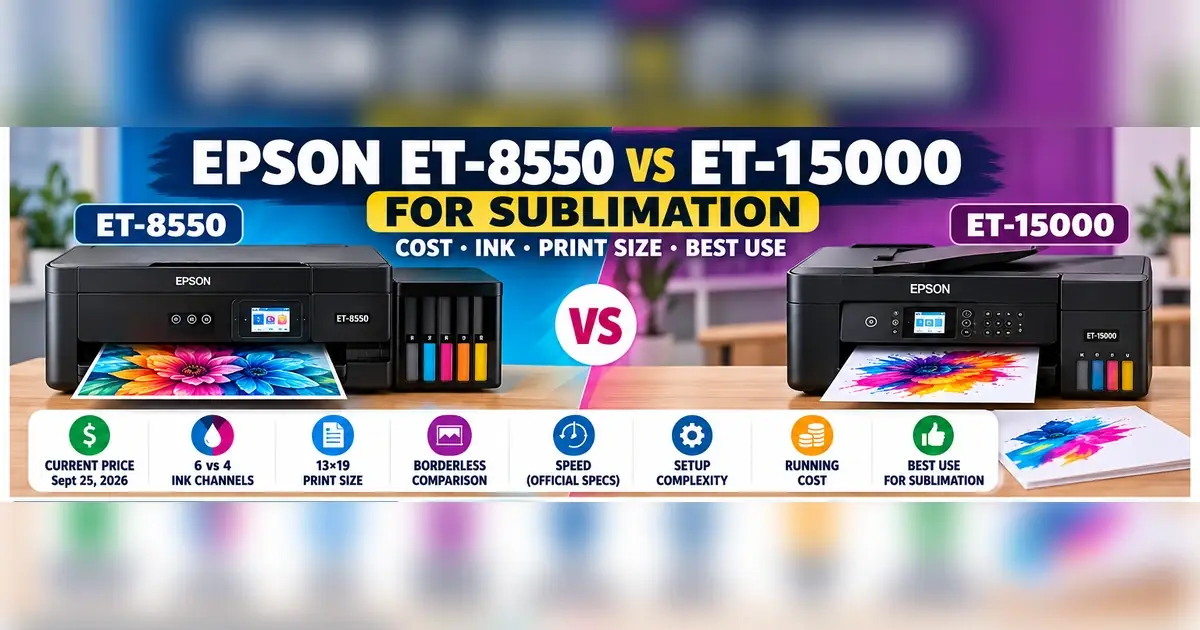
Epson ET-8550 vs ET-15000 for Sublimation: Cost, Ink, Print Size & Best Use

The Epson ET-8550 and ET-15000 can both handle 13×19-inch media, but they create very different sublimation conversion workflows.
The ET-15000 is the simpler option to build around a standard four-color CMYK sublimation setup. The ET-8550 gives you six physical ink channels, 13×19 borderless capability, and stronger stock photo-media features, but those extra channels add complexity once you replace Epson ink with third-party sublimation ink.
Neither printer is sold by Epson as a dedicated sublimation printer. Choosing between them should come down to transfer size, ink configuration, color-management needs, conversion cost, and how much maintenance complexity you want to manage.
ET-8550 vs ET-15000: Quick Sublimation Comparison
| Feature | Epson ET-8550 | Epson ET-15000 |
|---|---|---|
| Epson US price checked Sept. 25, 2026 | $749.99 | $699.99 |
| Native ink channels | 6 | 4 |
| Native Epson colors | Black, Photo Black, Gray, Cyan, Magenta, Yellow | Black, Cyan, Magenta, Yellow |
| Maximum media size | 13×19 in. | 13×19 in. |
| 13×19 borderless | Yes | No |
| ET-15000 borderless maximum | N/A | 11×17 in. |
| Official black ISO speed | 16 ppm | 17 ppm |
| Official color ISO speed | 12 ppm | 9 ppm |
| Display | 4.3-inch touchscreen | 2.7-inch touchscreen |
| ADF | No | Yes |
| Fax | No | Yes |
| Stock printer focus | Photo and creative work | Business/document work |
| Conversion complexity | Higher, six tanks | Lower, four tanks |
| Standard CMYK workflow | More complicated | Direct four-channel layout |
| Best reason to consider it for sublimation | Six-channel workflow and 13×19 media capability | Simpler wide-format CMYK conversion |
Epson currently lists the ET-8550 at $749.99 and the ET-15000 at $699.99 in the US. Epson also confirms 13×19 support for both printers.
Bottom line: the extra $50 in printer price is not the most important difference. The bigger decision is four ink channels versus six.
ET-8550 vs ET-15000 Cost: Price the Complete Conversion
The ET-15000 currently costs less at Epson’s US store, but the printer price alone does not tell you which setup will cost less to put into production.
A converted sublimation printer also needs compatible ink, paper, test material, color-management setup, and maintenance supplies.
Current printer price
As checked on September 25, 2026:
- Epson ET-8550: $749.99
- Epson ET-15000: $699.99
Those are current direct Epson US prices and can change with promotions.
Do not build a buying decision around an old sale price.
Conversion costs to compare
Add these costs before deciding:
| Cost | ET-8550 | ET-15000 |
|---|---|---|
| Printer | $________ | $________ |
| Compatible sublimation ink | $________ | $________ |
| Sublimation paper | $________ | $________ |
| ICC profile/custom profiling | $________ | $________ |
| Test blanks | $________ | $________ |
| Maintenance supplies | $________ | $________ |
| Shipping/tax | $________ | $________ |
| Total startup cost | $________ | $________ |
The six-channel ET-8550 deserves extra attention here. Do not compare a basic four-bottle CMYK kit with a complete ET-8550 conversion setup and assume the ink costs are equivalent.
Bottom line: calculate the complete working setup, not just the price on the printer box.
Four Ink Channels vs Six: The Biggest Sublimation Difference
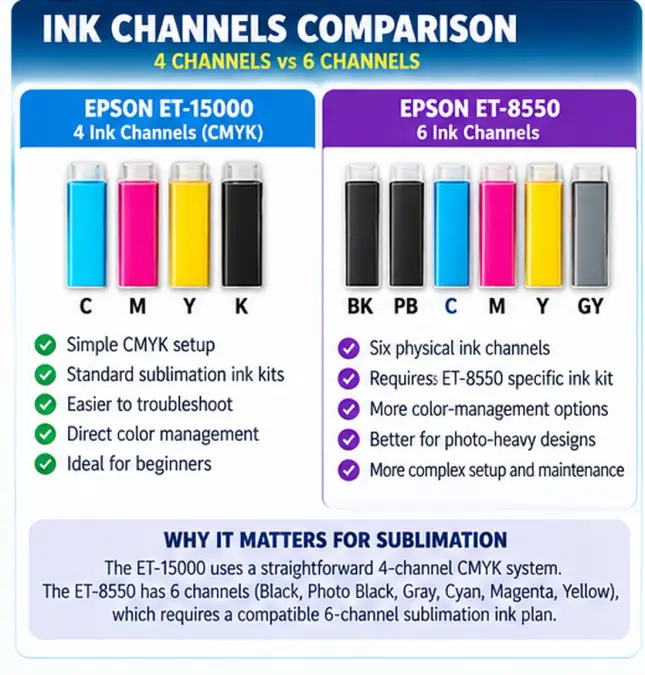
The ET-15000 uses four native ink channels. The ET-8550 uses six. That affects ink selection, tank mapping, profiling, troubleshooting, and maintenance.
Epson specifies Black, Cyan, Magenta, and Yellow for the ET-15000. The ET-8550’s stock six-color system contains Black, Photo Black, Gray, Cyan, Magenta, and Yellow.
ET-15000: four-channel CMYK
The ET-15000’s physical tank arrangement maps directly to the familiar four-color system:
- Cyan
- Magenta
- Yellow
- Black
That makes it easier to understand when buying a compatible sublimation ink set and diagnosing a missing color.
If the ET-15000 is the model you’re leaning toward, see the full Epson ET-15000 sublimation guide before ordering ink.
ET-8550: six physical ink channels
The ET-8550 has six tanks because Epson designed it as a photo printer using Claria ET Premium inks.
Its stock tank configuration is:
- Black
- Photo Black
- Gray
- Cyan
- Magenta
- Yellow
Epson describes this system as a six-color photographic ink setup for photos, graphics, and creative printing.
Once you convert the printer, however, you are no longer using Epson’s normal six-color ink system.
The sublimation-ink supplier needs to specify how its ink is intended to work across those six physical channels. Do not pour a standard four-bottle CMYK kit into an ET-8550 based only on a generic EcoTank conversion tutorial.
For model-specific conversion details, use the Epson ET-8550 sublimation setup.
Bottom line: four channels make the ET-15000 easier to understand. The ET-8550 makes sense only when you have a clear six-channel sublimation-ink and color-management plan.
Does the ET-8550 Produce Better Sublimation Color?
The ET-8550’s six-color stock specification does not by itself prove that it will produce better sublimation transfers than an ET-15000.
Epson’s six-color claims apply to its own Claria ET Premium photo-ink system. Epson describes the ET-8550 as a wide-format photo printer using six photographic inks, not as a sublimation printer.
Once converted, several parts of that stock workflow change.
What controls converted sublimation color?
Pressed output can depend on:
- sublimation ink formulation
- how the six ET-8550 tanks are configured
- ICC profile
- driver color settings
- sublimation paper
- nozzle condition
- substrate coating
- heat
- time
- pressure
That means a theoretical advantage from having more physical ink channels is not enough to predict the final pressed result.
When the ET-8550’s extra channels may be worth considering
The ET-8550 is more interesting when you already have:
- a six-channel sublimation ink set made for the ET-8550
- matching setup instructions
- a suitable ICC/profile workflow
- a reason to invest more time in color management
- designs where gradients, photographic content, or neutral tones are especially important
Even then, judge the decision by pressed output from a documented ink/profile workflow rather than the stock printer’s photo specifications.
For the color-management side, see the ICC profile resource for sublimation.
Bottom line: six tanks create more color-management possibilities, but they also create more variables. Do not buy the ET-8550 solely because “six is better than four.”
Print Size: Both Handle 13×19, but There Is a Key Difference
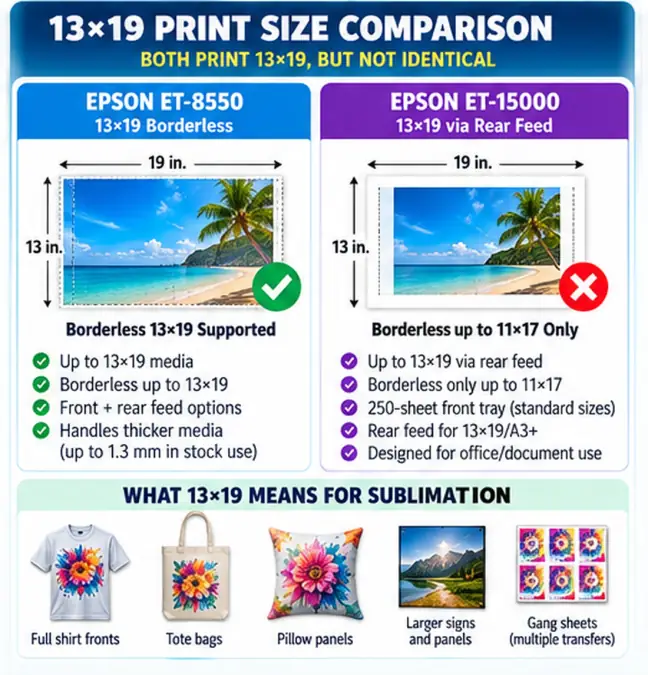
Both printers support media up to 13×19 inches, but only the ET-8550 supports Epson-documented borderless 13×19 printing.
Epson advertises the ET-8550 for borderless photos up to 13×19. The ET-15000 accepts 13×19 media through its rear feed, but Epson’s borderless compatibility list stops at 11×17 and specifically excludes A3+ 13×19 borderless printing.
ET-8550
- Up to 13×19 media
- Borderless up to 13×19
- Rear-feed and specialty-media handling
- Epson supports stock media up to 1.3 mm thick in its photo workflow
ET-15000
- Up to 13×19 through rear paper feed
- Borderless up to 11×17
- 250-sheet front tray for normal supported media
- Rear specialty feed for larger sheets
Does borderless 13×19 matter for sublimation?
Not always.
A sublimation transfer often needs margins for handling, alignment, trimming, or pressing. If your normal artwork already fits inside the ET-15000’s printable region, the ET-8550’s borderless capability may not improve your production workflow.
It matters more when you also plan to use the printer for compatible non-sublimation creative work where true edge-to-edge 13×19 output is useful.
Bottom line: both give you large transfer capability. The ET-8550 has the clear stock-spec advantage when 13×19 borderless printing is genuinely required.
What Can You Make With a 13×19 Sublimation Printer?
A 13×19 sheet gives you more layout flexibility than letter-size printing and can reduce the need to split larger artwork.
Practical uses include:
- larger shirt-front graphics
- hoodie designs
- tote-bag panels
- decorative pillow panels
- larger coated metal panels
- signs
- multiple smaller transfers arranged on one sheet
- photo-heavy apparel designs
The usable design area will still depend on printer margins, the artwork, transfer paper, and how much safe handling space you need.
A wide-format printer only helps production if your products actually need the larger sheet. If most of your work fits comfortably on 8.5×11 or 8.5×14 paper, the extra printer cost and desk space may not return much value.
Paper Handling: ET-8550 vs ET-15000
The ET-8550 offers more creative-media capability in Epson’s stock configuration, while the ET-15000 is built around an office-oriented document and rear-feed system.
That distinction matters less than using reliable sublimation paper correctly, but it can affect day-to-day workflow.
ET-15000 13×19 workflow
Epson routes 13×19 and A3+ media through the ET-15000’s rear feed. Epson’s loading table lists A3 and A3+ support through that path rather than the normal cassette.
For sublimation work, that means large sheets should be treated as a separate rear-feed workflow rather than something you leave in the standard document tray.
ET-8550 media workflow
The ET-8550 has a broader stock photo-media system with front trays, rear feed, and straight-through support for thicker compatible material.
Do not assume that every stock-media capability transfers directly to sublimation paper. Third-party sublimation paper can behave differently because of coating, curl, humidity, and ink load.
Before blaming the printer for a feed problem
Check:
- Correct sheet size is selected in the driver.
- The paper is loaded through the intended feed path.
- Sheets are flat rather than curled.
- Paper guides are snug without bending the sheet.
- Only the printable side is used.
- Driver media settings match the workflow you’re testing.
Bottom line: the ET-8550 has the broader stock media system. For standard 13×19 sublimation transfer paper, both need a consistent feed and driver setup more than they need exotic media features.
Which Printer Is Faster for Sublimation?
Epson’s official document-speed numbers favor different printers depending on black or color output, but those figures are not sublimation production benchmarks.
Current Epson specifications list:
| Official ISO speed | ET-8550 | ET-15000 |
|---|---|---|
| Black | 16 ppm | 17 ppm |
| Color | 12 ppm | 9 ppm |
That makes the ET-8550 faster on Epson’s official color ISO specification and the ET-15000 slightly faster for black ISO documents.
Those numbers are measured using standardized document-printing methods. A full 13×19 sublimation transfer at a high-quality driver setting is a very different print job.
Real sublimation production time changes with:
- transfer dimensions
- image coverage
- print-quality setting
- media setting
- driver
- connection
- color-management workflow
- maintenance cycles
Do not estimate business output by multiplying Epson’s ISO ppm number by 60.
Bottom line: official ISO speed does not establish which converted printer is faster for your actual 13×19 sublimation jobs.
Maintenance, Clogs, and Downtime
Both converted EcoTank printers need a maintenance routine that starts with diagnosis rather than repeated cleaning.
Third-party sublimation ink changes the printer from Epson’s intended stock-ink workflow. Nozzle condition becomes especially important because a missing color channel can look like an ICC or design problem.
Six channels vs four when troubleshooting
With an ET-15000, you have four primary channels to monitor.
The ET-8550 gives you six physical channels. More channels mean more individual ink paths that have to remain healthy and more variables to check when output changes.
That does not prove that the ET-8550 clogs more often. It does mean the troubleshooting map is more complex.
Use the nozzle check before changing color settings
If a transfer suddenly looks green, purple, weak, or streaked:
- Print a nozzle check.
- Confirm every expected channel is firing.
- Fix an ink-flow problem before changing the ICC profile.
- Retest color only after the nozzle pattern is healthy.
Our ET-2850 purge sheet and nozzle-check guide shows this nozzle-check-first diagnostic approach in detail. The downloadable purge sheets there are for the ET-2850 resource, but the key troubleshooting principle applies more broadly: confirm the physical ink channels before assuming color management is at fault.
For general maintenance, use the sublimation printer cleaning guide.
Bottom line: the simpler four-channel ET-15000 has fewer ink paths to diagnose. Whichever printer you choose, diagnose nozzle health before touching ICC settings.
Warranty and Sublimation Conversion Risk
Neither the ET-8550 nor ET-15000 is sold by Epson as a dedicated sublimation printer.
Converting one requires ink that Epson did not design as the printer’s normal ink system.
Epson’s wording is specific: its documentation says damage caused by third-party ink or ink not designed for the printer is not covered by Epson’s warranty. Epson also recommends genuine Epson ink for normal operation.
That is more accurate than saying the entire printer automatically loses every warranty right the moment third-party ink enters a tank.
Think about support before converting
A converted EcoTank makes sense when you accept responsibility for:
- choosing compatible third-party ink
- creating or obtaining the right color workflow
- troubleshooting conversion problems
- maintaining nozzles
- dealing with third-party ink suppliers
A dedicated sublimation printer is worth comparing when manufacturer-supported sublimation ink, profiles, and support matter more than EcoTank conversion flexibility.
See our Epson EcoTank vs Sawgrass comparison if manufacturer-supported sublimation is part of your buying decision.
Bottom line: factor support risk into the printer cost before converting either model.
ET-8550 vs ET-15000 by Sublimation Use Case
The most useful choice comes from matching the printer to the work you intend to produce.
| Use case | More practical fit | Why |
|---|---|---|
| Straightforward four-color wide-format conversion | ET-15000 | Four physical CMYK channels |
| 13×19 borderless required | ET-8550 | Epson supports borderless 13×19 |
| Existing standard CMYK workflow | ET-15000 | Easier tank mapping |
| Purpose-built six-channel sublimation workflow available | ET-8550 | Has six physical tanks |
| Beginner prioritizing simpler ink management | ET-15000 | Fewer ink channels |
| User comfortable with profiling and six-channel setup | ET-8550 | More complex workflow is manageable |
| Office ADF/fax features needed before conversion | ET-15000 | Includes ADF and fax |
| Stock photo printing and specialty creative media | ET-8550 | Designed by Epson for photo/creative output |
| Mainly letter-size small products | Neither necessarily | Wide-format capability may be unnecessary |
| Manufacturer-supported sublimation required | Compare dedicated printer instead | Neither EcoTank is sold as a sublimation printer |
This matrix is based on documented hardware differences and workflow complexity, not an unsupported side-by-side claim that one printer always produces a better sublimation transfer.
When the ET-15000 Makes More Sense for Sublimation
The ET-15000 is the more straightforward choice when your priority is a conventional four-color wide-format sublimation workflow.
It makes the most sense when you want:
- four CMYK tanks
- 13×19 transfer capability
- simpler ink selection
- fewer ink channels to diagnose
- a wide-format EcoTank without building a six-channel color workflow
Its biggest limitation in this comparison is that Epson does not support borderless 13×19. Borderless output stops at 11×17.
For normal sublimation transfer production, that may not matter.
Best fit
Consider the ET-15000 when the sentence below describes your plan:
“I want a wide-format EcoTank for sublimation, and I would rather manage a normal four-color CMYK system than build around six tanks.”
The full ET-15000 sublimation setup and printer overview covers that model in more depth.
When the ET-8550 Makes More Sense for Sublimation
The ET-8550 makes more sense when you deliberately want its six-channel architecture or its broader stock photo-media capabilities.
It is worth investigating when:
- you have an ET-8550-specific six-channel sublimation ink solution
- your supplier provides clear tank-mapping instructions
- matching ICC/profile support is available
- you are comfortable troubleshooting six ink channels
- 13×19 borderless capability also matters to your broader printing work
- photo-oriented media handling is useful outside the sublimation conversion
Do not buy it because generic comparison tables show a higher maximum resolution or more ink tanks.
Those specifications describe the hardware. They do not guarantee superior pressed sublimation color.
Best fit
The ET-8550 suits someone whose plan sounds more like:
“I know which six-channel sublimation ink and color workflow I will use, and the extra setup complexity is acceptable.”
Use the ET-8550 sublimation setup guide before buying ink.
ET-8550 vs ET-15000 Buying Checklist
Use this before ordering either printer.
Printer and media
- Do I actually need 13×19 transfers?
- Do I need 13×19 borderless output?
- Will the printer be dedicated to sublimation?
- Do I have enough workspace for a wide-format printer?
- Does my preferred sublimation paper feed reliably through the required paper path?
Ink
- Does my ink supplier explicitly support this printer?
- Is the ET-8550 kit designed for all six physical channels?
- Do I understand which ink goes into each tank?
- Can I easily reorder the same ink later?
- Am I avoiding mixed ink brands or undocumented tank combinations?
Color management
- Is an ICC profile available for the printer and ink combination?
- Do I know whether the ink is designed for an ICC or ICC-free workflow?
- Can I reproduce the same driver settings for every production job?
- Do I have a color test chart to verify pressed output?
Business cost
- Printer cost
- Sublimation ink cost
- 13×19 paper cost
- Test blanks
- ICC/custom profiling if needed
- Maintenance supplies
- Replacement/waste from failed prints
- Shipping and tax
Support risk
- I understand Epson does not sell this as a sublimation printer.
- I understand third-party ink damage may not be covered by Epson’s warranty.
- I am comfortable getting ink/profile help from a third-party supplier.
- I have compared the total cost with a dedicated sublimation printer.
If several of those answers are still unknown, solve them before ordering the printer.
Download the ET-8550 vs ET-15000 Buying Checklist
Use this printable worksheet to compare printer price, conversion costs, ink-channel setup, 13×19 printing needs, monthly expenses, and workflow complexity before buying.
Download the ET-8550 vs ET-15000 Buying Checklist + Cost Worksheet PDF
Epson ET-8550 vs ET-15000 FAQ
Is the ET-8550 better than the ET-15000 for sublimation?
Neither is better for every sublimation workflow. The ET-15000 has a simpler four-channel CMYK layout. The ET-8550 has six physical ink channels and 13×19 borderless capability but requires a more carefully matched six-channel conversion workflow.
Does the ET-8550 need six sublimation inks?
The ET-8550 has six physical ink tanks, so a conversion needs a sublimation-ink solution that specifically accounts for those six channels. Do not assume a standard four-bottle CMYK set is appropriate unless the ink supplier provides explicit ET-8550 instructions.
Can I use a regular four-color sublimation ink kit in the ET-8550?
Do not assume that you can. The printer has six physical tanks. Use a supplier that clearly documents how its sublimation ink is intended to work with the ET-8550.
Which printer prints larger?
Both support paper up to 13×19 inches. The difference is borderless capability: Epson supports 13×19 borderless on the ET-8550, while the ET-15000’s documented borderless maximum is 11×17.
Which printer is cheaper?
As of September 25, 2026, Epson US lists the ET-15000 at $699.99 and the ET-8550 at $749.99. Prices can change, and the complete conversion cost also depends on ink, paper, profiles, test material, and maintenance.
Which is easier for a sublimation beginner?
The ET-15000’s four-channel CMYK layout is easier to understand and troubleshoot than a six-channel conversion. That does not make every ET-15000 setup automatically easy, so ink compatibility and profile support should still be checked before purchase.
Does six-color ink make the ET-8550 better for sublimation photos?
Not automatically. Epson’s six-color performance claims refer to its stock Claria ET Premium photo inks. A sublimation conversion replaces that original ink workflow, so pressed output depends on the third-party sublimation ink, tank configuration, profile, paper, substrate, and heat-press process.
Which one is faster?
Epson rates the ET-8550 at 16 ISO ppm black and 12 color, while the ET-15000 is rated at 17 black and 9 color. Those are standardized document speeds and should not be treated as 13×19 sublimation production speeds.
Which is better for a small sublimation business?
Start with workflow rather than business size. The ET-15000 is easier to fit into a conventional four-color conversion. The ET-8550 is more appropriate when a proven six-channel sublimation ink/profile system is available and its added complexity serves a real production need.
Can I use either printer for regular documents after converting it?
A printer filled with sublimation ink should be treated as a sublimation printer. Sublimation dye is intended to transfer under heat to compatible polyester or polymer-coated surfaces, not to replace normal document ink for everyday paper printing.
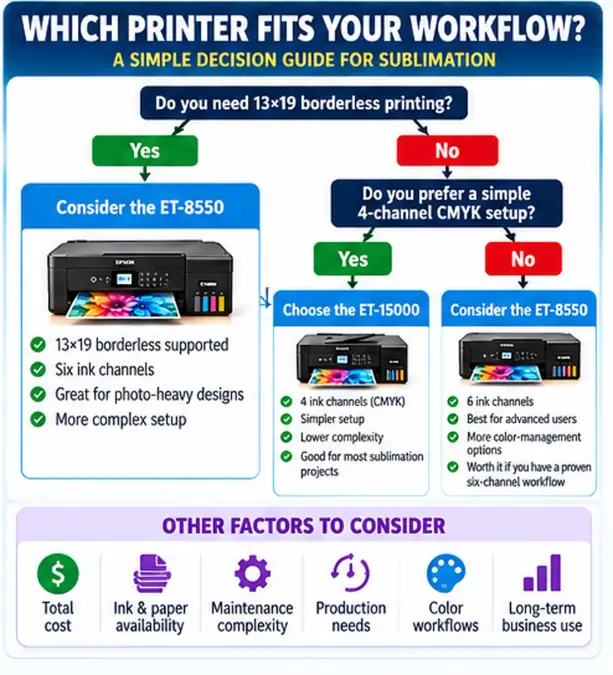
Choose the Printer by Workflow, Not the Bigger Specification
The ET-8550 vs ET-15000 decision becomes easier when you ignore specifications that do not change your sublimation workflow.
Choose around these four questions:
- Do you want a simple four-channel CMYK conversion or have a reason to manage six channels?
- Do you need 13×19 borderless printing, or is standard 13×19 transfer printing enough?
- What will the entire conversion cost after ink, paper, profiling, testing, and maintenance?
- How much setup and troubleshooting complexity are you willing to manage?
The ET-15000 is the more direct path to a conventional four-channel wide-format conversion. The ET-8550 becomes more compelling when its six-channel architecture and 13×19 borderless capability solve a specific need rather than simply adding more specifications.
If neither workflow sounds comfortable, compare them with the best sublimation printers before committing to a converted EcoTank.