How to Remove Sublimation Print from Polyester Shirts

Removing a sublimation print from polyester can be challenging because sublimation ink bonds permanently with polyester fibers during heat pressing. Unlike regular prints, it doesn’t peel or wash off easily.
This guide explains how to remove or fade sublimation ink from polyester shirts, what methods work best, and what results you can realistically expect.
Even so, while sublimation designs usually can’t be fully removed, several methods can fade or reduce the print so you can fix a mistake or press a new design. In this guide, you’ll learn why sublimation is hard to remove and what methods can help.
Can Sublimation Ink Be Removed?Short answer: Sublimation ink usually cannot be completely removed because the dye bonds permanently with polyester fibers during heat transfer. However, several methods can fade the design enough to fix mistakes or press a new design over it.
Can You Remove Sublimation Ink from Polyester?
Short answer: Sublimation ink cannot usually be completely removed from polyester because the dye permanently bonds with the fabric during the heat press process.
In dye sublimation printing, heat turns the ink into gas, allowing it to penetrate the polyester fibers and become part of the material itself. Once the fabric cools, the dye solidifies inside the fibers rather than sitting on the surface like vinyl or screen printing.
Because of this chemical bonding, sublimation prints don’t peel, crack, or wash off. In most cases, the best you can do is fade the design or reduce its visibility enough to correct a mistake or press a new design over it.
Why Sublimation Prints Are Difficult to Remove
Sublimation prints behave very differently from other garment printing methods. Instead of sitting on top of the fabric, sublimation ink bonds with polyester fibers at a molecular level during the heat press process.
When heat and pressure are applied, the sublimation ink turns into gas and penetrates the polyester fibers. As the material cools, the dye solidifies inside the fabric. This process is part of the sublimation printing process and is what makes sublimation prints so vibrant and long-lasting.
Because the dye becomes part of the fabric itself:
- The print will not peel like heat transfer vinyl
- Washing does not remove the design
- Scrubbing or chemical cleaners usually have little effect
This durability is one reason sublimation is popular for custom apparel. You can learn more about the full workflow in this sublimation printing guide.
Still, if a printing mistake happens, there are a few ways you can try to fade or reduce the design.
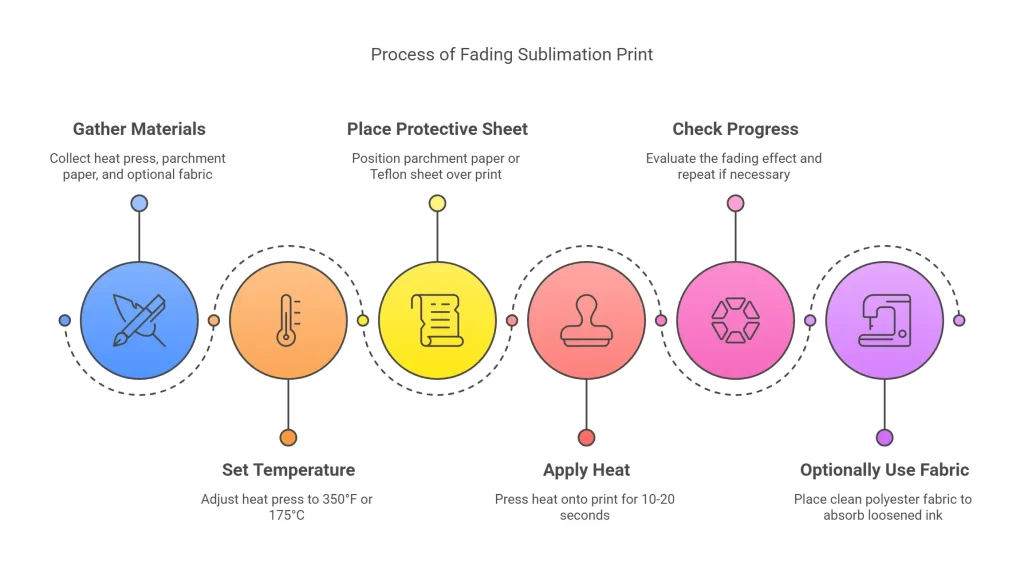
This won’t erase the print completely but can fade it enough for reprinting.
Method 1: Re-Pressing the Print to Fade It
One of the simplest ways to reduce a sublimation print is by applying heat again. Re-pressing the design can sometimes lighten the dye and reduce its visibility.
Steps
- Place the shirt on your heat press.
- Cover the print with protective parchment paper.
- Press the design again for 10–20 seconds.
- Remove the shirt and check whether the color has faded.
- Repeat carefully if needed.
This method works because heat can sometimes cause additional dye migration, which slightly reduces color intensity.
If you want to review safe pressing temperatures before trying this, check the recommended heat press temperature for sublimation.
Keep in mind that results vary depending on the fabric and ink used.
Method 2: Using Chemical Solvents (Limited Results)
Some people try chemical products to remove sublimation ink, but results are usually inconsistent. These methods may lighten the design slightly, but they rarely remove it completely.
Common solvents people test include:
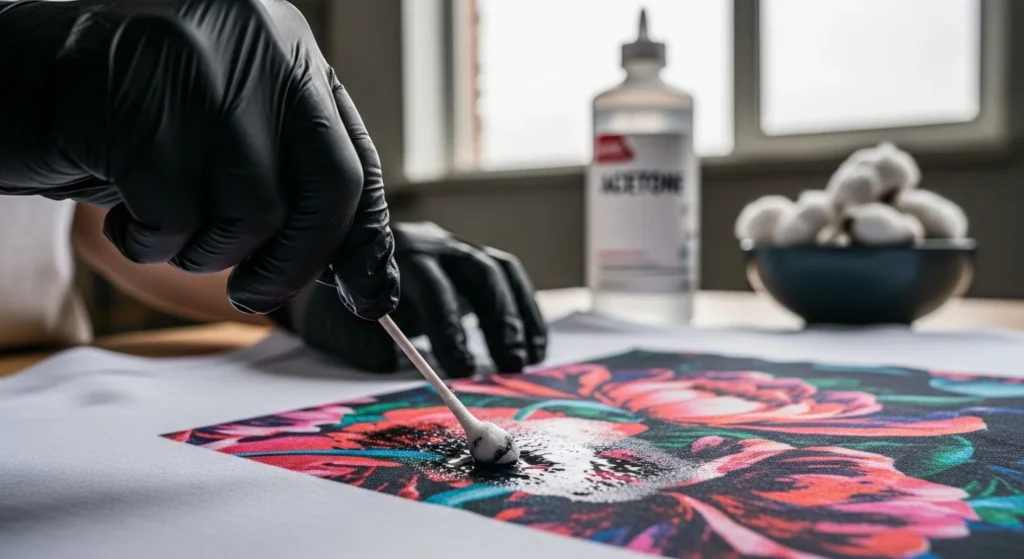
- Acetone
- Rubbing alcohol
- Mild bleach solutions
If you try a solvent, always test a small hidden area first. Polyester fabric can discolor or weaken if exposed to strong chemicals.
Many color issues people see in sublimation are actually related to print settings or color profiles. If your print looks incorrect, reviewing ICC profiles for sublimation printing can often prevent mistakes before pressing.
Method 3: Sunlight Fading
Another low-risk method is natural fading using sunlight.
How it works
Ultraviolet light gradually breaks down dyes over time. If you leave the garment in direct sunlight for several days, the sublimation print may fade slightly.
How to try it
- Wash the shirt normally.
- Lay it flat outside in direct sunlight.
- Leave it for several hours each day.
- Repeat for a few days.
This method is slow, but it avoids damaging the polyester fabric.
Method 4: Covering the Design Instead
In many cases, the best solution is not removing the design but covering it.
This approach is common in sublimation workflows when a design mistake happens.
Possible solutions include:
- Pressing a new sublimation design over the faded one
- Adding a patch or embroidered design
- Applying heat transfer vinyl over the area
If you frequently deal with print issues, reviewing a sublimation troubleshooting guide can help identify what went wrong before pressing the transfer.
How to Fix a Sublimation Mistake on a Shirt
Mistakes can happen during sublimation printing, especially when you are testing new materials or designs.
Common problems include:
- pressing the wrong image
- incorrect placement
- faded or uneven transfers
- color problems
- ghosting from moving transfer paper
If the mistake is minor, you may be able to correct it by:
- re-pressing the design
- slightly fading the original print
- covering the area with a new transfer
Many beginners run into similar issues when learning the process. Understanding common sublimation printing problems and solutions can help you avoid them in future projects.
Can Sublimation Ink Be Removed from Other Surfaces?
Removing sublimation prints from hard surfaces can be even more difficult than removing them from fabric.
Mugs and ceramics
Sublimation ink bonds with the polymer coating on mugs. Once pressed, the design is usually permanent.
Tumblers
Tumblers have a protective coating that holds the sublimation dye. Attempting to remove the ink often damages the coating instead.
Metal or coated blanks
Aluminum photo panels and other coated blanks behave similarly. The dye becomes embedded in the coating during heat transfer.
For this reason, testing your design on a sample blank before full production is always recommended.
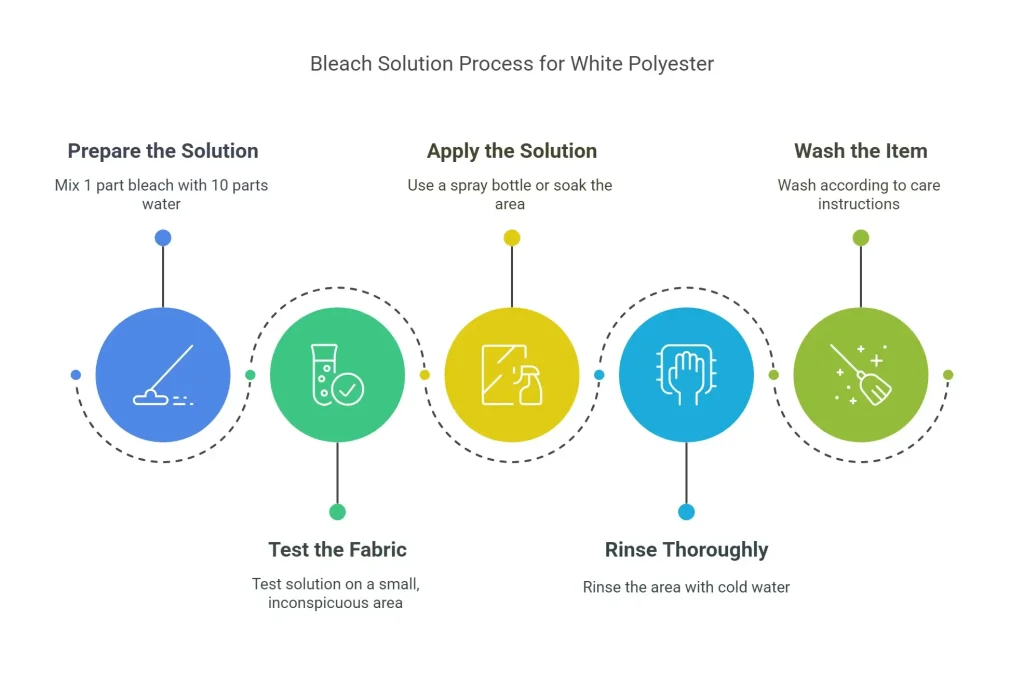
NOTE
Only use on white polyester, bleach will ruin dyed fabrics.
How to Remove Sublimation Ink from a Shirt
Removing sublimation ink from a shirt works the same way as removing it from polyester fabric because most sublimation shirts are made from polyester or polyester blends.
In most cases, the ink cannot be completely removed because it permanently bonds with the fibers during the heat press process. However, you can often fade the print using methods like re-pressing with heat, applying solvents carefully, or covering the design with a new transfer.
If the shirt is a polyester blend (such as 50/50 cotton-poly), fading methods may work slightly better because the dye does not bond as strongly to the cotton fibers.
Does Bleach or Acetone Remove Sublimation Ink?
Bleach and acetone are sometimes used to try fading sublimation prints, but results are usually limited.
- Bleach: may lighten sublimation ink on white polyester but can damage colored fabrics.
- Acetone: can slightly fade the print but may weaken polyester fibers if overused.
Because sublimation ink bonds inside the fabric, chemical methods usually fade the design rather than fully removing it.
Common Mistakes When Trying to Remove Sublimation Prints
When people try to remove sublimation ink, they often damage the garment or blank in the process.
Common mistakes include:
- using harsh chemicals on polyester
- overheating the fabric with a heat press
- scrubbing the material aggressively
- expecting the design to completely disappear
Remember that sublimation printing is designed to create permanent transfers. In most cases, fading or covering the design is the safest approach.
Tumblers may need re-coating and reprinting if the original coating is damaged.
Tips to Protect Your Polyester Item
- Avoid Harsh Scrubbing: Polyester fibers can fray or pill if treated too roughly.
- Test First: Always try any method on a small, inconspicuous area to avoid widespread damage.
- Act Quickly: Mistakes are easier to address if you attempt removal soon after printing, before the ink fully sets.
Sublimation Removal Methods Comparison
| Method | Effectiveness | Risk to Fabric |
|---|
| Heat Re-Press | Medium | Low |
| Solvents | Low–Medium | Medium |
| Sunlight | Low | Very Low |
| Overprinting | High | None |
Using Sublimation Ink Remover
Sublimation ink removers are specialized solvents designed to break down sublimation dyes on various surfaces, including polyester and mug coatings. They’re often stronger than household options like acetone but require extra care.
What You’ll Need:
- Sublimation ink remover
- Cotton balls or soft cloth
- Gloves, safety goggles, and a well-ventilated area
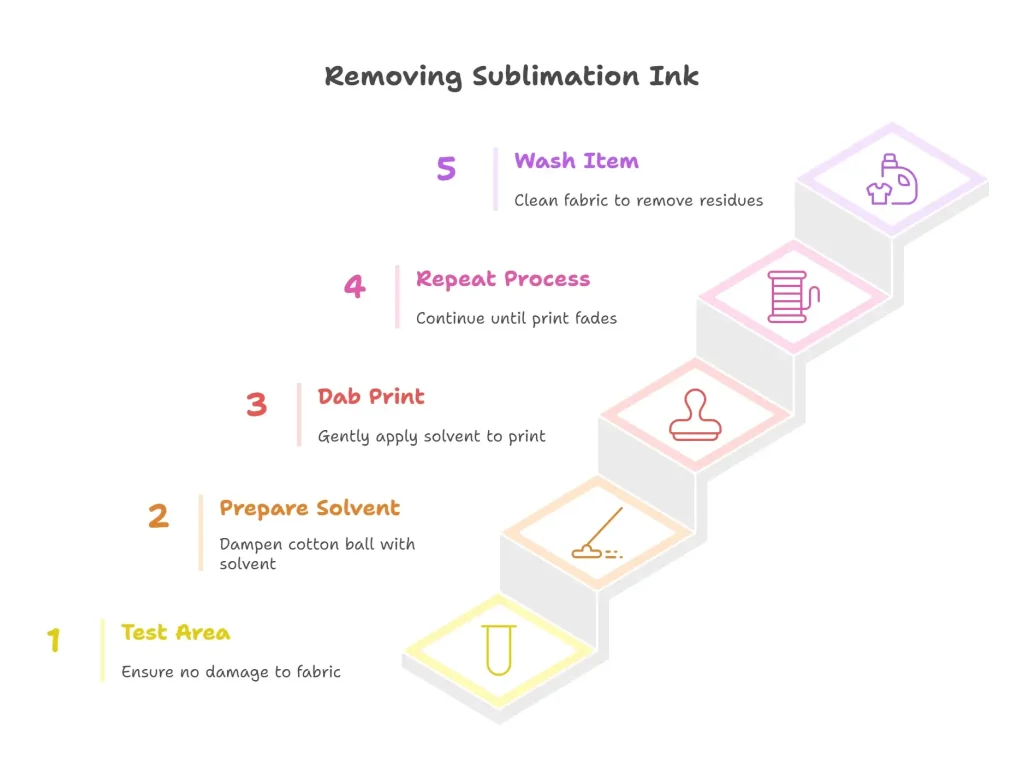
Steps for Polyester:
- Test on a small, hidden area to ensure fabric safety.
- Apply the remover to a cotton ball or cloth per product instructions.
- Dab gently on the print, avoiding heavy rubbing.
- Repeat until the ink fades, using fresh cotton balls.
- Wash with mild detergent and cold water.
Steps for Mugs:
- Test on a small area of the mug’s coating.
- Apply the remover with a cloth, wiping gently to lift ink.
- Rinse thoroughly with warm water and dish soap.
- Dry completely before reusing or reprinting.
Pros: Highly effective, formulated for sublimation ink.
Cons: Expensive, strong fumes require ventilation.
Safety Note: Always follow the remover’s label instructions. Wear gloves and goggles, and work in a well-ventilated space to avoid inhaling fumes.
Tips to Protect Your Items
- Test First: Try any method on a small area to avoid damage.
- Act Quickly: Fresh prints are easier to fade than set-in ones.
- Avoid Harsh Scrubbing: Polyester frays, and mugs can scratch.
- Use Dedicated Tools: Keep ovens or brushes for crafting separate from food prep.
Using Heat Transfer Vinyl Remover
Heat transfer vinyl (HTV) remover is a chemical solution designed to break down the adhesive bond between HTV and fabric, making it a handy tool for removing sublimation prints from polyester. Choose a remover specifically made for HTV to avoid damaging your fabric.
Pros
- ✅Highly effective, even on stubborn prints
- ✅Easy to use with minimal tools
- ✅Safe for most fabrics (with a quick test)
Cons
- ❌Can damage fabric if overused
- ❌Strong fumes—ventilation is a must
- ❌Not always needed for minor mistakes
Step-by-Step Instructions
- Gather your tools: HTV remover, cotton swabs or an applicator, rags or paper towels, and gloves.
- Follow the manufacturer’s instructions carefully for safe use.
- Apply the remover to a small, hidden area of the fabric to check for damage.
- If the test area is fine, apply the remover across the entire design.
- Let it sit for a few minutes (as per instructions), then gently peel off the HTV.
- Repeat if needed to lift all the HTV.
- Wash the fabric with mild detergent and cold water to remove any residue.
Safety Note: Work in a well-ventilated area, wear gloves, and avoid overusing the remover to protect your fabric.
Learn everything about sublimation and printers with Subli Genius Print.
Access a complete guide with detailed steps and expert insights.
Frequently Asked Questions
Can you remove sublimation ink from a shirt?
Not completely in most cases. Sublimation ink bonds with polyester fibers during heat pressing, so the design usually becomes permanent.
Will bleach remove sublimation ink?
Bleach may slightly fade the design, but it rarely removes sublimation ink completely and may damage the fabric.
Can acetone remove sublimation ink?
Acetone may lighten the print slightly, but it often damages polyester and does not fully remove sublimation dye.
How do you fix a sublimation mistake on a shirt?
You can sometimes fade the original design and press a new transfer over it, or cover the area with another design.
Can sublimation prints be washed out?
No. Sublimation ink becomes part of the fabric during heat transfer, so washing will not remove the design.