Halloween Sublimation Tumbler Wraps: 20 oz Sizing & Seam Fixes

Halloween sublimation tumbler wraps can look perfect on screen but leave a white stripe down the back of a finished 20 oz tumbler. The first thing to check is the wrap size, not the heat setting. Choose a sublimation-coated blank, use its supplier’s template, make a plain-paper fit test, and secure the seam so the transfer stays in contact throughout the heating cycle. Two tumblers labeled 20 oz can need different templates.
This Halloween guide focuses on wrapping straight and tapered blanks, positioning ghosts and pumpkins away from the seam, and fixing alignment problems before another blank is wasted. If you need the general print-and-press workflow first, see how to sublimate a full-wrap tumbler.
Choose a 20 oz Sublimation Blank Before Sizing Your Halloween Wrap
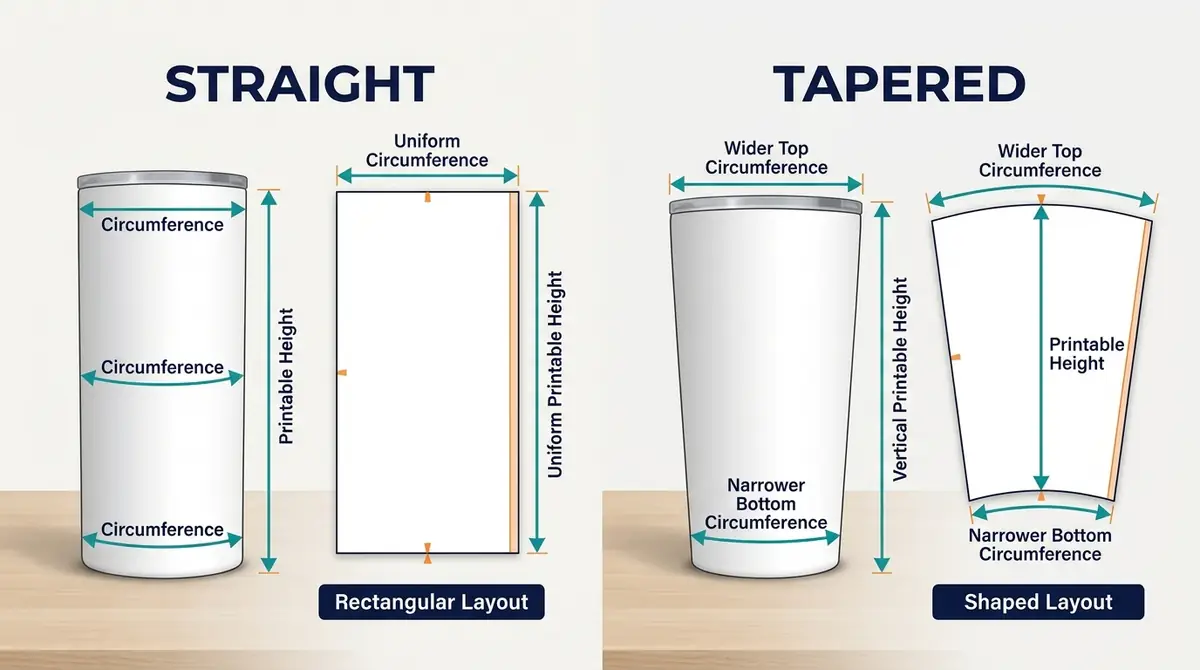
Capacity describes liquid volume, not the tumbler’s printable circumference. A straight skinny tumbler has approximately parallel sides; a tapered model narrows toward the base and usually needs a shaped layout. A glow-coated tumbler may also have separate design or pressing instructions.
| Example blank | Published wrap or body information | What to check |
|---|---|---|
| MakerFlo 20 oz Skinny stainless steel | Straight blank; 9.325 × 8.125 in template | Use its own PDF or SVG template and heat directions |
| REAL BLANKS 20 oz straight | 9.25 in circumference; 9.375 × 8.439 in design | Includes supplier-specific seam and bottom allowances |
| MakerFlo 20 oz glow-in-the-dark | Separate glow-coated sublimation blank | Confirm the current template and finish-specific instructions |
| 20 oz tapered tumbler | Top and bottom circumferences differ | Use an exact shaped template for that product |
The guide to sublimation tumbler blanks covers coatings and sizes in more detail. For this project, a clear white straight 20 oz blank is the easiest shape to plan around, but that is a design convenience, not a claim that it is the best tested product.
What Size Should a Halloween 20 oz Tumbler Wrap Be?
There is no universal 20 oz tumbler wrap size. Start with the template for the exact product SKU. Manufacturer dimensions may include printed bleed or a small overlap, so the design width can differ from the measured circumference.
| Manufacturer | Blank-specific measurement | What it means |
|---|---|---|
| MakerFlo 20 oz straight skinny | Template: 9.325 × 8.125 in | Use for this named straight blank only |
| REAL BLANKS 20 oz straight | Circumference: 9.25 in | Physical circumference of that blank |
| REAL BLANKS 20 oz straight | Design: 9.375 × 8.439 in | Includes ⅛ in seam overlap and ¼ in bottom allowance, per supplier |
The values above are published on MakerFlo’s product page and REAL BLANKS’ product page. REAL BLANKS also offers separate straight and tapered templates. Never take the overlap from one brand and add it to another brand’s finished template.
Measure the printable area, not just the tumbler
- Measure circumference with a flexible tape around the straight printable section. Keep it level and snug.
- Measure the coated printable height, excluding top rims or lower curves the supplier says to avoid.
- For tapered blanks, measure both top and bottom printable circumferences and use a supplied tapered layout.
- Record the product SKU and exact supplier template before creating the design.
Use the site’s sublimation tumbler wrap size calculator to organize measurements when a product template is unavailable. It cannot establish safe overlap or press settings for an undocumented blank.
Do a 100% paper-fit test
Print a low-cost paper outline at actual size, wrap it around the blank, and check that the top and bottom sit level. If a printer or design program shrank the file to fit the page, the seam can open even when the original template was correct. Verify paper size and print margins; do not silently scale the design down.
For example, a design height of 8.439 inches has only 0.061 inches left across the narrow side of an 8.5-inch-wide sheet. Some printers need wider nonprintable margins. Use suitable larger paper or a different printing setup if necessary.
Design Halloween Artwork Around the Tumbler Seam
A physically accurate wrap can still look misaligned if it splits a face, word, or large moon across its meeting edges. Build the main design where it will be seen and make the seam area a deliberate background rather than an accidental cut through the focal point.
- Ghosts and bats: Repeat small shapes on a navy background so slight pattern differences are less obvious.
- Personalized pumpkins: Put names and large jack-o’-lantern faces on the front-facing area, away from the paper join.
- Haunted-house silhouette: Keep the main house centered and continue a simpler night-sky background toward both edges.
- Glow-coated blanks: Consider the coating’s daytime color and verify the maker’s art guidance; do not promise a particular glow effect.
Check that both ends of a repeating pattern align at the intended finished size. A digitally seamless pattern does not guarantee a physically invisible transfer seam after heating.
Make Your Halloween Tumbler Wrap: Step-by-Step
1. Confirm the exact tumbler and prepare artwork
Choose the manufacturer template for your 20 oz blank, verify its printable height and circumference, and place text clear of the seam. Save a copy of the design at final print size.
2. Make a plain-paper sizing test
Print a sample outline, wrap it around the cooled empty tumbler and inspect top and bottom edges. A diagonal seam on a tapered blank is often evidence that a straight rectangular template was used on the wrong shape.
3. Print the final sublimation transfer
Use the correct sublimation printer, ink and paper. Mirror the transfer when your face-down printing process requires it and check that text is not reversed twice. Turn off automatic fit-to-page scaling unless the blank supplier expressly calls for a different setup.
4. Clean and align the coated blank
Prepare the surface using the supplier’s cleaning instructions. Position the printed side of the transfer against the coating, center the design, and bring the seam edges together in the way the manufacturer prescribes.
5. Secure the seam and all raised edges
Use suitable heat-resistant sublimation tape, keeping the transfer smooth without air gaps. Some workflows also require a shrink sleeve or compatible fixture. Do not assume a tighter wrap makes up for a wrong-size template.
6. Press or heat in an approved sublimation oven
Follow the exact blank and equipment manufacturer’s temperature, time, rotation and contact instructions. For a general distinction between equipment methods, see tumbler press versus oven heating guidance. Keep sublimation work separate from appliances used for food.
7. Remove, cool and check the printed seam
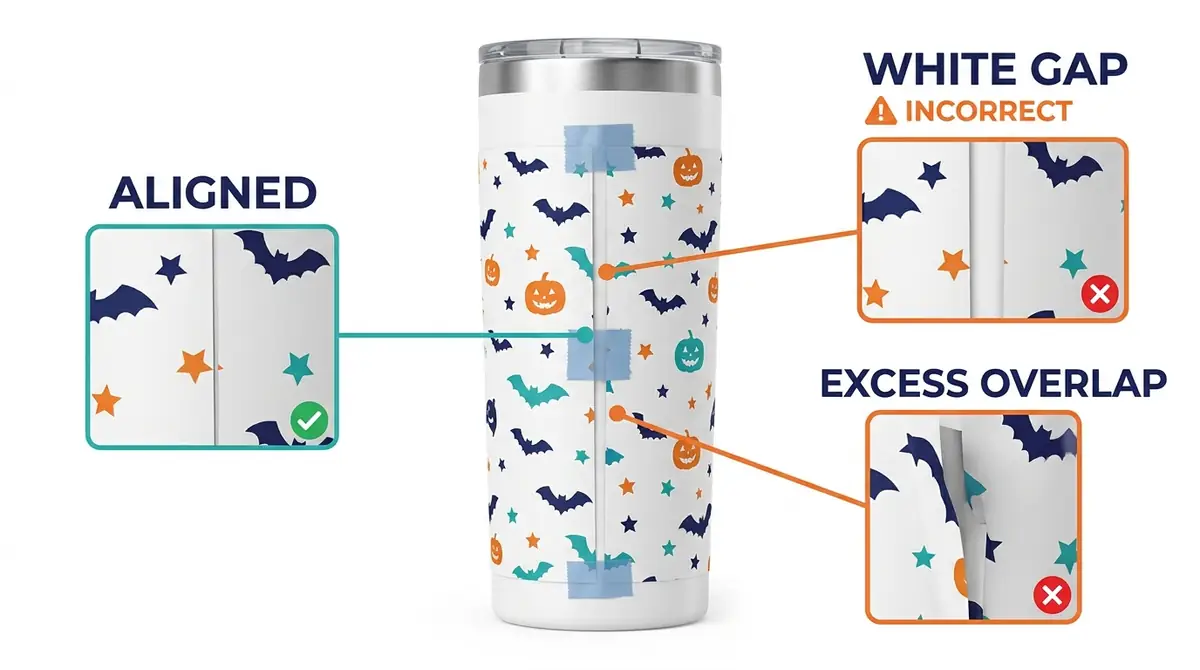
Use heat-resistant gloves and follow the blank supplier’s transfer-removal and cooling directions. Look for a white gap, dark doubled strip, faded upper or lower area, shifted pattern, or blurry Halloween details. Record the result before repeating the process.
20 oz Tumbler Temperature and Time: Product-Specific Example
MakerFlo publishes these starting instructions for its 20 oz straight skinny coated tumbler. They are not transferable to REAL BLANKS, tapered tumblers, or glow-coated products without matching manufacturer guidance.
| MakerFlo method | Published starting setting | Handling detail |
|---|---|---|
| Convection oven | 375°F for 5–6 minutes | Rotate 180° halfway if the tumbler is horizontal, per MakerFlo |
| Tumbler press | 365°F for 40 seconds | Rotate and press for another 40 seconds |
A heater’s actual temperature, fit and contact can vary. Use the product supplier’s current instructions together with the heat-press or oven manufacturer’s operating directions. Don’t combine one company’s temperature with another’s time.
How to Fix White Gaps, Double Seams and Faded Halloween Wraps
| Result | Check first | Better next action |
|---|---|---|
| White vertical seam | Paper too short, incorrect print scaling or a physical gap | Compare paper width and fit with the exact supplier template |
| Dark or doubled vertical band | Excess overlap or patterns that do not join | Recheck manufacturer allowance and artwork continuity |
| Blurry ghost or pumpkin details | Transfer moved while hot | Review tape placement and removal motion |
| Faded top or bottom | Uneven contact, blank shape or incomplete heat coverage | Confirm press/sleeve fit and supplier heating method |
| Crooked letters around the body | Wrong straight or tapered layout | Replace with the correct shape-specific template |
| Patchy pale areas | Wrinkles, air pockets or coating issue | Inspect paper contact and blank suitability |
For accessory choices, see sublimation tumbler seam-control tools. A faint seam is not always a temperature problem. Start with the printable dimensions and paper contact, and avoid blindly increasing heat to correct a sizing error.
Download the Free Halloween Seam-Proofing Worksheet
Use the printable two-page US Letter worksheet to record your 20 oz blank’s exact template, measure the seam, plan a safe artwork zone, test the paper fit, and log what happened after pressing. It is a measurement and troubleshooting worksheet, not a one-size-fits-all tumbler template.
Save the manufacturer’s instructions with your recorded measurements. The supplier’s dimensions always take priority over examples from a different brand.
Halloween 20 oz Tumbler Wrap FAQs
Are all 20 oz tumbler wraps the same size?
No. Two 20 oz straight tumblers may have different circumferences and printable heights. MakerFlo and REAL BLANKS publish different template dimensions. Check the exact blank and use a 100% paper-fit test.
How much seam overlap should I use?
Use the blank supplier’s recommended method. REAL BLANKS publishes ⅛ inch for its straight 20 oz blank, but that is not a universal overlap setting. Some systems need a different join.
Can a straight wrap be used on a tapered tumbler?
Not reliably. A tapered blank has a changing circumference. A rectangular design may wrinkle or leave a diagonal gap. Choose the shaped template intended for the exact tapered blank.
What causes a white vertical line on a Halloween tumbler?
A short design, unintended print scaling, paper lifting, or poor contact near the meeting edges can all contribute. Inspect a plain-paper fit before changing temperature.
Should I mirror a Halloween tumbler wrap?
Usually, when printing a face-down sublimation transfer. Verify the setting in your design program and print workflow so names, numbers and other lettering are mirrored only once.
Can I use the same setting on a glow-in-the-dark 20 oz tumbler?
Do not assume so. A glow-coated sublimation blank is a distinct product, and its maker may supply separate size and heating instructions. Confirm its current directions before pressing.
Keep the Halloween Pattern, Not a White Stripe
For Halloween sublimation tumbler wraps, the most reliable preparation is to measure the actual blank, use its supplier’s template, perform a plain-paper fit check, and protect the design’s main lettering from the seam. Record the result in the downloadable worksheet and refer to more Halloween sublimation projects for a matching seasonal collection.
Manufacturer Sources and Editorial Note
Dimensions and heat examples were checked against MakerFlo 20 oz straight tumbler specifications, REAL BLANKS straight tumbler instructions, REAL BLANKS template library and MakerFlo glow-in-the-dark tumbler details. This guide is based on published manufacturer information and design-planning principles, not independent hands-on testing by Subli Genius Print. Always verify the current instructions for the exact product and equipment.