Heat Press Pressure Test: Paper-Pull Method + Free Checklist

Your transfer looks fine in the middle, but one corner keeps lifting. You increase the pressing time, try again, and the same spot fails. Before changing temperature or wasting another shirt, check whether the heat press is making even contact.
A heat press pressure test using four pieces of ordinary printer paper can help identify uneven platen contact. It costs almost nothing and gives you a practical starting point for troubleshooting. The test does not measure pounds per square inch (PSI), prove a machine is calibrated, or tell you the correct pressure for every transfer.
Use the printable four-corner checklist to record your test and compare the results after an adjustment.
What Does a Heat Press Pressure Test Tell You?
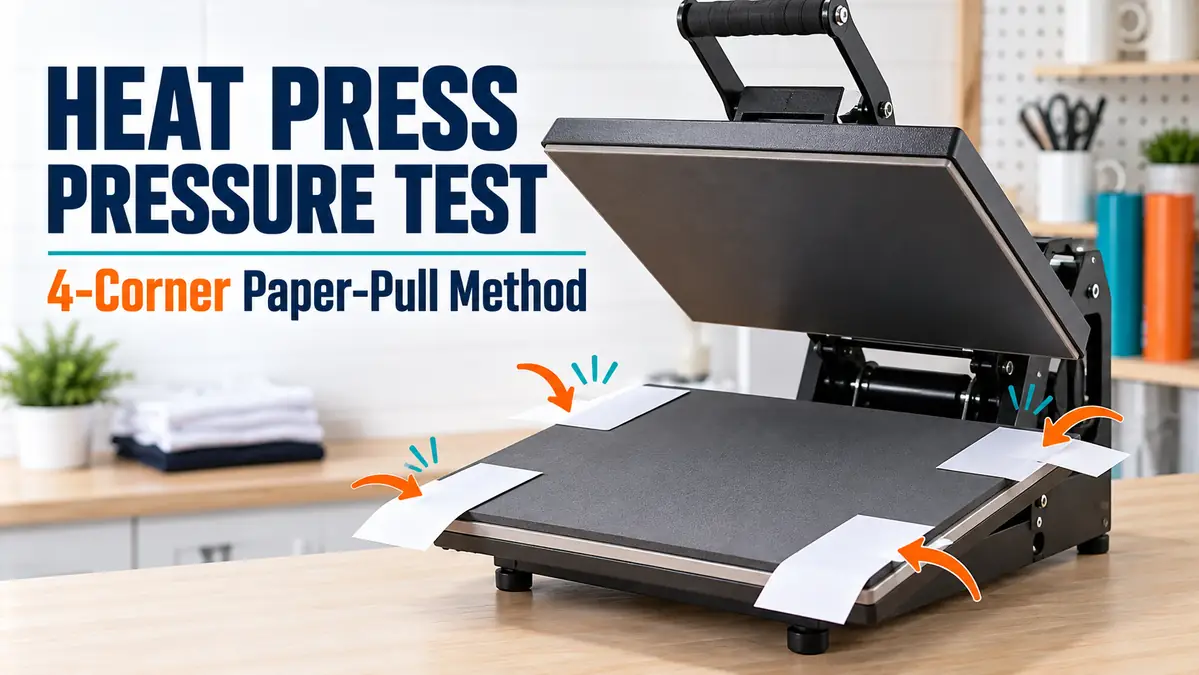
A paper-pull test compares how firmly a closed heat press holds paper at different points around the lower platen. Place four matching paper strips near the corners, close the press using its normal mechanical setting, and compare resistance as you gently pull the exposed ends from outside the platen area.
If three strips are firmly held while the fourth slides out easily, contact may be uneven. This method is described by STAHLS’ and Heat Press Nation, though instructions vary by press design.
| What you notice | What it may suggest |
|---|---|
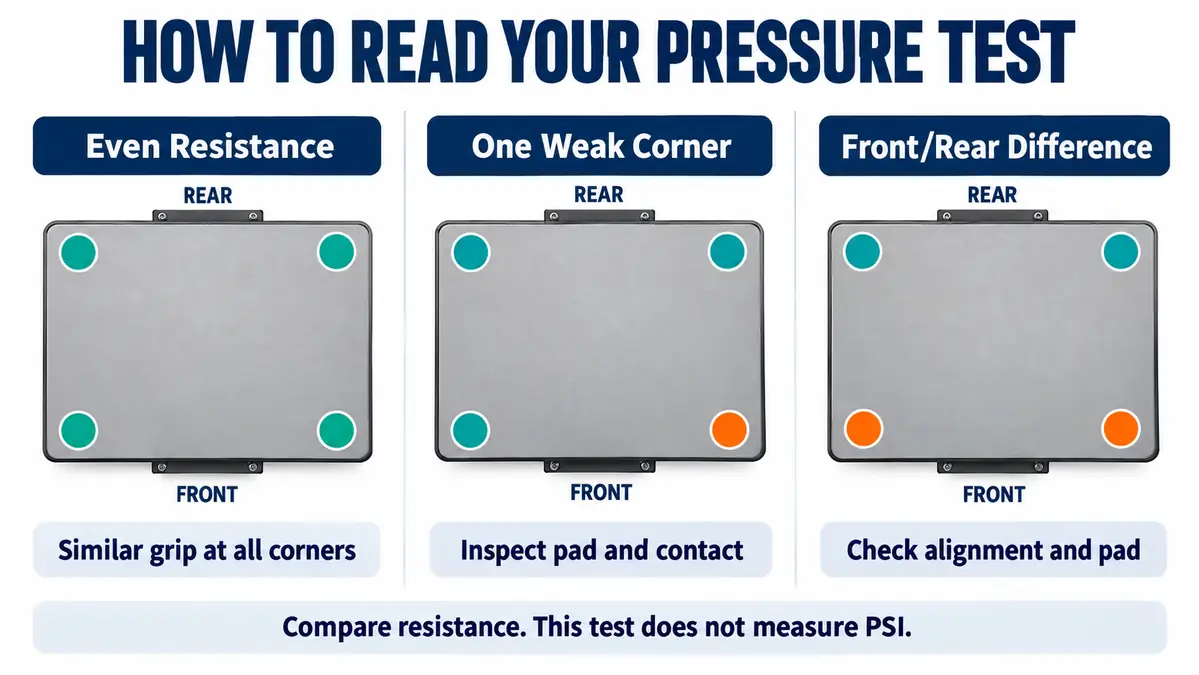
| Similar resistance at all four corners | Contact appears reasonably even at the tested points |
| One corner releases easily | Possible uneven contact or localized pad issue |
| Both front corners release easily | Possible front-to-back contact difference |
| Every strip moves easily | Contact may be light at the present setting |
| Every strip is trapped firmly | Strong contact, but not proof of correct pressure for your transfer |
Even contact is not the same as correct transfer pressure. Heat, application time, substrate thickness, and transfer-specific instructions must be checked separately. The heat press settings calculator can help organize your settings, but your material manufacturer’s instructions take priority.
How to Perform the Paper-Pull Heat Press Pressure Test
For suitable manually operated presses, the initial test can be performed after the machine has cooled completely. Some automatic or pneumatic presses cannot close safely without power. Do not improvise this procedure on those machines: follow their approved diagnostic method or contact the manufacturer.
What you need
- Four identical strips of ordinary printer paper
- Scissors and a pen
- A fully cooled press that can safely close without power
- A notebook or the printable checklist
- Your heat press manufacturer’s instructions
Step 1: Switch off and cool the press
Turn off the machine, disconnect it from power where appropriate, and allow the upper platen to cool completely. Do not put fingers under a hot platen or reach into a closed press. First confirm that the machine can safely close and lock without electrical power.
Step 2: Inspect the pressing surfaces
With the press cool and open, check the lower silicone pad for folds, cracks, uneven seating, residue, or obstructions. Look for visible damage to the platen or linkage without taking the machine apart. If it appears damaged or unsafe, stop and seek qualified service.
Step 3: Cut and position four matching strips
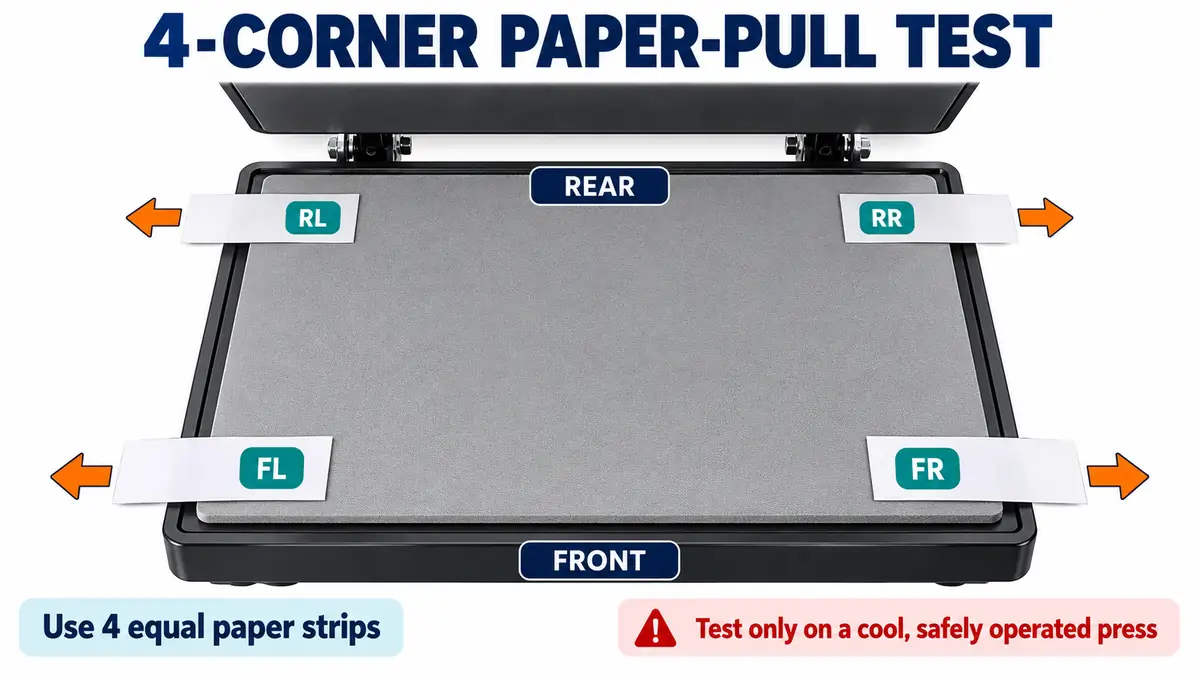
Cut four strips from the same sheet of paper. About 1 inch wide is convenient for many flat presses; consistency matters more than the exact size. Place one near each corner of the lower platen with its outer end extending far enough to reach from outside the machine. Label the corners rear left (RL), rear right (RR), front left (FL), and front right (FR).
Step 4: Close the press at its current setting
Record the pressure-control position before changing anything. Close the press normally in accordance with the manual. Never force its handle, add body weight, defeat a safety interlock, or reach between the platens.
Step 5: Compare resistance
With the press safely locked, gently pull each exposed paper end using approximately the same motion. Note whether it slides easily, moves with some resistance, or is firmly held. Do not pull hard enough to tear paper or risk moving the machine.
Step 6: Repeat with fresh paper
Open the press safely, replace the four strips, and repeat the check. A consistent weak corner is more informative than one result that could have been affected by folded paper or inconsistent placement.
Test limitation: A cool paper test is only a preliminary contact check. It cannot certify platen flatness, confirm PSI, or predict performance at operating temperature. Use manufacturer-approved operating checks and a properly performed test transfer afterward.
How to Read Your Four-Corner Pressure Test Results
| Corner | Easy | Some resistance | Firmly held |
|---|---|---|---|
| Rear left (RL) | ☐ | ☐ | ☐ |
| Rear right (RR) | ☐ | ☐ | ☐ |
| Front left (FL) | ☐ | ☐ | ☐ |
| Front right (FR) | ☐ | ☐ | ☐ |
All four corners behave similarly
This suggests that contact is reasonably even at the tested points, not that pressure is correct or that heat is uniform. If transfers still fail, check the application instructions and the actual temperature. See how to check heat press temperature accuracy for that separate diagnostic task.
One corner releases more easily
Inspect the pad and nearby platen area for damage, residue, or poor seating. Repeat the paper test. If the same corner remains noticeably weak, consult the manufacturer rather than trying to bend or adjust structural parts yourself.
The front and rear give different results
The mechanism, platen alignment, and pad may need inspection. Repeat the test before drawing conclusions. A paper-pull test alone does not prove that the hinge or platen is defective.
All four strips are loose or all four are trapped
Loose strips can indicate light contact, while firmly trapped strips indicate stronger contact. Neither result supplies a universal pressure target. Check the relevant transfer instructions before making an authorized adjustment.
Why a Heat Press May Have Uneven Contact
| Possible cause | What to check | Safer next step |
|---|---|---|
| Worn lower pad | Cracks, compressed spots, uneven thickness | Use a manufacturer-approved replacement if damaged |
| Platen alignment issue | Repeated front-to-back or side-to-side difference | Request manufacturer guidance |
| Residue or debris | Foreign material on pressing surfaces | Clean only as directed in the manual |
| Incorrect pad seating | Shifted or folded pad edges | Reseat only as permitted |
| Damaged pressure mechanism | Visible looseness, bending, unusual movement | Stop and arrange qualified service |
| Raised garment area | Seams, pockets, collars, zippers | Reposition the garment when applying the actual transfer |
A paper test on a bare platen does not reproduce every condition of a loaded garment. Raised seams or thick sections can prevent full contact with a transfer. Cricut also warns that seams and zippers may cause inconsistent heating and pressure.
How to Fix Uneven Heat Press Pressure
1. Start with the lower platen pad
Inspect it while completely cool. If it is cracked, permanently compressed, or displaced, consult the manual and use the correct replacement part. A random foam sheet is not automatically a safe substitute.
2. Remove permitted surface obstructions
Debris and transfer residue can change contact. Clean with the equipment manufacturer’s approved method and allow surfaces to dry before testing.
3. Review the pressure adjustment
Only adjust a control the manufacturer designates as user-adjustable. For example, Heat Press Nation instructs owners of its MPress to turn the adjustment knob while the press is open. Do not assume this direction or procedure applies to other models.
4. Retest and record the change
Keep paper size and positions consistent, repeat the four-corner check, and write down the new outcome. Adjust only one permitted variable at a time so you can understand the effect.
5. Perform a transfer test
Once the machine is safe to use, try a spare blank using the correct transfer, fabric, and manufacturer-specified application settings. If defects recur in the same position, consider the temperature, substrate, and placement as well as pressure. The sublimation troubleshooting chart helps separate common production problems.
6. Stop if the mechanism may be damaged
A bent platen, malfunctioning pneumatic system, damaged linkage, or unsafe closing mechanism needs professional assessment. Do not bypass guards or modify springs simply to improve the paper-test result.
Pressure Requirements for Sublimation, DTF, and HTV
The paper-pull test checks relative contact. It cannot tell you how much force a specific transfer requires. Use the correct application instructions for the exact transfer material and blank.
| Process | What determines pressure | Additional checks |
|---|---|---|
| Sublimation on polyester | Fabric and transfer-system guidance | Time, temperature, fabric composition, pressing surface |
| Sublimation on coated blanks | Blank and coating manufacturer instructions | Orientation, protective layers, press fit |
| DTF transfer | Film, adhesive, garment, supplier instructions | Time, temperature, peel procedure |
| Heat transfer vinyl (HTV) | Specific vinyl product instructions | Time, temperature, carrier-peel method |
Sublimation
Changing pressure cannot reliably compensate for a coating problem, incompatible blank, or inaccurate platen temperature. Refer to the sublimation heat press temperature chart for a reference, then follow the instructions supplied with your particular blank.
DTF
A lifting DTF transfer can reflect inadequate bonding, uneven contact, insufficient temperature, incorrect time, or a peel method that does not match the film. If only one corner repeatedly lifts, contact consistency is worth checking. For whole-design failures, verify the supplier’s full workflow before changing pressure.
Heat transfer vinyl
HTV pressure is product-specific. Siser, for example, specifies medium pressure for EasyWeed. Another film can require different settings. Keep temperature, pressure, pressing time, and peeling instructions together as one material-specific recipe.
Free Printable Heat Press Pressure Test Checklist
Record the four corners, current knob setting, repeated results, observations, and any adjustments on the free one-page US Letter checklist. Having the first result beside the retest helps reveal whether contact actually changed.
For each test, record the press model, platen size, corner resistance, visible pad condition, adjustment, and final test transfer. Change one variable at a time so you can distinguish a real correction from an accidental improvement.
A paper-pull test cannot certify a heat press. It can help identify repeatable uneven contact before additional blanks and production time are wasted. If results remain inconsistent after safe checks, refer the machine to the manufacturer or a qualified technician.