DTF Gang Sheet Calculator: Designs per Sheet, Waste & Cost

A DTF gang sheet can look full and still waste paid film. The useful question is not only how much artwork area you have. You also need to know how many complete transfer rectangles fit, whether rotation improves the layout, how much media you must buy, and what each required transfer costs.
Use this DTF gang sheet calculator to estimate repeated designs per sheet, fixed-sheet count, roll length, utilization, waste, and media cost using your own printable area and current costs.
Planning note: this is a rectangular layout estimator. It does not replace a RIP, nesting engine, or supplier gang-sheet builder for irregular mixed artwork.
Use the DTF Gang Sheet Calculator
Enter one repeated transfer size at a time. Use final print dimensions, the actual printable media width, your preferred cutting gap, and the outside margin your workflow requires.
DTF Gang Sheet Fit, Waste & Cost Calculator
Plan repeated rectangular transfers on a fixed sheet or roll-fed layout. Enter your own printable dimensions, spacing, quantity and media cost.
Planning result
| Orientation | Columns | Fixed-sheet rows | Transfers / fixed sheet | Rows needed on roll | Roll length |
|---|
Planning tool only. Verify the final production file, printable area, margins, artwork dimensions, RIP settings, and supplier requirements before printing or ordering transfers.
The key result is not simply designs per sheet. Review the media you must actually purchase, the unused space, and the cost per required transfer. A layout with a high theoretical fit can still be awkward to cut or sort.
Worked example: For a 22 × 24-inch fixed sheet, 4 × 5-inch designs, 0.25-inch cutting gap, and 0.5-inch edge margins, five columns and four rows fit 20 transfers per sheet. An order for 50 transfers needs three sheets. At $5 per sheet and no shipping allocation, the media cost is $15, or $0.30 per required transfer.
This example assumes the paid-for film is 22 inches wide. Enter the actual physical width if it exceeds the printable width to include the non-printable film in utilization and waste. For rolls, optional billing increments round the paid length up. Confirm supplier minimums and setup allowances separately. The Excel workbook has not been verified against the new optional fields.
Download the DTF Gang Sheet Planning Workbook
Use the companion Excel worksheet to compare fixed-sheet and roll-fed layouts, rotation, waste, media use and cost with your own inputs.
Excel workbook • Fixed sheet and roll-fed planning • Uses your own dimensions and media costs
How Many DTF Designs Fit on a Gang Sheet?
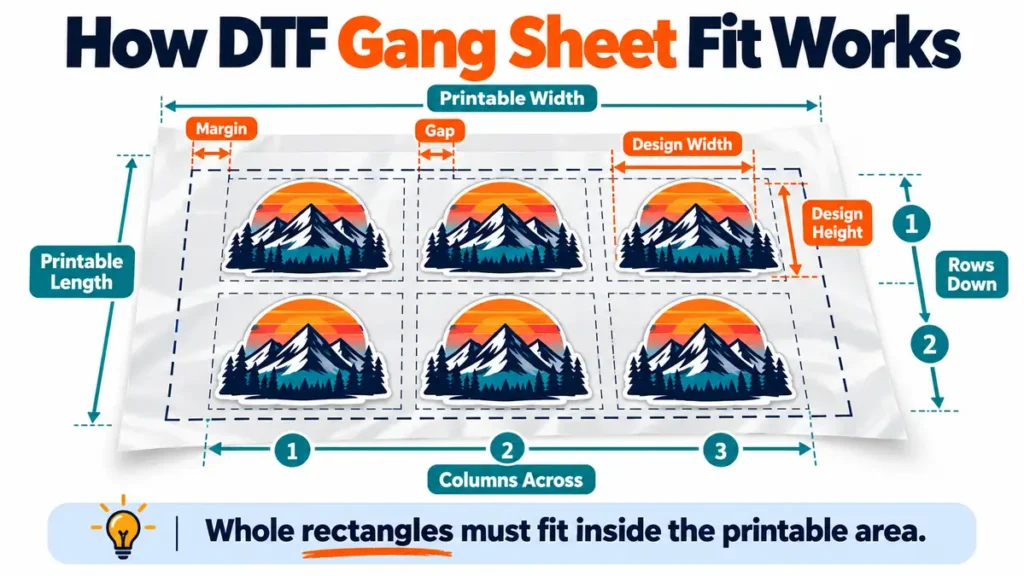
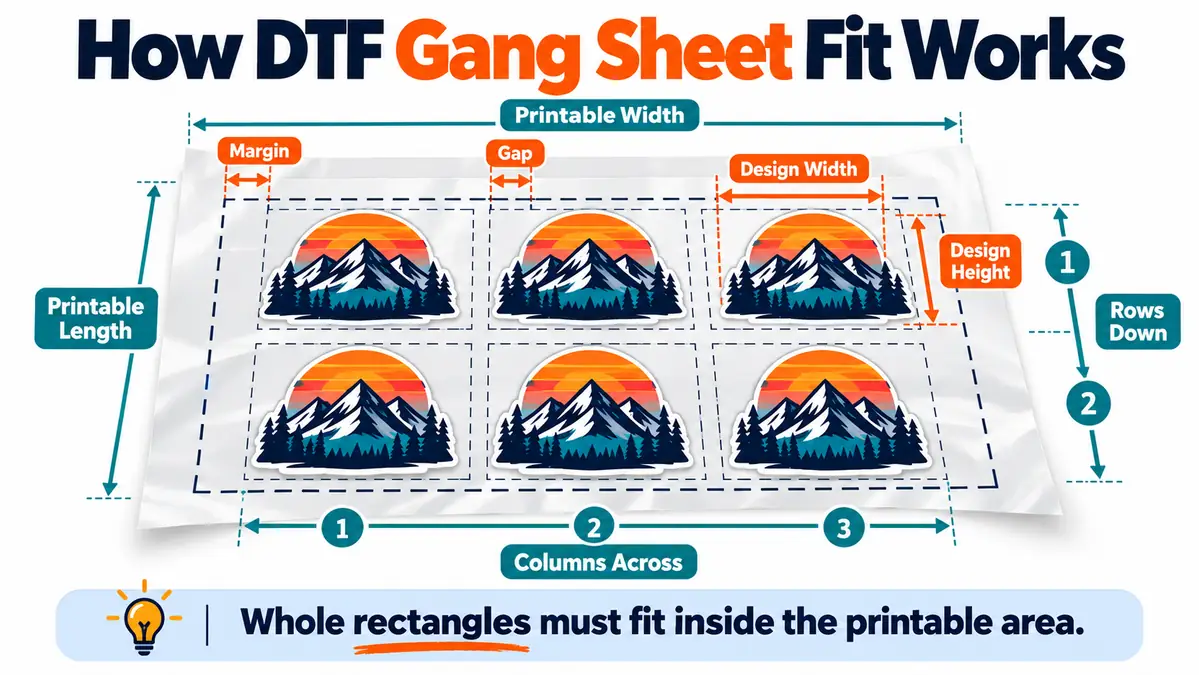
The fit depends on usable sheet width, usable sheet length, final transfer width, final transfer height, and the space you leave between transfers.
First remove the outside margin:
Usable width = sheet width − left margin − right margin
Usable length = sheet length − top margin − bottom margin
Then calculate whole columns and rows. A design cannot partly fit at the edge, so the calculator rounds down to complete transfer rectangles.
Area alone is not enough. A sheet can contain enough total square inches for several designs while the actual rectangles fail to fit because of proportions, margins, spacing, or an incomplete final row.
Why Rotating a DTF Design Can Fit More Transfers
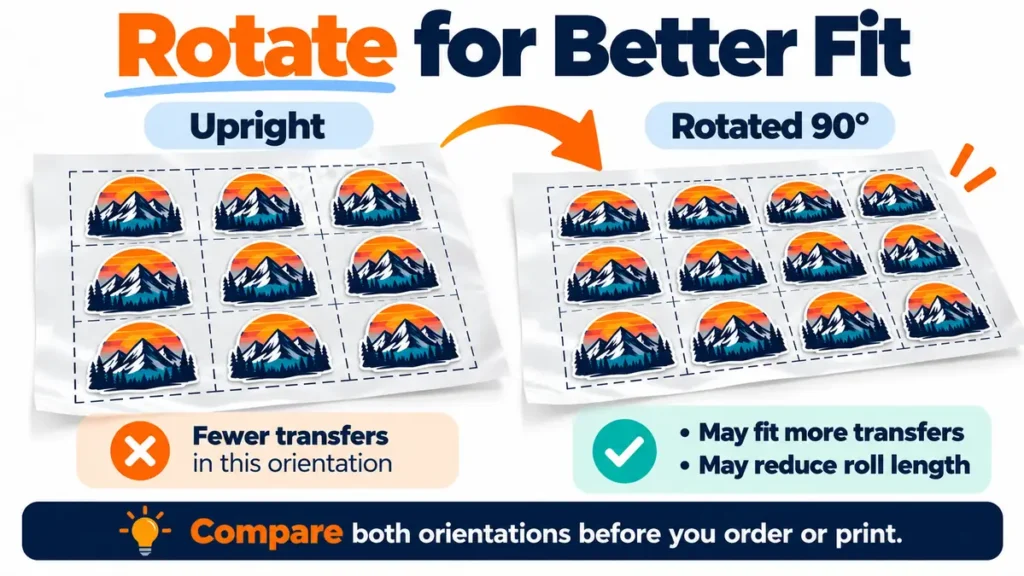
A 90-degree rotation swaps the design width and height. That can add another column on a fixed sheet or reduce the length required on roll media.
| Layout check | What changes |
|---|---|
| Standard orientation | Uses the entered design width × height |
| Rotated orientation | Tests design height × width |
| Fixed sheet | Choose the orientation with more complete transfers per sheet |
| Roll media | Choose the orientation that needs less total length |
Rotation should remain optional. A shop may keep designs upright to simplify customer grouping, cutting, labels, or production order even when the rotated grid uses slightly less media.
Calculate DTF Gang Sheet Waste
Waste is the purchased media that does not become a required transfer rectangle. It includes outside margins, gaps, incomplete rows, unused positions, and the empty part of a final fixed sheet.
| Metric | What it measures |
|---|---|
| Design utilization | Required transfer rectangle area ÷ purchased media area |
| Waste percentage | Unused purchased media area ÷ purchased media area |
The calculator uses the transfer’s outer rectangle. Transparent pixels inside a PNG are not automatically reusable. A true nesting tool can sometimes place other artwork into irregular open areas, but simple grid math cannot safely make that assumption.
Sheet Cost Is Different From Design-Area Cost
A transfer can occupy only part of the media you pay for. Fixed-sheet orders are the clearest example: the final purchased sheet may contain only a few required designs, but the unused area still affects the job cost.
Use:
Cost per required transfer = total entered media cost ÷ required usable transfers
For fixed sheets, total media cost can include the number of sheets required plus the order-specific shipping amount you choose to allocate. For roll media, it can use the required linear length multiplied by your own cost per linear foot.
No supplier price is built into the calculator. Enter your own current cost each time the quote or vendor changes.
Why Cost per Square Inch Can Mislead You
Square-inch pricing is useful for raw media comparisons, but it does not automatically show the real media cost of one finished transfer.
- A design may force another row.
- A quantity may require another fixed sheet.
- Margins and cutting gaps consume paid media.
- The final sheet can have unused positions.
- Roll length changes with orientation and columns across.
Calculate the actual layout first, then calculate the purchased media and cost per required transfer.
If you are comparing DTF with another decoration method, see the DTF vs sublimation printing comparison for the broader fabric and workflow differences.
How Much Space Should You Leave Between DTF Designs?
There is no universal gap for every DTF workflow. The practical amount depends on how the sheet will be cut and handled.
- Scissors may need more comfortable separation.
- A straight cutter may benefit from clean cutting lanes.
- Customer groups may need visible separation.
- Labels or order marks may need room.
- A supplier or builder may have its own requirements.
Use the calculator’s gap field to model your own workflow. The tightest possible layout is not automatically the fastest layout to process.
Printable Width Matters More Than Nominal Film Width
Use the width available for artwork, not automatically the width printed on a roll label. Printer mechanics, RIP settings, handling margins, or supplier upload rules can reduce the usable area.
Before a large run, verify printable width in the documentation or production system you actually use. The calculator cannot correct an incorrect width input.
Fixed Gang Sheets vs Roll-Fed DTF
| Fixed sheet | Roll-fed media |
|---|---|
| Width and length are fixed | Width is fixed and job length can vary |
| Calculate transfers per sheet | Calculate columns and rows required |
| Calculate sheets required | Calculate total linear length |
| Partial final sheet creates unused capacity | Length can stop closer to the planned job |
| Common for outsourced gang-sheet ordering | Common for in-house roll production |
For roll media, the calculator estimates the length needed for the entered transfer rectangles, margins, and gaps. It does not automatically add leader film, trailer film, nozzle tests, color checks, or other setup media because those requirements vary by production system.
Mixed Designs Need a Gang-Sheet Builder, Not Just Grid Math
A repeated-design calculator works best when the same rectangular transfer size is used across the job. Mixed artwork creates a different packing problem.
- Full-back prints
- Left-chest logos
- Sleeve transfers
- Youth sizes
- Names and numbers
- Several customer orders
| Planning calculator | True nesting / builder tool |
|---|---|
| Uses width and height | Uses actual artwork shapes |
| Good for repeated-size estimates | Better for mixed artwork |
| Tests rows, columns and rotation | Can fill irregular open areas |
| Useful during quoting | Useful for final production layout |
| Does not create the finished print file | May build or export production artwork |
Use this calculator to estimate fit and cost before the job is approved. Build the real mixed gang sheet in the RIP, design software, or supplier builder used for production.
Maximum Film Utilization Is Not Always the Best Layout
The layout with the least empty film can create more cutting and sorting work. A highly mixed sheet can require irregular cuts, more relabeling, and more checking before each transfer reaches the correct customer order.
| Film efficiency | Production efficiency |
|---|---|
| Reduces unused media | Reduces cutting and sorting work |
| Packs designs tightly | Keeps jobs in clear groups |
| Optimizes area | Supports straight cutting lanes |
| Can create irregular cuts | Can intentionally use a little more film |
Compare material savings with labor and error risk. A slightly less dense layout can be the better production choice when it makes cutting and job separation faster.
How to Plan a DTF Gang Sheet Before Ordering
- Confirm the final transfer width and height.
- Confirm the actual printable media width.
- Enter the required quantity.
- Enter a gap and edge margin that match your cutting workflow.
- Compare standard and rotated layouts.
- Review required sheets or roll length.
- Review utilization, waste, and unused fixed-sheet positions.
- Enter your own current media cost.
- Use the cost per required transfer in the quote.
- Build and verify the final production gang sheet separately.
Check the finished file for dimensions, quantity, transparency, artwork quality, orientation, margins, and supplier or RIP requirements before printing.
When Gang Sheets Make Sense
Gang sheets are useful when several transfers can share one media run. They can work well for repeated shirt designs, size variations, order batches, stock transfers, and outsourced ready-to-press orders.
They are not automatically the cheapest option for every quantity. One small transfer can leave most of a minimum fixed sheet unused. A dense mixed layout can also add enough cutting and sorting labor to reduce the media savings.
Compare Gang Sheet Options by Required Quantity
| Metric | Why it matters |
|---|---|
| Designs per sheet | Shows repeated-design capacity |
| Required quantity | Shows what the job actually needs |
| Sheets or roll length required | Determines purchased media |
| Unused positions | Shows fixed-sheet capacity not used |
| Waste percentage | Shows media efficiency |
| Total media cost | Shows the entered media expense |
| Cost per required transfer | Useful for quoting |
| Cutting complexity | Affects labor and error risk |
Common DTF Gang Sheet Planning Mistakes
Using nominal width instead of printable width
Confirm the real artwork area before calculating fit.
Forgetting cutting space
Zero-gap layouts can be difficult to separate even when they look efficient on screen.
Comparing only square inches
Rectangles must fit in complete rows and columns. Total area alone can overstate capacity.
Ignoring the final partial sheet
Unused capacity on the last purchased sheet still affects cost per required transfer.
Treating transparent pixels as reusable space
A rectangular estimator cannot safely nest other artwork inside irregular transparent areas.
Skipping the rotation test
A 90-degree orientation can increase fixed-sheet capacity or shorten a roll job.
Treating the calculator as a production builder
Use the result for planning and quoting. Verify the actual production file separately.
Use the Calculator for Quotes, Then Build the Real Sheet
During quoting, enter the final transfer dimensions, quantity, printable media size, spacing, and cost. That gives you an estimated fit, required media, waste percentage, and media cost per required transfer without building a finished gang sheet for every inquiry.
After the order is approved, load the actual artwork, confirm resolution and dimensions, nest mixed designs where appropriate, organize jobs for cutting, and export the file using the production requirements of your printer or supplier.
For other production and pricing tools, visit the Sublimation Calculator Hub.
Frequently Asked Questions
How do I calculate how many DTF designs fit on a gang sheet?
Subtract outside margins from the printable width and length, then calculate whole columns and rows using the final transfer dimensions plus the spacing between designs. Test the layout again after rotating the transfer 90 degrees when rotation is allowed.
Should DTF designs be rotated on a gang sheet?
Rotate the artwork when it improves the media layout and the production workflow allows it. Rotation can increase transfers per fixed sheet or reduce roll length, but a shop may keep one orientation for easier cutting or customer grouping.
How much spacing should I leave between DTF transfers?
Use the spacing required by your own cutting and handling process. Scissors, straight cutters, labels, customer grouping, and supplier requirements can all change the practical gap.
What is DTF gang sheet utilization?
Utilization compares the rectangular area occupied by required transfers with the purchased media area used in the calculation. It measures film use, not cutting or sorting labor.
How do I calculate DTF gang sheet waste?
Calculate the purchased media area, subtract the area assigned to the required transfer rectangles, then compare the unused area with the purchased area. Margins, gaps, incomplete rows, and unused final-sheet space all contribute to the estimate.
Can I mix different design sizes on one DTF gang sheet?
Yes, but a repeated rectangular grid cannot optimize complex mixed artwork. Use a gang-sheet builder, RIP, or nesting tool for the final mixed production layout.
Does this calculator create a print-ready DTF gang sheet?
No. It estimates fit, rotation, purchased media, waste, and cost from the dimensions you enter. Build and verify the final production file separately.
Plan the Sheet Before You Pay for Film
Measure the final transfer, confirm printable width, enter the required quantity, set practical spacing, compare rotation, review waste, and calculate the media cost before the job reaches production.
Then build the final gang sheet around the real artwork and production workflow. The best layout balances paid film, cutting time, sorting, and accuracy rather than chasing the highest packing percentage alone.