Sublimation Production Time Calculator: Job Time & Pieces Per Hour

A sublimation production time calculator estimates how long an order will take based on your actual workflow, not just the heat press timer. For related planning, see Can You Sublimate on Silicone Watch Bands? What Actually Works.
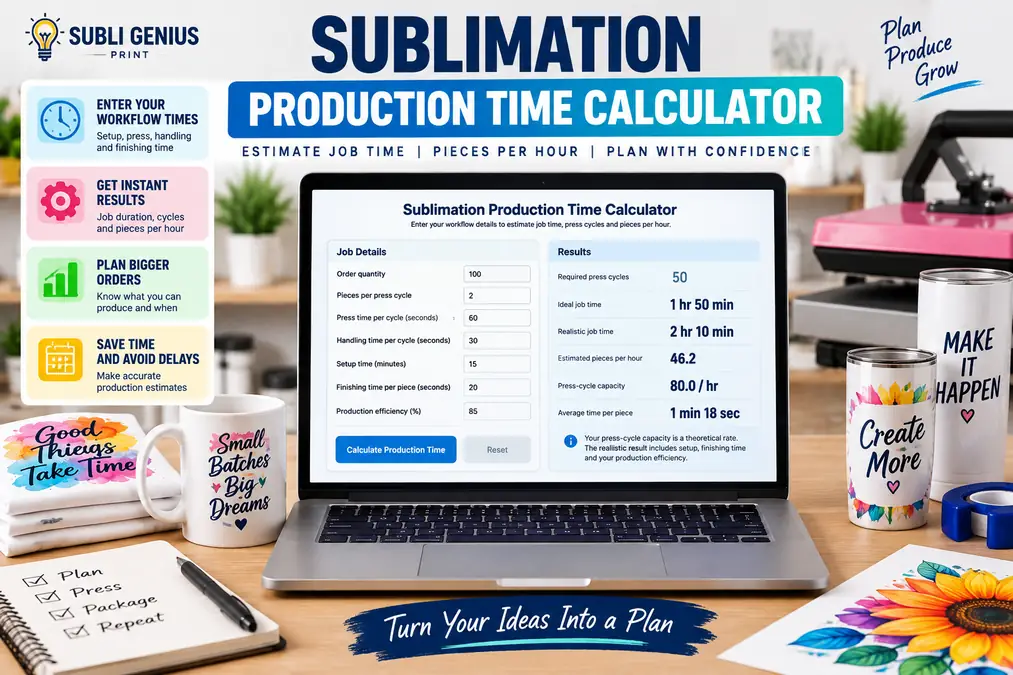
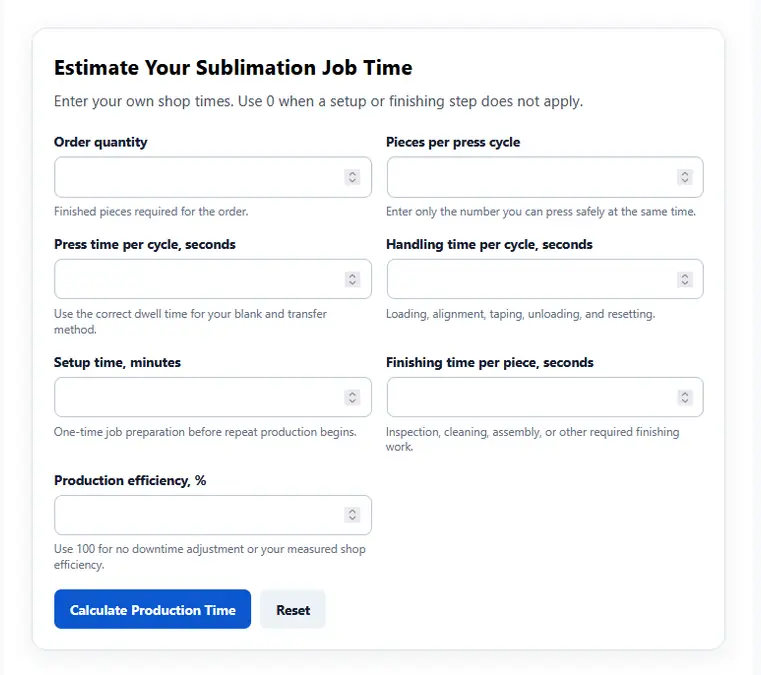
Enter the order quantity, pieces pressed per cycle, press time, handling time, setup time, finishing time, and production efficiency. The calculator returns the number of press cycles, ideal job time, realistic production time, and estimated pieces per hour.
Use your own measured workflow times. A 60-second press setting does not mean you can finish 60 products per hour because loading, alignment, unloading, setup, finishing, and interruptions all take time. For related planning, see How Much Does It Cost to Print Shipping Labels? (Print Shop Cost Guide 2026).
For heat-setting help before calculating capacity, use the heat press settings calculator.
Sublimation Production Time Calculator
Enter the timing from the product and workflow you actually use. For related planning, see Invisible Sublimation Ink.
Estimate Your Sublimation Job Time
Enter your own shop times. Use 0 when a setup or finishing step does not apply. For related planning, see 7 Reasons Why You Should Buy a White Ink Sublimation Printer in.
The calculator separates press-cycle capacity from total job capacity. That distinction helps prevent an easy planning mistake: multiplying the heat press timer by the number of products and treating the result as the full production time.
What to Enter
| Input | What it means |
|---|---|
| Order quantity | Number of finished products required |
| Pieces per press cycle | How many products you can press at the same time |
| Press time | Heat dwell time for one press cycle |
| Handling time | Loading, positioning, taping, unloading, and resetting per cycle |
| Setup time | Fixed time before production starts |
| Finishing time per piece | Cooling, inspection, packaging prep, or other post-press work |
| Production efficiency | Percentage of working time that remains productive after normal interruptions |
Do not use a press time from this calculator as a heat-setting recommendation. Follow the blank, transfer material, and equipment guidance for the product you are making.
What the Calculator Shows
The results include:
- Required press cycles: How many complete press cycles the order needs.
- Ideal job time: Production time if the workflow runs without interruptions.
- Realistic job time: Time adjusted for the efficiency percentage you enter.
- Estimated pieces per hour: Finished output based on the complete job.
- Press-cycle capacity: Theoretical output from press and handling time before fixed setup and finishing work are included.
- Average time per finished piece: Total realistic job time divided across the order.
The difference between press-cycle capacity and realistic output is often where scheduling errors become visible.
How the Production Time Calculation Works
The calculator treats setup time, repeatable press cycles, finishing work, and normal production losses as separate parts of the job.
That makes the result more useful than calculating quantity × press time.
Number of Press Cycles
Divide the order quantity by the number of pieces that fit in one press cycle, then round up.
Formula:
Press cycles = Order quantity ÷ Pieces per cycle, rounded up
A 25-piece order pressed two at a time needs 13 cycles, not 12.5.
The final cycle may contain unused capacity, but you still have to run the cycle to finish the order.
Active Press-Cycle Time
Each production cycle includes more than the heat dwell.
Formula:
Cycle time = Press time + Handling time
Then:
Active cycle time = Number of cycles × Cycle time
Handling time should include tasks that prevent you from starting the next cycle, such as aligning the blank, placing the transfer, closing the press, removing the finished item, and resetting the station.
Do not include work that another operator performs at the same time unless that work actually delays the next press cycle.
Add Finishing Time
Some products leave the press ready for the next stage. Others need cooling, inspection, protective-film removal, cleaning, assembly, or packaging preparation.
Formula:
Finishing time = Order quantity × Finishing time per piece
This keeps post-press labor from disappearing from the production estimate.
Adjust for Production Efficiency
A shop rarely runs at theoretical capacity for an entire order.
Small interruptions can include:
- Repositioning a transfer
- Replacing protective paper
- Checking a print
- Walking between workstations
- Restocking blanks
- Answering a production question
- Cleaning the work area
- Correcting a misalignment
- Waiting for another process
The calculator uses the efficiency percentage you enter rather than assuming a universal downtime rate.
Formula:
Adjusted production time = Productive recurring time ÷ Efficiency
If your measured workflow operates at 80% efficiency, enter 80%.
A lower efficiency percentage increases the estimated job duration.
Total Production Time
Fixed setup time is then added to the adjusted recurring production time.
Formula:
Total job time = Setup time + Adjusted recurring production time
This is the main result to use when estimating how long the order will occupy the production workflow.
Pieces Per Hour
The realistic production rate is based on finished output and total estimated job time.
Formula:
Pieces per hour = Order quantity ÷ Total job hours
This is more useful for scheduling than calculating pieces per hour from the press timer alone.
Example: Estimating a 40-Piece Sublimation Order
Consider a hypothetical 40-piece job.
These numbers are only an example of how the calculator works. They are not recommended heat settings.
| Input | Example |
|---|---|
| Order quantity | 40 pieces |
| Pieces per press cycle | 1 |
| Press time | 45 seconds |
| Handling time | 30 seconds |
| Setup time | 10 minutes |
| Finishing time | 15 seconds per piece |
| Production efficiency | 80% |
The press and handling portion takes 75 seconds per cycle.
With 40 cycles:
40 × 75 seconds = 3,000 seconds
That equals 50 minutes of press-cycle work.
Finishing adds:
40 × 15 seconds = 600 seconds
That adds another 10 minutes.
Recurring productive time is therefore:
50 + 10 = 60 minutes
At 80% production efficiency:
60 ÷ 0.80 = 75 minutes
Add the 10-minute setup:
75 + 10 = 85 minutes
The estimated realistic job time is 1 hour 25 minutes.
The finished-job production rate is:
40 ÷ 1.4167 hours ≈ 28.2 pieces per hour
Now compare that with the press-cycle capacity.
A 75-second press-and-handling cycle can theoretically run:
3,600 ÷ 75 = 48 cycles per hour
The press appears capable of 48 pieces per hour, but the complete job estimate is only about 28 pieces per hour after setup, finishing, and the entered efficiency are included.
That difference is exactly why press dwell time alone is a weak production-planning number. For related planning, see White Sublimation Printer Explained.
What Actually Slows Sublimation Production
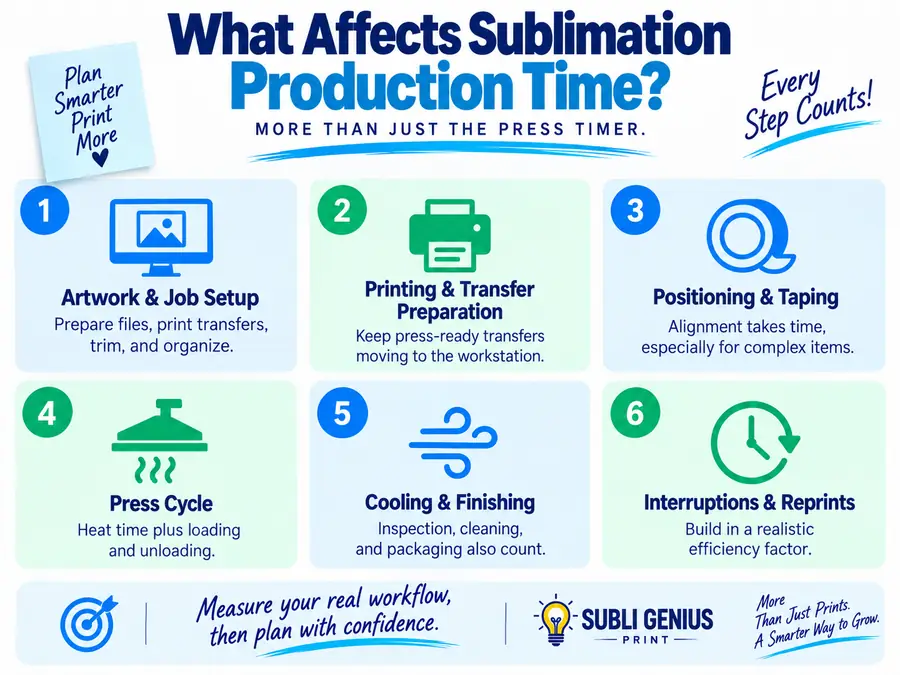
The heat press is only one stage of a sublimation order. The slowest repeatable stage often determines how quickly finished products move through the shop. For related planning, see How to Bleach Shirts for Sublimation (Step.
Artwork and Job Setup
Production can stop before the first blank reaches the press.
Common setup work includes preparing artwork, confirming sizes, creating print layouts, printing transfers, trimming paper, gathering blanks, and organizing the job.
If those tasks happen once per order, include them in setup time.
For a repeatable shop process, use a print shop production checklist before production starts.
Printing and Transfer Preparation
A heat press can sit unused while the printer catches up. For related planning, see Genuine vs Compatible Ink Cartridges For Sublimation.
Large graphics, multiple print sheets, trimming, taping, and transfer organization all affect the pace at which press-ready work reaches the station.
When transfer preparation is slower than pressing, adding a faster press will not automatically increase finished output.
Positioning and Taping
Alignment can take longer than the actual heat cycle on some products.
Full-wrap tumblers, double-sided blanks, detailed shirt placement, and products requiring multiple tape points create more handling time than a simple centered transfer.
Measure the full repeatable handling sequence instead of guessing.
Loading and Unloading
A timer showing 60 seconds only measures the period while the press is closed.
The operator still has to:
- Prepare the next item
- Open the press
- Remove the previous product
- Position the new product
- Check alignment
- Close the press
- Reset the work area
These seconds accumulate across a large order.
Cooling and Finishing
Cooling may not affect press throughput if finished pieces can cool away from the production station.
It becomes a bottleneck when the next step cannot begin until the item cools or when the operator must stop pressing to finish each piece.
Separate parallel work from work that actually blocks production.
Inspection and Reprints
A reprint consumes more than another heat cycle. It can require another blank, another transfer, additional setup, and another quality check.
Tracking reprints is useful because an order with a high theoretical press rate can still have poor finished throughput.
Our guide to reducing print shop mistakes and reprints explains where these losses usually enter the production workflow.
Press Time Is Not the Same as Job Time
Press time measures only how long heat and pressure are applied.
Production time measures the complete work required to finish the order.
| Time measurement | Includes |
|---|---|
| Press time | Heat dwell only |
| Cycle time | Pressing plus repeatable handling |
| Active production time | All required press cycles plus finishing |
| Realistic production time | Active work adjusted for normal interruptions plus setup |
| Lead time | May also include waiting, artwork approval, printing queues, shipping, or other work outside the calculator |
This calculator is designed for active production planning.
It does not automatically calculate customer lead time because an order may spend hours or days waiting for artwork approval, materials, production capacity, pickup, or shipping.
How to Use the Estimate for Production Planning
Production time becomes useful when it changes a real shop decision.
Check Whether an Order Fits Into the Day
Calculate the order before promising a completion window.
If a job needs four hours of production and only two open production hours remain, the calculator makes the conflict visible before the deadline becomes a problem.
For a more consistent process across multiple orders, build the estimate into your print shop workflow.
Compare One-at-a-Time and Batch Pressing
Changing the pieces per press cycle field shows the potential effect of batching.
Do not increase the number just because multiple products physically fit on the platen. They must still receive suitable heat and pressure, and the loading arrangement must be practical.
If two products can genuinely be processed in one cycle, the calculator will reduce the required number of cycles.
Identify the Real Bottleneck
Run the calculator once using your current measurements.
Then test one realistic improvement at a time.
For example, reduce handling time while leaving press time unchanged. If total job time falls meaningfully, workstation layout or alignment may deserve more attention than a faster heat press.
If the result barely changes, handling was not the main bottleneck.
Plan Labor More Accurately
One operator may print transfers while another runs the press. A single-person shop may perform both jobs sequentially.
The calculator should reflect the workflow that actually blocks completion.
Do not add every minute spent by every person if several tasks occur in parallel. Count the time that affects the order’s elapsed production path.
Measure Before Buying Another Press
A second heat press only helps when pressing is limiting production.
If artwork preparation, printing, trimming, taping, inspection, or finishing is slower than the press station, another press may spend much of its time waiting.
Use recorded job times to find the bottleneck before making an equipment decision.
Production Time vs Production Cost
This calculator answers how long the job takes. It does not calculate what you should charge.
Keeping those questions separate makes each tool easier to use.
| Question | Use this resource |
|---|---|
| How long will this order take? | Production Time Calculator |
| What does each blank really cost? | Sublimation Blank Cost Calculator |
| How much ink could the print use? | Sublimation Ink Coverage Calculator |
| What is my profit and margin? | Sublimation Profit Margin Calculator |
| Which other tools are available? | Sublimation Calculator Hub |
Production time still matters when pricing because labor and equipment capacity have value. Use the time estimate as an input to your pricing process rather than turning this page into a second profit calculator.
Production Planning Checklist
Run through these checks before trusting the estimate for a customer order.
- Use the correct order quantity.
- Count only products that can genuinely fit in one press cycle.
- Use the actual press setting for that blank and transfer method.
- Time loading, alignment, unloading, and resetting.
- Include one-time setup work.
- Include finishing work that delays completion.
- Use an efficiency percentage based on your shop data when possible.
- Allow for required test pieces separately.
- Do not count defective products as finished output.
- Recalculate when the product, press, operator, or workflow changes.
The most useful production estimate comes from measured shop data.
After a few completed orders, compare the calculator estimate with the actual time. Adjust your handling time or efficiency percentage when the prediction consistently runs high or low.
How Many Sublimation Shirts Can I Make Per Hour?
There is no reliable universal number because shirt size, transfer size, press dwell, alignment, operator speed, press type, and workflow all affect throughput.
Use:
Pieces per hour = Finished quantity ÷ Total production hours
For future jobs, measure your press and handling cycle, include setup and finishing work, then apply a realistic efficiency factor.
How Do I Calculate Heat Press Production Capacity?
For a basic press-cycle estimate:
Press-cycle capacity = Pieces per cycle × 3,600 ÷ Cycle time in seconds
Cycle time should include both pressing and the handling required before the next cycle can begin.
This number represents theoretical station capacity. Total finished-job output can be lower after setup, finishing, interruptions, and rework are included.
Does Press Time Equal Production Time?
No.
Press time is only the heat dwell portion of the job. Production time can also include setup, transfer preparation, alignment, loading, unloading, finishing, inspection, and normal interruptions.
Using only press time usually overstates how many finished products a shop can complete in an hour.
How Do Multiple Items Per Press Affect Production Time?
Pressing multiple products in one valid cycle reduces the number of cycles required.
For example, an order of 20 pieces requires 20 cycles when pressing one at a time but only 10 cycles when two pieces can safely and consistently be processed together.
Do not batch products if doing so creates uneven pressure, poor heating, difficult alignment, or results outside the blank or equipment guidance.
How Should Downtime Be Included?
Use the production efficiency field to account for normal interruptions.
If your recurring production work would take 60 minutes at 100% efficiency and your measured efficiency is 80%, the adjusted recurring time becomes:
60 ÷ 0.80 = 75 minutes
Base the percentage on recorded production when possible rather than using an arbitrary industry number.
Should Setup Time Be Divided Across Every Piece?
Setup time is normally entered once for the order.
The calculator includes that fixed time in the total job duration, which means setup has a larger per-piece impact on small orders than on large ones.
That is useful when comparing short custom runs with larger batches.
Can This Calculator Estimate a Completion Date?
It estimates the amount of production time required rather than a calendar delivery date.
To create a reliable completion date, you would also need to account for your working hours, existing production queue, artwork approval, material availability, breaks, shipping, and any other scheduled jobs.
Use the calculated duration as the production block you need to place on your schedule.
Should I Use Theoretical or Realistic Production Time?
Use realistic production time when scheduling orders.
Theoretical time is useful for understanding the fastest possible workflow under the inputs entered. Realistic time adds the production-efficiency adjustment and is better suited to day-to-day planning.
If your actual jobs regularly take longer than the estimate, measure the process again instead of continually adding an unexplained safety buffer.
A reliable production estimate starts with one completed job and a timer. Measure the setup, repeatable cycle, finishing work, and actual interruptions. Enter those numbers into the calculator, compare the result with the finished order, and refine the inputs as your workflow changes.
That creates a production rate based on your shop rather than a generic “shirts per hour” number that may have little connection to the products you actually make.