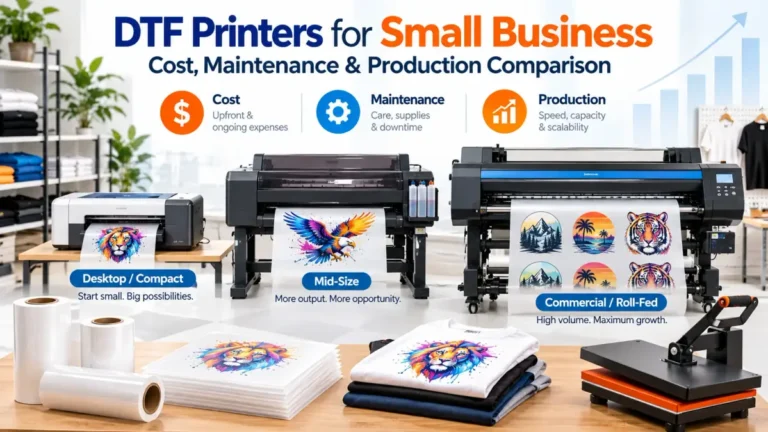
DTF Printers for Small Business: Cost, Maintenance & Production Comparison

A DTF printer can give a small apparel business more control over turnaround times, transfer sizes, and production scheduling. It can also become an expensive maintenance job when order volume is too low to justify owning one.
For most businesses, the right decision starts with three questions: How many transfers do you actually need, how much maintenance can you handle, and what will the complete workflow cost?
The printer is only one part of that decision.
Quick Comparison: Which DTF Printer Class Fits Your Business?
Start with your current order volume and workflow, not the highest printer specification you can afford.
| Business stage | Practical starting point | Main advantage | Main risk |
|---|---|---|---|
| Testing apparel demand | Outsourced DTF transfers | No printer maintenance or large equipment investment | Higher per-transfer cost and supplier turnaround |
| Home or side business | 13 to 14-inch desktop DTF system | Lower entry cost and smaller footprint | More hands-on maintenance and limited width |
| Growing apparel shop | 24 to 32-inch roll-fed system | Better gang-sheet capacity and production workflow | Higher equipment and finishing-system cost |
| Established production shop | 30-inch+ commercial system | Wider media, stronger service options, production automation | Large capital investment and more floor space |
A printer that looks inexpensive can become costly when you add curing equipment, a heat press, software, ink, film, powder, cleaning supplies, replacement parts, ventilation, and downtime.
Bottom line: buy enough capacity for your proven demand, with room for growth. Do not pay for production capacity you cannot keep busy.
DTF Printers Worth Comparing for a Small Business
There is no single DTF printer that fits every small business. These machines represent four different ownership levels, from a compact 13-inch setup to commercial production equipment.
Price checked: October 16, 2026. Prices, promotions, bundles, availability, shipping, taxes, and dealer quotes can change.
Procolored F13 Pro Panda: Compact Dual-Head Option
The Procolored F13 Pro sits in the compact A3 category. It uses a 13-inch roll-fed format with dual XP600 printheads and CMYK plus white ink.
Procolored lists a white-ink circulation system, automatic printhead cleaning, and its Pro RIP software. The company states that the printer performs an automatic cleaning cycle every 10 hours when left powered on.
At the time of this check, the manufacturer listed the F13 Pro printer at $4,799, with higher-priced packages available with an oven, shaker, or heat press. Manufacturer source.
Best fit: A small apparel shop that has outgrown an entry-level printer but still needs a compact 13-inch workflow.
Watch for: The low printer price compared with commercial systems does not eliminate the need for curing, pressing, maintenance, Windows-based RIP workflow, and replacement consumables.
xTool Apparel Printer Plus: Automation-Focused Small-Shop System
The xTool Apparel Printer Plus takes a different approach. It combines a 14-inch print width with dual Epson I1600 printheads, automatic cleaning, white-ink circulation, wet capping, built-in humidification, and remote monitoring.
xTool Creative Space handles design preparation, RIP functions, nesting, print layout, and machine control. Automatic powdering and curing require the compatible xTool shaker oven rather than the standalone printer.
The official U.S. page showed a $4,999 promotional standalone price against a $5,399 MSRP at the time checked. Bundle pricing was considerably higher. Manufacturer source.
Best fit: A small shop that values an integrated software and maintenance workflow more than the lowest possible hardware price.
Watch for: Compare the complete system price, not the standalone printer price, if automated powdering and curing are important to your workflow.
Mimaki TxF150-75: Dealer-Supported 31.5-Inch Step Up
The Mimaki TxF150-75 moves into a wider, more commercial class. Mimaki specifies a maximum print width of 31.5 inches, PHT50 CMYK plus white ink, and white-ink circulation.
Its reliability features include Mimaki’s Nozzle Check Unit, Nozzle Recovery System, and MCTv2 white-ink circulation. Those systems are designed to detect nozzle problems and reduce issues associated with white pigment settling. Manufacturer specifications.
Mimaki also publishes specific daily maintenance procedures for areas such as the carriage, cap, nozzle-check unit, and wiper. This matters because automated ink management does not make a DTF printer maintenance-free. Maintenance guidance.
Best fit: A growing shop that wants wider roll media and a commercial dealer/service relationship.
Watch for: Get a current written dealer quote for the printer, compatible finishing equipment, installation, training, software, freight, and service coverage. I could not verify one consistent current U.S. manufacturer price, so a price is not listed here.
Epson SureColor G6070: Wide Commercial DTF Platform
The Epson SureColor G6070 has a 35.4-inch print width, PrecisionCore Micro TFP printhead, Nozzle Verification Technology, sealed UltraChrome DF ink packs, and an automated maintenance system.
Epson says the maintenance system is designed to reduce routine user upkeep to a few minutes per week. The limited warranty also includes on-site service and support, which changes the ownership equation for businesses where printer downtime directly affects customer orders. Epson announcement.
The current U.S. product page lists an MSRP of $14,995. Finishing equipment still needs to be included when calculating the complete installed workflow. Epson product page.
Best fit: An established apparel business bringing significant transfer production in-house.
Watch for: A $14,995 printer can still be the wrong purchase when monthly production cannot support the investment.
Roland TY-300i: Production-Focused DTF System
The Roland TY-300i is aimed at higher-volume commercial production. It supports a maximum printing width of 28.9 inches, CMYK plus white ink, VersaWorks 7 RIP software, guided maintenance, and improved white-ink circulation.
Roland lists production speeds up to 117.32 square feet per hour in standard mode and 188.18 square feet per hour in its high-speed mode. These are manufacturer figures, so actual job output will depend on print mode, artwork, media, finishing workflow, and operator setup. Roland product page.
The printer was listed at a promotional $17,195 in the U.S. through December 31, 2026. Roland’s compatible shaker systems are separate purchases, so compare the total installed package rather than the printer alone.
Best fit: A print shop where DTF is already a meaningful production line and downtime costs more than the jump to commercial equipment.
DTF Printer Comparison Table
| Printer | Print width | Printhead setup | White-ink / maintenance features | Workflow software | Price snapshot |
|---|---|---|---|---|---|
| Procolored F13 Pro | 13 in | Dual XP600 | Circulation, filtration, auto cleaning | Pro RIP | $4,799 printer |
| xTool Apparel Printer Plus | 14 in | Dual Epson I1600 | Circulation, wet capping, humidification, auto cleaning | xTool Creative Space | $4,999 promotional standalone price |
| Mimaki TxF150-75 | 31.5 in | On-demand piezo | White circulation, nozzle check and recovery | Mimaki workflow | Dealer quote |
| Epson SureColor G6070 | 35.4 in | PrecisionCore Micro TFP | Automated maintenance, nozzle verification | Fiery Digital Factory DTF Epson Edition | $14,995 MSRP |
| Roland TY-300i | 28.9 in | Piezo inkjet | Improved white circulation, guided maintenance | VersaWorks 7 | $17,195 promotional printer price |
Prices checked October 16, 2026. Manufacturer promotions and reseller packages can change.
What Does a Complete DTF Setup Actually Cost?
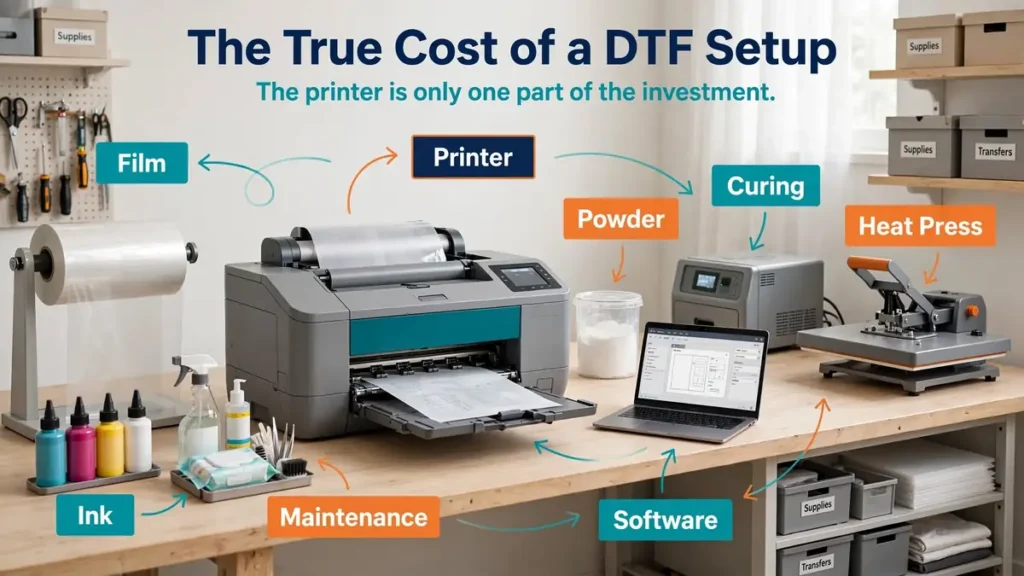
The useful number is installed workflow cost, not printer price.
- DTF printer
- curing oven or shaker/dryer
- quality heat press
- ventilation or extraction appropriate to the equipment and consumables
- computer
- RIP or production software
- CMYK and white ink
- PET film
- adhesive powder
- cleaning fluid and maintenance consumables
- spare maintenance parts
- waste containers
- work tables and media storage
- freight or delivery
- installation and training
- electrical changes
- service plan or extended warranty
If you still need pressing equipment, use the heat press buying guide to choose a press around platen size, workload, workspace, and production needs rather than buying the cheapest press available.
Compact Manual Workflow
A compact setup normally keeps the printer smaller and handles powdering and curing with more operator involvement. It works best when space is limited, order volume is still developing, and one operator can manage the workflow.
Automated Small-Shop Workflow
Adding a shaker and curing system reduces repetitive powder application and curing work. It becomes more attractive when gang sheets are printed regularly, orders arrive several days each week, and labor is becoming a bottleneck.
Commercial Production Workflow
Commercial systems put more money into width, uptime, software, support, automation, and service. A commercial machine should solve an existing capacity or reliability problem. It should not be purchased only because the shop expects demand to appear later.
Bottom line: calculate the cost of the entire production cell before financing the printer.
Buy a DTF Printer or Outsource Transfers?
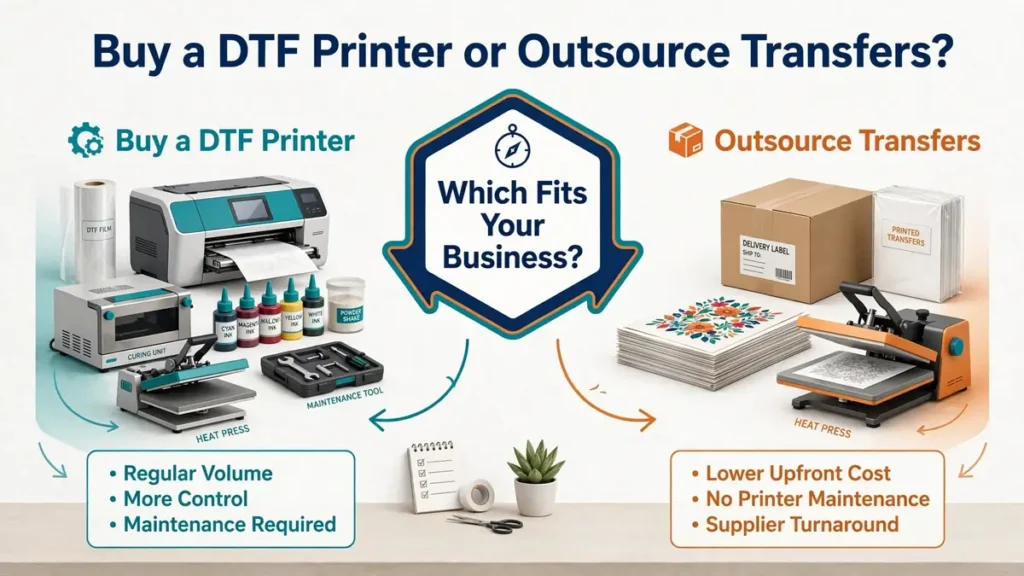
Outsourcing is often the safer choice while demand is inconsistent. Owning the printer becomes more useful when transfer volume is frequent enough that turnaround, shipping, and supplier dependence begin slowing the business.
Keep Outsourcing DTF Transfers When
- DTF orders are occasional
- weekly demand changes sharply
- you are still testing apparel products
- nobody has time for printer maintenance
- workspace is limited
- ventilation or curing space is unavailable
- cash is needed for blanks, advertising, inventory, or other equipment
- supplier turnaround is not hurting customer delivery dates
Consider Bringing DTF In-House When
- you order transfers several times per week
- rush jobs are common
- shipping delays affect production
- transfer purchases have become a significant recurring expense
- gang sheets are part of the normal workflow
- you have an operator responsible for maintenance
- enough floor space exists for printing and finishing
- scheduling control has become commercially valuable
The key word is repeatable. One large shirt order does not prove that a printer will stay productive for the next twelve months.
DTF Buy vs Outsource Calculator
Use your own quotes and operating assumptions. This calculator compares your current outsourced DTF transfer spend with an estimated in-house monthly cost. It does not assume a universal cost per transfer.
Current outsourcing cost
Estimated in-house cost
The recommendation updates automatically.
Planning note: Actual profitability can change with taxes, financing interest, downtime, repairs, labor rates, waste, order mix, reseller pricing, and supplier costs. Use current quotes before making an equipment purchase.
DTF Maintenance Is Part of the Purchase Decision
White ink makes DTF maintenance more demanding than many first-time buyers expect. White pigment can settle when the ink sits. Manufacturers use circulation, stirring, cleaning cycles, wet capping, filtration, humidity management, or nozzle monitoring to reduce problems, but those systems do not remove maintenance entirely.
Automatic Maintenance Does Not Mean Maintenance-Free
Mimaki provides daily cleaning procedures for the TxF150-75, including cleaning around the carriage, cap, nozzle-check unit, and wiper. Epson designed the G6070 around more automated maintenance and states that routine upkeep can take only a few minutes per week. Those are manufacturer-specific workflows, not universal DTF maintenance schedules.
Ask These Maintenance Questions Before Ordering
- What happens when the printer sits unused for several days?
- Does white ink circulate automatically?
- Does the printer clean itself while idle?
- Does it need to remain powered on?
- What must the operator clean manually?
- How much ink do automated cleaning cycles consume?
- What humidity range does the manufacturer require?
- Which components are routine replacement items?
- Can the printhead be replaced locally?
- Are capping stations, dampers, pumps, filters, and waste parts stocked in the U.S.?
- Does the warranty include onsite service or remote support only?
- What happens when the machine stops during your busiest month?
Bottom line: maintenance requirements belong in the buying decision before price, not after the printer arrives.
Print Width Matters More Than Many First-Time Buyers Expect
Print width changes gang-sheet efficiency, artwork size, finishing equipment requirements, and production capacity.
13 to 14 Inches
This range fits compact A3-class systems. It works well for many common shirt graphics and smaller gang sheets while keeping the printer footprint manageable. The limitation appears when you start producing oversized artwork, large batches, or gang sheets for other decorators.
24 to 32 Inches
This range gives growing shops more room to nest designs efficiently. A wider roll can help with larger chest and back artwork, commercial gang sheets, mixed-size jobs, repeated logos, transfer resale, and better use of production time.
35 Inches and Wider
Wide commercial equipment is easier to justify when the business has enough daily work to use the width. More width does not automatically mean more profit. The shop still needs orders, operators, finishing capacity, and a heat-press workflow capable of keeping up.
Printhead Type: What Small Businesses Need to Know
Printhead names are useful, but they should not decide the purchase by themselves. Desktop DTF systems commonly advertise heads such as XP600 or Epson I1600. Commercial systems may use proprietary or purpose-built printhead platforms integrated with the printer’s ink delivery, firmware, software, and maintenance system.
- number of printheads
- white and color channel configuration
- replacement availability
- replacement procedure
- local parts availability
- cleaning system
- operating environment
- dealer support
- complete machine design
A dual-head printer may increase production capacity, but it also gives the machine more printhead hardware to maintain and eventually replace.
RIP Software Can Make a Cheap Printer Expensive
DTF production depends on software for more than sending an image to the printer. A useful RIP or production system needs to manage white underbase generation, white-ink density, color management, ICC profiles, nesting, image duplication, gang-sheet layout, print queues, mirrored output, media use, and printer control.
Before buying, check Windows and macOS compatibility, license expiration, subscription fees, update fees, number of computers allowed, remote monitoring, color-profile support, and technical support.
Support and Replacement Parts Can Matter More Than Resolution
Downtime changes the meaning of a printer’s purchase price. A home business printing occasional orders can sometimes tolerate a few lost production days. A shop promising same-week delivery to schools, teams, businesses, or event customers may not have that flexibility.
Direct-to-Consumer Equipment
- support hours and time zone
- phone, email, chat, or remote-access support
- where parts ship from
- typical parts availability
- warranty coverage
- printhead exclusions
- setup assistance
- training options
Dealer-Supported Commercial Equipment
- installation
- operator training
- local dealer technicians
- onsite repairs
- warranty response
- extended service contracts
- consumable stock
- replacement-part stock
- emergency service procedures
DTF vs Sublimation for a Small Shirt Business
DTF and sublimation solve different apparel problems. DTF is useful when the business needs to decorate a wider range of garment colors and fabrics with a transferred graphic layer. Sublimation bonds dye into compatible polyester or polymer-coated material and works especially well when a soft, integrated print is the priority.
| Factor | DTF | Sublimation |
|---|---|---|
| Dark shirts | Yes, with white ink | Standard sublimation is not suitable |
| Cotton shirts | Common DTF use | Standard sublimation does not bond directly to cotton |
| Light polyester | Yes | Excellent fit |
| White ink | Used | Not used in standard CMYK sublimation |
| Transfer feel | Transfer layer on garment | Dye becomes part of compatible polyester |
| Maintenance | White ink adds maintenance | Depends heavily on printer and conversion |
| Powder/curing | Required | Not part of standard sublimation workflow |
For a deeper method comparison, see DTF vs sublimation printing. Shops also comparing direct-to-garment and embroidery can use the DTG vs DTF vs sublimation vs embroidery comparison.
Which DTF Printer Class Should You Buy?
Testing a New Apparel Business
Start with outsourced transfers. Prove that customers will buy the products before taking on white-ink maintenance, software, powder, film, curing, and printer repair.
Established Home Business With Regular Orders
Compare compact 13 to 14-inch systems. The Procolored F13 Pro and xTool Apparel Printer Plus show two different approaches to this category. Compare the complete system, not the printer box.
Growing Local Apparel Shop
Compare wider roll-fed and dealer-supported equipment. At this stage, width, gang-sheet capacity, support, parts, and production reliability become more important. The Mimaki TxF150-75 is an example of the 31.5-inch commercial step-up category.
High-Volume Shop Where Downtime Is Expensive
Compare purpose-built commercial platforms and service agreements. The Epson G6070 and Roland TY-300i belong here. The extra investment buys more than width. You are evaluating automated maintenance, production software, ink systems, manufacturer support, onsite service options, and a workflow designed around frequent use.
DTF Printer Buying Checklist
- Current monthly DTF transfer volume
- Peak weekly volume
- Maximum print and media width
- White-ink circulation and automatic cleaning
- Manufacturer-required humidity and idle procedure
- Powder and curing workflow
- Heat press compatibility
- Ventilation/extraction requirements
- RIP software and operating-system compatibility
- Replacement printhead cost and parts availability
- Warranty terms and printhead exclusions
- Remote and onsite support
- Training
- Printer, shaker, oven, freight, installation and financing cost
- Working capital left after purchase
A printer that passes the specification checklist can still fail the financial checklist.
Before You Finance a DTF Printer
- Complete equipment quote: printer, shaker, oven, heat press, stand, software, freight, installation, and accessories.
- Consumables list: ink, film, powder, cleaners, filters, waste components, and routine supplies.
- Warranty document: read the actual coverage rather than relying on a sales summary.
- Maintenance schedule: ask for manufacturer-approved daily, weekly, and idle procedures.
- Software terms: confirm licenses, operating systems, updates, subscriptions, and computer requirements.
- Production demonstration: use artwork similar to the work your shop sells and watch the complete workflow.
- Replacement-parts pricing: ask about printheads, caps, dampers, pumps, filters, and wipers.
- Training details: confirm how training is delivered and how later staff are supported.
- Finishing-system quote: include the correct powder and curing workflow.
- Facility requirements: verify footprint, electrical requirements, temperature, humidity, and applicable ventilation needs.
For broader startup budgeting, the print shop startup cost guide can help put equipment spending in the context of inventory, software, workspace, insurance, and operating cash.
Common DTF Printer Buying Mistakes
Buying Based on DPI
Resolution is only one specification. Reliable white ink, good profiles, film handling, curing, maintenance, and operator workflow can matter more to daily production.
Comparing Printer Price Instead of System Price
A $5,000 printer can become a much larger investment after curing equipment, pressing, software, freight, supplies, and workspace are included.
Buying Too Early
Outsourced transfers can be a useful business tool. Let another company own the maintenance risk while you prove demand.
Buying Too Small
The opposite problem appears when established shops choose an A3 printer despite already ordering large gang sheets every week. The bottleneck can arrive immediately.
Ignoring White-Ink Maintenance
Ask how the exact printer circulates, agitates, filters, caps, and cleans white ink. Do not assume automatic cleaning solves everything.
Is a DTF Printer Worth It for a Small Business?
A DTF printer is worth considering when regular transfer demand is high enough to justify the installed equipment cost, maintenance, labor, and risk of downtime.
A business still testing shirt sales will usually carry less risk by outsourcing transfers. A shop ordering transfers repeatedly, losing time to supplier shipping, and turning away rush work has a stronger case for bringing production in-house.
The best DTF printer for a small business is not automatically the cheapest machine or the fastest commercial model. It is the lowest-risk complete workflow that can handle verified demand, fit the workspace, receive service when it fails, and recover its investment without starving the rest of the business of cash.
Once production moves in-house, use a repeatable print shop production checklist so artwork approval, printing, curing, pressing, quality checks, packing, and delivery do not depend on memory.
Frequently Asked Questions
Is a DTF printer worth it for a small business?
It can be when DTF orders are consistent enough to offset equipment, consumables, maintenance, labor, and repair risk. Businesses with occasional orders often have a lower-risk option in outsourced transfers. Calculate using your actual monthly transfer spend rather than a generic order-volume threshold.
How much does a small-business DTF printer cost?
Compact printers can cost several thousand dollars, while commercial systems can move well above $10,000 before finishing equipment. The printer alone is not the full investment. Include curing, a heat press, software, initial consumables, freight, training, maintenance, ventilation, and service.
How often does a DTF printer need maintenance?
The schedule depends on the exact machine. Some manufacturers publish daily cleaning tasks, while newer commercial systems automate more of the process. Follow the manufacturer procedure for your printer, ink, operating environment, and idle periods instead of applying a generic schedule.
Can a DTF printer sit unused for a week?
That depends on the machine’s white-ink management, automatic cleaning system, required idle procedure, temperature, and humidity. Do not assume a DTF printer can simply be switched off for a week. Check the manufacturer’s storage and idle instructions before buying.
Is it cheaper to print DTF transfers or buy them?
In-house printing can reduce transfer purchasing and shipping expenses at sufficient volume, but it adds equipment, labor, consumables, cleaning, waste, repairs, and downtime. Compare your real outsourced monthly cost with a realistic in-house operating estimate before deciding.
What size DTF printer should I buy?
A 13 to 14-inch machine can suit a home business or smaller apparel operation. Wider roll-fed equipment becomes more useful for larger gang sheets, oversized graphics, transfer resale, and higher volume. Choose width around the jobs you already produce and realistic growth.
Do I need a shaker and curing oven?
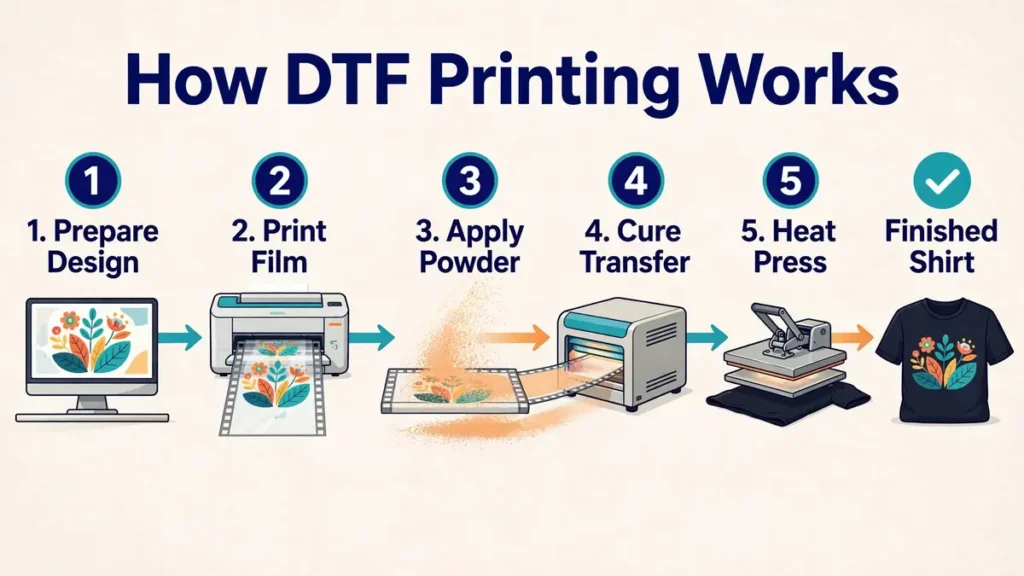
DTF film needs adhesive powder applied and cured before the transfer is heat pressed. Small workflows can handle parts of that process manually with compatible curing equipment. Higher-volume shops commonly use shaker/dryer systems to automate powdering and curing.
What is the difference between an A3 DTF printer and a roll-fed DTF printer?
A3-class machines focus on a compact working width, usually around 13 inches. Wider roll-fed systems accept larger media and can produce larger or more densely nested gang sheets. Wider systems normally require more floor space, larger finishing equipment, and more capital.
Can DTF print on cotton and polyester?
DTF is commonly used on cotton, polyester, and many blends because the printed film is transferred through an adhesive layer rather than relying on polyester fibers to absorb dye. Special fabrics still need compatibility checks for heat, coating, stretch, and manufacturer care requirements.
What should I ask a DTF printer dealer before buying?
Ask for the complete installed price, maintenance schedule, warranty, printhead coverage, software terms, training, replacement-part availability, support response process, finishing requirements, environmental requirements, and a demonstration using artwork similar to your real production jobs.