Sublimation ROI Calculator: Equipment Break-Even & Payback

A sublimation printer or heat press can look affordable until you add the rest of the setup and ask how many paid products it must produce before the purchase earns its cost back. Use this free sublimation ROI calculator to estimate equipment break-even units, monthly equipment profit, payback time, and 12-month ROI from your own numbers.
Enter actual quotes and realistic sales assumptions when possible. The calculator does not assume that every product sells, and it does not use preset industry profit claims.
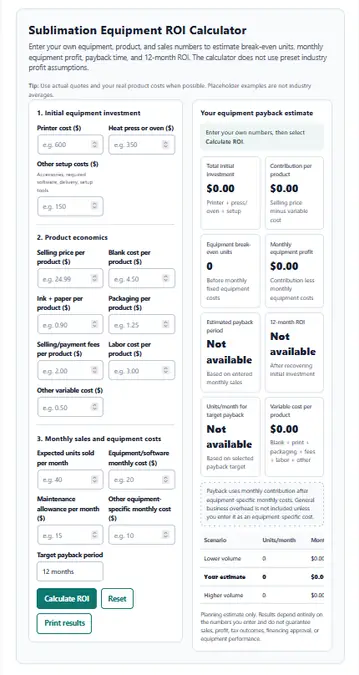
Sublimation Equipment ROI Calculator
Enter your own equipment, product, and sales numbers to estimate break-even units, monthly equipment profit, payback time, and 12-month ROI. The calculator does not use preset industry profit assumptions.
Tip: Use actual quotes and your real product costs when possible. Placeholder examples are not industry averages.
Your equipment payback estimate
| Scenario | Units/month | Monthly profit | Payback |
|---|---|---|---|
| Lower volume | 0 | $0.00 | Not available |
| Your estimate | 0 | $0.00 | Not available |
| Higher volume | 0 | $0.00 | Not available |
Planning estimate only. Results depend entirely on the numbers you enter and do not guarantee sales, profit, tax outcomes, financing approval, or equipment performance.
How to Use the Sublimation ROI Calculator
The calculator works best when every input comes from the same product and the same expected sales period.
- Enter the equipment investment. Add the printer, heat press or oven, and other costs required to make the setup usable.
- Enter the selling price per product. Use the amount you actually expect the customer to pay before sales tax.
- Add variable costs. Include the blank, ink, paper, packaging, selling fees, labor, and other costs that rise when you make another item.
- Enter expected monthly sales. Use a realistic paid-sales estimate, not the printer’s maximum production capacity.
- Add equipment-specific monthly costs. Examples include required software, maintenance allowance, or another cost created by this equipment purchase.
- Choose a target payback period. The calculator shows how many units per month are needed to recover the initial investment within that period.
- Review the lower, base, and higher-volume scenarios. These show how sensitive the payback estimate is to changes in sales volume.
If you are still working out product-level profitability, use the Sublimation Profit Margin Calculator first. ROI calculations become much more useful once the contribution from each product is reasonably accurate.
What Your ROI Results Mean
A single ROI percentage does not tell the whole story. The calculator separates the result into several numbers so you can see what is driving the estimate.
| Result | What it tells you |
|---|---|
| Total initial investment | How much cash must be recovered from the equipment purchase |
| Variable cost per product | The costs that rise with each additional item sold |
| Contribution per product | The amount left from each sale after variable costs |
| Equipment break-even units | Approximate number of products needed to recover the initial investment before monthly fixed equipment costs |
| Monthly equipment profit | Product contribution minus the equipment-specific monthly costs you entered |
| Estimated payback period | How many months the current sales estimate needs to recover the initial investment |
| 12-month ROI | Estimated first-year return after deducting the initial investment |
| Units per month for target payback | Monthly sales needed to reach the payback period you selected |
Equipment Break-Even Units
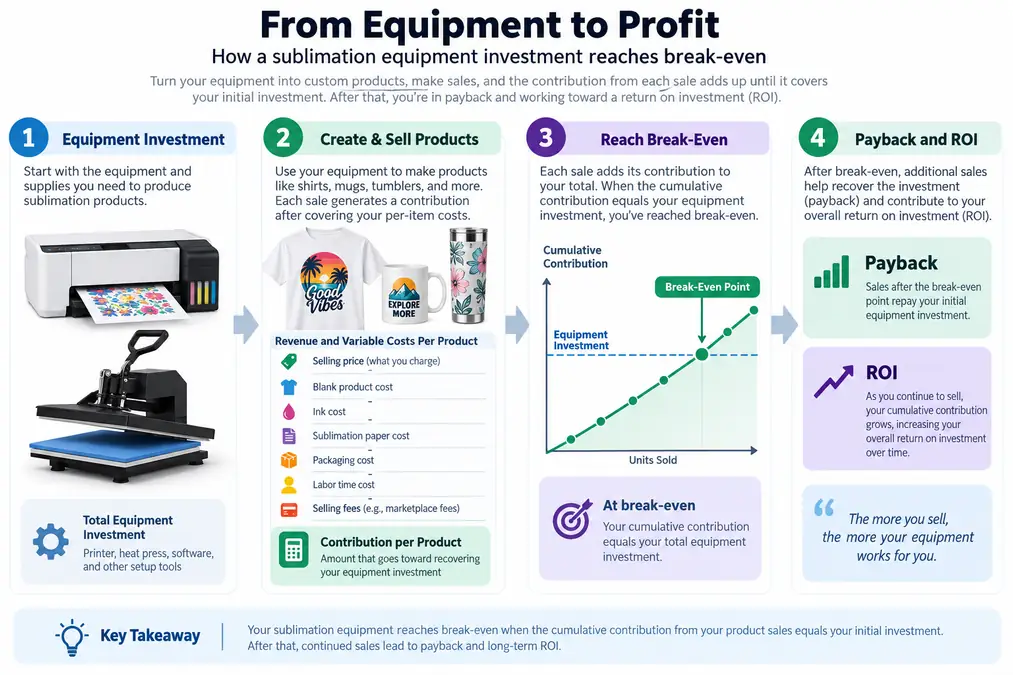
Break-even units answer a narrow question: how many products would need to contribute toward the equipment purchase before the initial investment is recovered?
The calculator divides the total initial investment by contribution per product and rounds up to a whole product. Monthly software, maintenance, and other recurring equipment costs are handled separately in the payback calculation.
Monthly Equipment Profit
This result is the contribution from the number of products you expect to sell each month, minus the equipment-specific recurring costs entered in the calculator.
It is not the same as total business profit. General rent, advertising, taxes, debt payments, owner draws, and other business expenses are not included unless you deliberately add a relevant cost to the calculator.
Payback Period
Payback period estimates how long the equipment needs to recover the initial cash investment at the sales volume you entered.
If monthly contribution does not cover the recurring equipment costs, the calculator will not show a payback period. That is useful information. It means the entered price, costs, or sales volume need to change before the equipment can repay its purchase cost under this model.
12-Month ROI
The 12-month ROI compares the first year of estimated equipment profit with the initial investment.
A positive result means the model has recovered the starting investment and produced an additional return during the first 12 months. A negative result means the investment has not been fully recovered within that period.
ROI is only as reliable as the assumptions entered. It should be used as a planning estimate, not as a sales guarantee.
What Costs Should Be Included?
The strongest ROI estimate starts with the full cost required to put the equipment into productive use, then separates one-time investment from recurring and per-product expenses.
| Cost | Where to enter it | Example types |
|---|---|---|
| Printer | Initial investment | Sublimation printer or converted printer purchase |
| Heat press or oven | Initial investment | Flat press, mug press, tumbler press, convection oven |
| Required setup | Other setup costs | Required accessories, delivery, initial software, setup tools |
| Blank | Variable cost | Shirt, mug, tumbler, panel, keychain |
| Ink and paper | Variable cost | Sublimation ink and transfer paper used for the item |
| Packaging | Variable cost | Box, mailer, insert, protective packaging |
| Selling/payment fees | Variable cost | Fees tied directly to the sale |
| Labor | Variable cost | Your production labor or paid operator time per product |
| Required software | Monthly equipment cost | Software needed to operate the production workflow |
| Maintenance | Monthly equipment cost | A planning allowance for equipment-specific maintenance |
Do not count the same expense twice. For example, if a required accessory is included in the equipment quote, do not enter it again under setup costs.
If you need help separating ink from other product costs, the Sublimation Ink Cost Per Print Calculator can give you a cleaner ink estimate before you return to this ROI calculation.
Sublimation Equipment Break-Even Formula
The calculator uses contribution, not sales revenue, to estimate payback.
Contribution per product
Selling price - variable cost per product = contribution per product
If a product sells for $25 but costs $12 in blanks, ink, paper, packaging, fees, labor, and other variable expenses, the contribution is $13. That $13 is the amount available to cover equipment-specific monthly costs and recover the initial investment.
Equipment break-even units
Initial equipment investment ÷ contribution per product = break-even units
The result is rounded up because a fraction of a finished product cannot complete the payback.
Monthly equipment profit estimate
Contribution per product × units sold per month - equipment-specific monthly costs
Estimated payback period
Initial investment ÷ monthly equipment profit = payback months
The payback calculation only works when monthly equipment profit is positive.
Units needed for a target payback period
(Initial investment ÷ target months + monthly equipment costs) ÷ contribution per product
This is useful when the buying decision starts with a deadline. Instead of asking only how long the current sales estimate takes, you can see how many units would need to sell each month to recover the equipment within 6, 12, or 24 months.
Hypothetical example
Assume a setup costs $1,200, contribution per product is $13, recurring equipment-specific costs are $50 per month, and expected sales are 15 products per month.
- Equipment break-even before monthly fixed costs:
1,200 ÷ 13 = 92.3, so 93 products - Monthly equipment profit:
13 × 15 - 50 = $145 - Estimated payback:
1,200 ÷ 145 = about 8.3 months - Approximate 12-month ROI:
((145 × 12) - 1,200) ÷ 1,200 × 100 = 45%
These numbers are only a math example. They are not suggested prices, costs, margins, or expected sublimation sales.
Test Your Sales Assumption Before Buying Equipment
Production capacity and customer demand are different numbers. A printer may be capable of producing far more pieces than a business can consistently sell.
The calculator automatically tests three sales-volume cases:
- Lower volume: 20% below your entered monthly sales
- Your estimate: the monthly sales number you entered
- Higher volume: 20% above your entered monthly sales
This sensitivity check helps expose a purchase that only works under an optimistic sales assumption. If the lower-volume case produces no payback while the base case looks attractive, the decision depends heavily on maintaining the expected sales level.
For a new business, compare the equipment estimate with your broader sublimation startup costs. Equipment can repay itself on paper while the business still needs cash for inventory, marketing, shipping supplies, insurance, and other operating needs.
Compare Two Equipment Purchases Fairly
A cheaper printer does not automatically produce a better ROI, and a more expensive machine does not automatically produce more profit. Compare equipment with the same product economics first.
Use this process:
- Enter the same selling price and per-product costs for both options.
- Use the same realistic monthly sales volume unless one machine creates a genuine capacity limit.
- Change the initial equipment and setup costs.
- Change only recurring costs that actually differ between the two setups.
- Compare break-even units, monthly equipment profit, and payback time.
If one machine would change ink cost or another recurring expense, adjust that number only when you have a reliable figure for the specific setup.
The Best Sublimation Printers 2026 guide can help narrow the equipment shortlist before you run the ROI numbers. If a Sawgrass model is under consideration, the Sawgrass SG500 cost and setup guide provides a focused equipment reference.
Common ROI Calculation Mistakes
Small input errors can change the payback result more than the formula itself.
Treating revenue as profit
A $25 sale does not contribute $25 toward the printer. The blank, ink, transfer paper, packaging, labor, and selling fees must come out first.
Leaving labor at zero because you do the work yourself
Owner labor still uses time that could be spent producing another order, selling, designing, or doing other work. Use a labor value when you want the calculation to reflect the real production effort.
Using machine speed as expected sales
Maximum output is a production constraint, not a demand forecast. Enter what you reasonably expect to sell, not what the machine could theoretically produce in a full month.
Ignoring recurring equipment costs
Required software, maintenance, or another equipment-specific monthly cost reduces the cash available for payback.
Double-counting setup expenses
Do not add delivery, software, accessories, or installation twice when they are already included in the equipment price you entered.
Assuming every month will match the base case
Seasonality, promotions, wholesale orders, and slow periods can change volume. Use the scenario table to see how much the payback result moves when sales fall below the base estimate.
Treating ROI as a guarantee
The calculator can test the economics of an assumption. It cannot guarantee customer demand, equipment uptime, future costs, or the price buyers will accept.
If downtime would create a serious cash-flow problem, review whether equipment insurance for heat presses and printers is relevant to your operation as part of the broader buying decision.
Questions About Sublimation Equipment ROI
How many products do I need to sell to pay off a sublimation printer?
Divide the total printer and setup investment by the contribution from each product, then round up. Contribution means selling price minus the variable cost required to make and sell one product. If you have recurring equipment costs, use the payback result as well because those expenses affect how quickly the investment is actually recovered.
How do I calculate ROI on a heat press?
Start with the full heat press investment, including required setup costs. Estimate the contribution from products made with the press, subtract recurring equipment-specific costs, then compare the resulting profit with the original investment. The same calculator can be used for a heat press by leaving the printer field blank.
What is a good payback period for sublimation equipment?
There is no universal payback period that fits every sublimation business. A reasonable target depends on available cash, confidence in sales demand, equipment life, maintenance risk, and what else the money could be used for. Compare several target periods and decide which one fits your own risk tolerance and cash needs.
Should labor be included in equipment ROI?
Yes, when labor is required to make each product. Leaving labor out makes product contribution look higher and can make payback appear faster than it really is. Use the labor cost per product field so the estimate reflects the production work involved.
Should ROI use revenue or profit?
Use profit contribution rather than gross revenue. Revenue does not account for the blank, ink, paper, packaging, fees, labor, and other costs attached to each sale. The calculator subtracts those variable costs before estimating equipment payback.
Can I calculate a printer and heat press together?
Yes. Enter both costs in the initial investment section and include any other setup expense required to make the equipment usable. The result then estimates payback for the combined setup rather than one machine by itself.
Use ROI as a Buying Check, Not a Sales Forecast
A sublimation ROI calculator is most useful before money is committed. Enter the real equipment quote, realistic product costs, and a sales volume you can defend. Then compare the base result with the lower-volume case.
If the equipment still reaches an acceptable payback under numbers you consider realistic, you have a clearer basis for the purchase. If you want to evaluate other cost and pricing decisions first, use the Sublimation Calculator Hub to choose the calculator that matches the next question.