Epson F170 vs F570: Print Size, Ink Cost & Upgrade

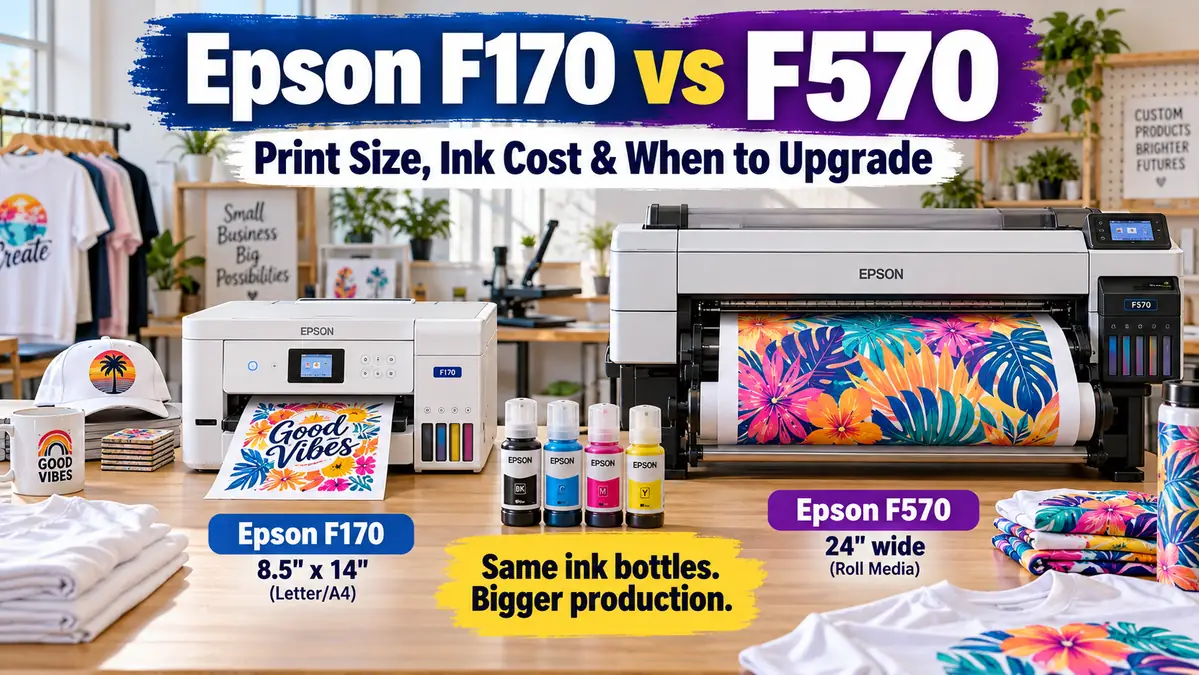
The Epson F170 and F570 use the same 140 mL T49M sublimation ink bottles, so ink price is not the main reason to move up to the F570. For related planning, see Workers' Comp for Print Shop Employees.
The real difference is production capacity.
The F170 is an 8.5-inch-wide sheet printer that fits smaller workspaces and smaller transfers. The F570 moves into 24-inch-class printing with roll media, a built-in cutter, a larger printhead, and much more room for wide designs or gang layouts.
If your F170 still handles every profitable product you sell, there may be little reason to replace it. If the 8.5-inch width forces you to split artwork, reject larger jobs, or feed too many individual sheets during batch work, the F570 starts making more business sense.
Epson F170 vs F570 at a Glance
| Feature | Epson SureColor F170 | Epson SureColor F570 |
|---|---|---|
| Printer type | Purpose-built dye-sublimation | Purpose-built dye-sublimation |
| Maximum media width | 8.5″ | 24.4″ |
| Maximum F170 sheet size | 8.5″ × 47.2″ | Printable length depends on software, OS and driver/RIP |
| Roll media | No | Yes, up to 24.4″ wide |
| Built-in roll cutter | No | Yes |
| Maximum resolution | 1200 × 600 dpi | 2400 × 1200 dpi |
| Ink system | Epson T49M, 140 mL | Epson T49M, 140 mL |
| Auto sheet feeder | Up to 150 sheets | 50-sheet feeder |
| Display | 2.4″ color LCD | 4.3″ touchscreen |
| Storage dimensions | 13.7″ × 13.7″ × 7.4″ | 38.2″ × 20.7″ × 9.6″ without stand |
| Weight | 10.2 lb | 84 lb without stand |
| Current Epson US price | $399 MSRP | $2,495 listed price |
| Best fit | Small transfers, compact workspace, lower-volume production | Wide transfers, roll media, gang printing, growing production |
The F170 is not a smaller version of exactly the same production system. The F570 changes how you can lay out, feed, cut, and batch jobs.
If you want deeper F170-specific settings and operating information, see our Epson SureColor F170 settings, specs and ink cost guide.
The Biggest Difference Is 8.5 Inches vs 24 Inches
The most important number in this comparison is print width.
The F170 accepts media up to 8.5 inches wide. Epson specifies a maximum sheet size of 8.5 × 47.2 inches, which means the printer can handle unusually long sheets even though the width stays narrow.
That distinction matters.
A long sheet does not let the F170 produce a 12-inch-wide chest graphic, a 15-inch sign, or a wide décor panel in one piece.
The F570 handles media up to 24.4 inches wide and supports roll media, giving it much more flexibility for wide designs and production layouts.
What the F170 handles well
The F170 makes sense when most of your transfers fit comfortably inside an 8.5-inch width.
Common examples include:
- mug artwork
- coasters
- small signs
- keychains
- ornaments
- mousepads
- small apparel graphics
- many tumbler layouts when the design orientation fits
- smaller hard-substrate products
Some designs that appear too large at first can be rotated so the narrow dimension stays below 8.5 inches.
Check the actual transfer dimensions before assuming you need a wider printer.
Our sublimation paper size guide can help you compare 8.5 × 11, 11 × 17, 13 × 19 and other common transfer sizes.
What the F570 opens up
The wider printer becomes more useful when the product itself requires width or when you want to place several smaller transfers together.
Examples include:
- large front or back shirt graphics
- larger polyester panels
- banners and soft signage
- wide hard-substrate panels
- home décor
- larger sportswear transfers
- multiple logos or product designs nested on one wide sheet
- roll-based batch production
Bottom line: Long F170 sheets help with long designs. They do not solve designs that need more than 8.5 inches of width.
Do the Epson F170 and F570 Use the Same Ink?
Yes. Both printers use Epson’s T49M 140 mL CMYK dye-sublimation bottles.
As of September 2026, Epson lists T49M black, cyan, magenta and yellow bottles at $24.95 each, and its compatibility list includes both the SureColor F170 and F570.
That removes one common reason people expect the larger machine to cost dramatically more per print.
The F570 does not use a more expensive ink family
You are not moving from inexpensive F170 ink to a separate premium F570 cartridge system.
The same T49M bottle family serves both printers.
Actual ink cost per job still varies because the jobs are different.
A 20-inch-wide transfer obviously contains more printable area than a small mug graphic. Ink use also changes with:
- artwork coverage
- color density
- transfer dimensions
- print quality
- test prints
- failed prints
- maintenance
- layout efficiency
Avoid comparing running cost using a made-up “cost per sheet” number.
Use your actual bottle price and real production data in our Sublimation Ink Cost Per Print Calculator.
Think in cost per sellable transfer
This is a better comparison than cost per page.
Suppose a job requires 12 separate designs.
The F170 may require several individual sheets. The F570 may allow more designs to be nested across a single wide layout.
The F570 may use a larger piece of paper, but it can also reduce unprinted margins, loading steps, and separate print jobs when the layout is planned well.
That is a workflow question, not just an ink question.
Is F570 Print Quality Better Than F170?
The F570 has a more capable printhead specification, but a higher maximum resolution does not mean every customer will see a dramatic difference on every sublimated product.
The F170 uses a PrecisionCore MicroTFP printhead with a maximum resolution of 1200 × 600 dpi. Epson lists 784 nozzles in total.
The F570 uses a 4-channel PrecisionCore MicroTFP head with 800 nozzles per channel, a maximum resolution of 2400 × 1200 dpi, and Epson’s Nozzle Verification Technology.
Those are meaningful hardware differences.
The finished result still depends on:
- source-image quality
- color management
- transfer paper
- print mode
- substrate coating
- heat press temperature
- time
- pressure
A technically higher-resolution printer cannot fix a poor source image or bad pressing process.
Use the Sublimation Image Resolution & Print Size Checker before blaming printer resolution for a soft enlarged image.
What About F170 Dithering Complaints?
Some F170 owners report visible dots or grain in areas of light or solid color.
Reddit discussions include users describing dithering in colors such as light blue, yellow and other smooth tonal areas. Some commenters report preferring the F570 for those jobs.
These are community reports, not an Epson statement that every F170 has a hardware defect.
Several factors can make dot patterns more visible:
- smooth solid-color artwork
- light colors
- hard glossy substrates
- close viewing distance
- source-image processing
- print settings
- color-management workflow
A shirt graphic viewed from normal distance may hide patterns that become much easier to notice on a glossy photo panel or ceramic tile.
If your F170 already produces acceptable customer work, there is little value in replacing it because somebody else’s printer shows a problem yours does not.
If dithering is visible on your real products, make controlled comparison prints before deciding that a more expensive printer is the only fix.
F170 vs F570 for Batch Production
Print width can matter even when every individual design fits on the F170.
Consider a batch of small logos, coasters or shirt graphics.
The F170 may require several separate sheets because every layout is limited to 8.5 inches across.
The F570 gives you a much wider canvas for nesting designs across the media.
That can reduce:
- separate print jobs
- sheet loading
- repeated setup
- unused margin areas
- time spent organizing individual transfers
The F570 also supports roll media and includes a built-in rotary cutter. Epson says the cutter can operate automatically or manually across the roll.
The built-in cutter does not cut every individual design
This catches some new F570 buyers by surprise.
The built-in cutter cuts the media across the roll. It is not a contour cutter that automatically trims every logo, mug wrap, or nested transfer from a gang layout.
A user discussing F170 versus F570 specifically raised this issue when trying to gang multiple mug transfers across wider media.
After printing a gang layout, you may still need:
- scissors
- a rotary trimmer
- a guillotine cutter
- another finishing tool
Factor that handling time into your production plan.
Paper Waste Can Matter as Much as Ink Cost
Moving to the F570 does not automatically reduce paper waste.
It gives you more control over layout.
A wide roll can be efficient when designs nest together cleanly. A poorly arranged layout can waste a large section of expensive transfer paper.
Hypothetical example
Assume you need to print several 7-inch-wide transfers.
On the F170, the designs may have to run one across each sheet because the page is only 8.5 inches wide.
On the F570, several designs might fit across one wide roll layout, depending on their exact dimensions and required spacing.
The useful measurement is not:
How much paper did the printer feed?
It is:
How much transfer paper did I use per finished sellable product?
Track that number for your own jobs.
Paper choice can affect transfer quality and production cost too. Compare options in our best sublimation paper for Epson printers guide.
The F570 Needs Much More Workspace
The F170 is genuinely compact.
Epson lists its storage dimensions at 13.7 × 13.7 × 7.4 inches, with a weight of 10.2 pounds.
The F570 measures 38.2 × 20.7 × 9.6 inches without its stand and weighs 84 pounds.
That difference affects more than desk space.
A useful F570 workspace needs room for:
- the printer
- loading roll media
- media exiting the printer
- trimming transfers
- storing rolls
- organizing printed jobs
- moving finished transfers to the heat press
An F570 squeezed onto the wrong table can make the shop less efficient even though the printer itself is more capable.
One F170 owner on Reddit said space was a major reason for delaying an F570 purchase despite liking the wider printer.
Measure your workspace before ordering.
When the Epson F170 Is Still Enough
A smaller printer is not automatically a beginner printer that must eventually be replaced.
The F170 can remain the right production tool when:
- profitable designs fit within its 8.5-inch width
- most work uses small individual transfers
- current order volume is manageable
- sheet loading is not slowing production
- workspace is limited
- large-format inquiries are rare
- your heat press cannot use much wider transfers
- the printer is not causing missed deadlines or lost sales
A $399 printer that handles your actual product line efficiently can make more business sense than a $2,495 printer operating far below its capacity. Epson lists those current US prices as of September 2026.
Do not upgrade because the F570 is larger.
Upgrade when the F170 creates a measurable production problem.
7 Signs You May Be Ready for the F570
1. You regularly reject jobs because of print width
This is the clearest signal.
Track how many real inquiries you turn away because the artwork cannot fit within 8.5 inches.
Occasional requests do not automatically justify new equipment. Repeated profitable requests deserve closer attention.
2. You split artwork that should be printed in one piece
Splitting a large design can add alignment work, increase press risk and slow production.
When this becomes routine, the F170’s width is working against the product you are trying to sell.
3. Batch jobs require too many separate sheets
The design itself may be small, but production volume can still expose the limit.
If a wider gang layout can replace several separate F170 print jobs, calculate how much handling time the change could save.
4. Loading and organizing sheets is becoming a bottleneck
Printer speed is only part of production time.
Employees or owners still have to:
- prepare layouts
- load media
- collect sheets
- trim transfers
- organize jobs
- move them to pressing
Use our Sublimation Production Time Calculator to measure the whole workflow instead of judging speed only by printer specifications.
5. You specifically need roll media
The F170 is sheet-based.
The F570’s roll support changes how long jobs and wide gang layouts can be produced. If roll media solves an existing production problem, the upgrade has a clear operational purpose.
6. Larger products already have proven demand
Avoid buying wide-format equipment because you might sell larger products someday.
Real customer requests are better evidence.
Track inquiries for:
- large apparel graphics
- signs
- décor panels
- sportswear
- wide soft goods
- larger hard substrates
A repeated pattern is much more useful than a guess.
7. The extra profit can reasonably recover the equipment cost
This is the business test that matters most.
The F570 should earn back its cost by:
- unlocking additional orders
- saving labor
- improving batch efficiency
- reducing waste
- supporting higher-value products
Run the numbers with our Sublimation Equipment ROI Calculator.
Calculate the F170 to F570 Upgrade Before Buying
Do not base the decision only on printer price.
Write down these numbers from your real shop.
| Upgrade factor | Your number |
|---|---|
| F570 purchase cost | $ |
| Current monthly sublimation orders | |
| Orders lost monthly because of F170 width | |
| Average profit per lost order | $ |
| Average F170 sheets per batch | |
| Estimated wider layouts needed per batch | |
| Minutes currently spent loading/organizing sheets | |
| Estimated minutes saved per month | |
| Labor value per hour | $ |
| Current transfer-paper waste | $ |
| Estimated added monthly profit | $ |
| Expected monthly labor/material savings | $ |
| Target payback period | months |
Avoid forcing optimistic numbers into the worksheet just to make the purchase look sensible.
Use actual orders from the last few months when possible.
A simple upgrade test
Ask:
If I buy the F570, what specific monthly cost or lost revenue disappears?
Good answers include:
- “$600 of profitable wide-format work is currently being outsourced.”
- “We turn away five large apparel orders most months.”
- “Our weekly batch takes several extra hours because everything prints on separate sheets.”
A weak answer is:
“I might start making bigger things.”
Demand first. Equipment second.
Your Heat Press May Be the Real Bottleneck
Buying a 24-inch-class printer does not automatically create a 24-inch production workflow.
The transfer still has to fit your heat equipment.
Check four dimensions together:
Artwork size → printer width → press platen → blank
For example, moving from an 8.5-inch printer to a 24-inch printer makes less difference if your current press cannot apply the larger transfer in one controlled press.
Before upgrading the printer, measure:
- platen width
- platen depth
- usable pressing area
- largest blank you actually sell
- largest transfer customers actually request
A heat press upgrade may solve the more important bottleneck in some shops.
F170 vs F570 for Different Sublimation Businesses
| Business or workflow | More practical fit | Why |
|---|---|---|
| Small hobby setup | F170 | Compact and lower initial cost |
| Mug-focused shop | F170 in many cases | Most artwork can fit narrow media |
| Small hard substrates | F170 | Wide roll capability may go unused |
| Tight home studio | F170 | Much smaller footprint |
| Large apparel graphics | F570 | More usable print width |
| Wide signs and décor | F570 | 24-inch-class media handling |
| Roll-based production | F570 | F170 does not support roll media |
| Frequent gang printing | F570 | Wider layouts can reduce separate jobs |
| Growing shop that needs 13 × 19 but not 24″ | Consider F370 | New intermediate Epson option |
The right choice changes when the product mix changes.
September 2026 Update: Should You Consider the New Epson F370?
There is now a middle option between the F170 and F570.
Epson announced the SureColor F370 on September 23, 2026. It supports printing up to 13 × 19 inches, carries a $999 MSRP, and Epson says availability is planned for November 2026.
That changes the upgrade path for some F170 owners.
F170 to F370
The F370 may be relevant when your main problem is that 8.5 inches is too narrow, but you do not need a 24-inch roll workflow.
A 13 × 19 transfer can cover many apparel and hard-substrate jobs that are awkward or impossible on the F170.
F170 to F570
The F570 remains the more substantial workflow change when you need:
- 24-inch-class media
- roll printing
- wide gang layouts
- a built-in roll cutter
- larger-format production
Do not change a planned F570 purchase solely because the F370 is newer.
Compare the size of the work you actually need to produce.
If 13 inches solves the problem, the F370 deserves consideration. If your jobs regularly need more than 13 inches or your goal is roll production, the F570 serves a different role.
F170 vs F570 Purchase Price
The price jump is substantial.
Epson currently lists:
- SureColor F170: $399 MSRP
- SureColor F570: $2,495
Prices verified on Epson US in September 2026.
The useful question is not whether the F570 costs more. It clearly does.
Ask what the extra spending buys in your workflow.
You are paying for:
- much greater media width
- roll support
- larger printhead architecture
- higher maximum resolution
- built-in roll cutting
- larger touchscreen
- broader production capability
If none of those solve a current problem, keep the money in the business.
Should a Beginner Start With the F170 or F570?
The F170 gives a new sublimation business a lower-cost way to use a purpose-built Epson dye-sublimation printer.
Starting with the F570 can make sense when larger production is already part of the business plan and budget.
Community discussions show both approaches. Some F570 owners report buying the larger printer specifically for large prints, gang printing and volume, while another F170 owner said the smaller machine met current needs and delayed the F570 because of cost, space and lack of immediate demand for larger work.
That is a useful way to think about the decision.
Do not buy the F170 with the assumption that every serious business must replace it later.
Do not buy the F570 simply to avoid future regret.
Match the printer to the first product line that has enough demand to pay for it.
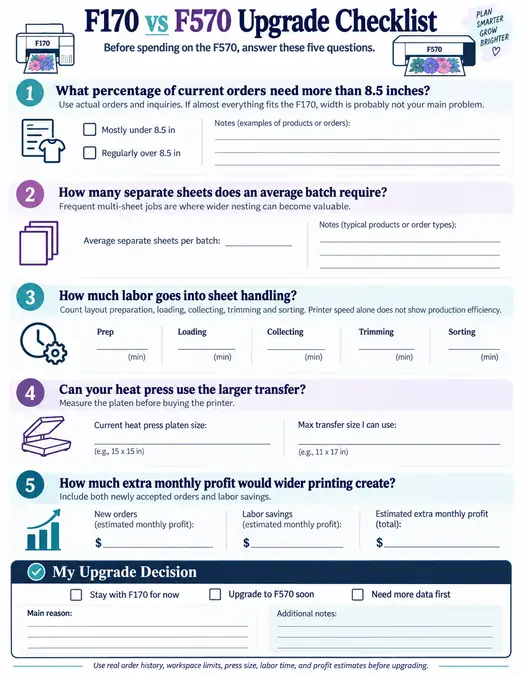
F170 vs F570 Upgrade Checklist
Before spending on the F570, answer these five questions.
What percentage of current orders need more than 8.5 inches?
Use actual orders and inquiries.
If almost everything fits the F170, width is probably not your main problem.
How many separate sheets does an average batch require?
Frequent multi-sheet jobs are where wider nesting can become valuable.
How much labor goes into sheet handling?
Count layout preparation, loading, collecting, trimming and sorting.
Printer speed alone does not show production efficiency.
Can your heat press use the larger transfer?
Measure the platen before buying the printer.
How much extra monthly profit would wider printing create?
Include both newly accepted orders and labor savings.
Then compare the result with the equipment cost through the equipment ROI calculator.
Epson F170 vs F570 FAQs
Does the F570 use more expensive ink than the F170?
No. Both printers use Epson T49M 140 mL dye-sublimation ink bottles. Epson currently lists the bottles at $24.95 per color and identifies both printers as compatible. Actual job cost still changes with print area, coverage, waste and print settings. For related planning, see Best Sublimation Blank Suppliers in USA.
Do the F170 and F570 use the same Epson ink?
Yes. Both use T49M black, cyan, magenta and yellow dye-sublimation bottles. You do not move to a separate ink family when upgrading from the F170 to F570.
What is the maximum print size on the Epson F170?
Epson lists the maximum paper width as 8.5 inches and the maximum sheet size as 8.5 × 47.2 inches. The practical limitation is width. A long sheet does not let you print artwork wider than 8.5 inches.
Can the F170 print larger than 8.5 × 14?
Yes. Epson’s specifications list sheet media up to 8.5 × 47.2 inches. Software, operating-system and driver limitations can still affect maximum printable length.
How wide can the Epson F570 print?
Epson lists a maximum paper width of 24.4 inches. The printer supports roll media and top-loaded sheets up to that width.
Can the F570 print individual sheets or only rolls?
It can use both. Epson lists a 50-sheet auto-feed system for narrower sheets, top-loading single sheets up to 24.4 inches wide, and roll media up to 24.4 inches wide.
Does the F570 automatically cut every printed design?
No. Its internal rotary cutter cuts roll media across the width. It does not work like a contour cutter that separates every individual nested design. Gang-printed transfers may still require manual trimming.
Is the F570 print quality better than the F170?
The F570 has stronger printhead specifications, including a 2400 × 1200 dpi maximum resolution, 800 nozzles per channel and Nozzle Verification Technology. The F170 is rated at 1200 × 600 dpi. Finished sublimation quality still depends on artwork, color management, paper, substrate and pressing.
Is the F570 worth upgrading to for a sublimation business?
It makes the strongest case when F170 width or sheet handling is already costing you profitable work or production time. If all your products fit the F170 and production remains manageable, the larger printer may add capacity you do not currently need.
Should I buy the F370 instead of upgrading to the F570?
The F370 may fit shops that need more than 8.5 inches but do not require 24-inch roll production. Epson announced the 13 × 19-inch F370 on September 23, 2026 at a $999 MSRP, with availability planned for November 2026. The F570 still covers a much wider production range.
Can I use the same sublimation paper with the F170 and F570?
Both are designed for dye-sublimation transfer workflows, but media size and feeding method differ. Choose paper that matches the printer’s supported size and your substrate workflow. See our best sublimation paper for Epson printers comparison for more detail.
Keep the F170 Until It Becomes the Bottleneck
The F570 is not automatically a better business purchase just because it is wider, heavier and more expensive.
The F170 still makes sense when it produces the products customers are buying without creating a serious production bottleneck.
Move toward the F570 when the numbers show a clear problem:
too many rejected wide-format jobs, too much sheet handling, too many split designs, or proven demand for larger products.
Before buying, record one month of lost orders, production time and transfer sizes. Put those numbers into the Sublimation Equipment ROI Calculator.
That will tell you far more about the value of the upgrade than comparing printer specifications alone.