Heat Press Silicone Pad Replacement: Signs, Sizes & Free Checklist

One corner of your heat press keeps leaving transfers that won’t stick. The temperature looks right, and you’ve checked the pressing time, but the problem keeps returning. Before replacing the entire machine, inspect the silicone pad on its lower platen.
A worn, dented, or damaged lower pad can prevent consistent contact with your garment. Heat press silicone pad replacement may solve the problem when the pad is responsible, but an incompatible replacement can create new issues. This guide explains when to replace the pad, how to identify a compatible part, and how to check the press before using it again.
Table of Contents
- When Should You Replace a Heat Press Silicone Pad?
- How to Check Whether Your Lower Silicone Pad Is Worn
- How to Choose the Correct Heat Press Silicone Pad Replacement
- How to Replace a Heat Press Silicone Pad Safely
- Common Silicone Pad Replacement Mistakes to Avoid
- How to Check the Heat Press After Replacing the Pad
- Free Silicone Pad Inspection & Replacement Checklist
- Manufacturer references
When Should You Replace a Heat Press Silicone Pad?
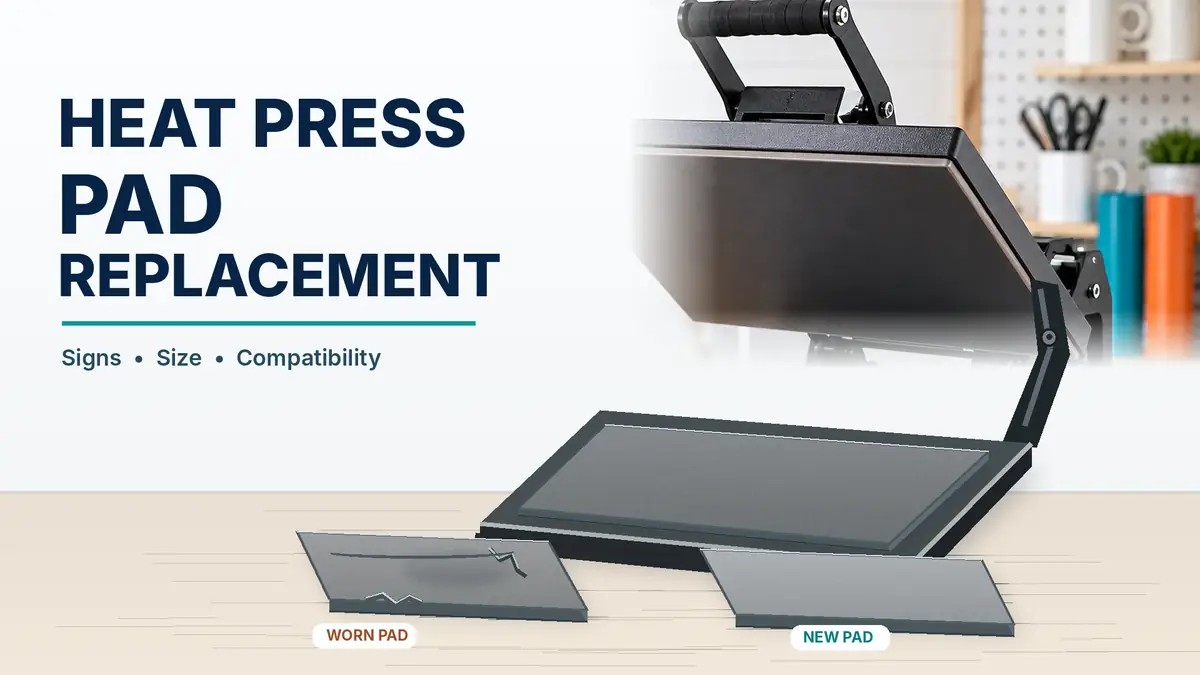
Replace the silicone pad when it has significant damage, permanent low spots, deteriorating edges, or wear that prevents consistent contact. Cleaning may be enough when the pad is structurally sound but has removable surface debris.
The lower pad supports the garment beneath the upper heat platen. It compresses during pressing and accommodates small differences in thickness. Over time, it can deteriorate. Manufacturers and equipment suppliers identify silicone pad wear as a possible cause of inconsistent application pressure.
Signs your silicone pad may need replacing
| Warning sign | What it may mean | Recommended action |
|---|---|---|
| Visible cracks or tears | The pad is physically damaged | Check replacement availability |
| Permanent dents or low spots | Contact may be uneven | Inspect the surface and compare contact |
| Rounded, badly worn edges | Some areas may receive less support | Check contact and replacement options |
| Pad lifting from its mounting surface | Attachment may be failing | Stop and consult the manufacturer’s instructions |
| Repeat failures in the same area | Possible contact distribution problem | Inspect pad, alignment, heat, and garment placement |
| Dust or removable residue | Contact may be obstructed | Clean according to the manual and inspect again |
When replacement may not be necessary
A failed transfer does not automatically mean the pad is worn. Before buying a part, check whether the actual platen temperature is inaccurate, a thick seam or zipper interferes with contact, pressure is inappropriate for the transfer, or the required application time or peeling method is incorrect.
If temperature accuracy is in doubt, follow the separate procedure for checking heat press temperature accuracy. A new pad cannot repair a failed heating element, misaligned mechanism, or incorrect transfer instructions.
How to Check Whether Your Lower Silicone Pad Is Worn
Begin with a visual inspection while the heat press is fully cooled, switched off, and disconnected from power. Never touch or attempt to remove the pad while the machine is hot.
Step 1: Inspect the entire surface
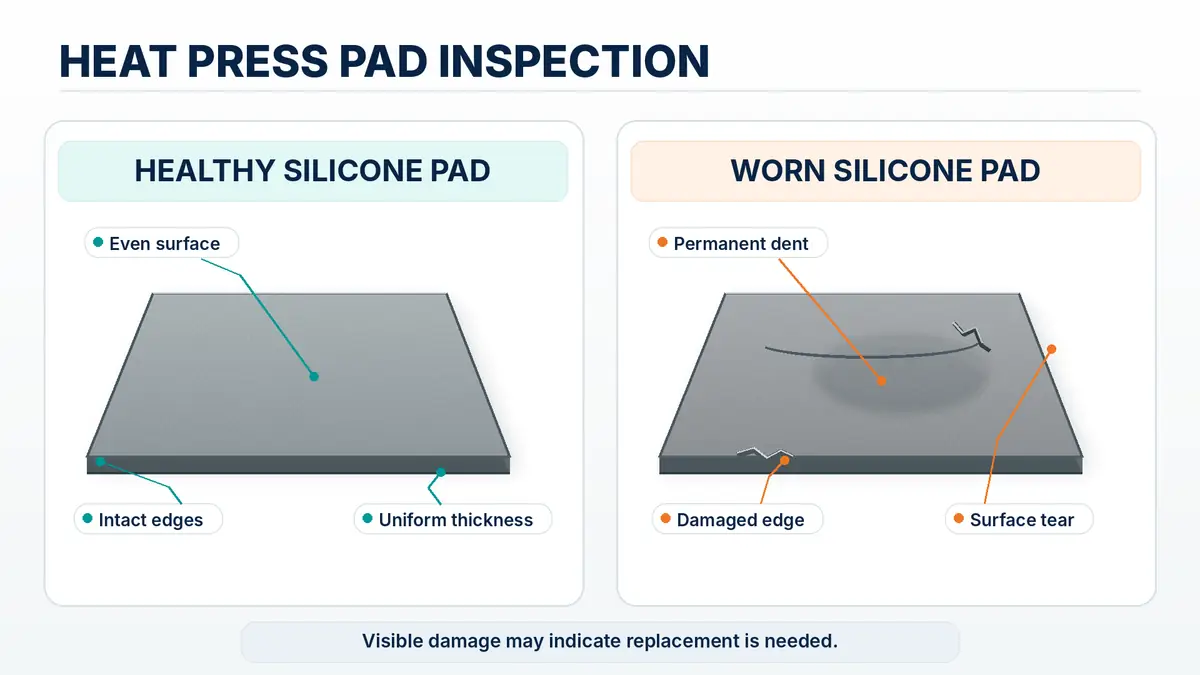
Open the press and look at the lower platen pad from several angles. Watch for deep impressions that do not recover, split edges, uneven thickness, lifting corners, sharp-object damage, or places where the pad has separated from its mounting surface. Superficial marks alone do not necessarily establish that the pad has failed.
Step 2: Check the edges and corners
Inspect all four corners and the front and rear edges. Lower pads can develop rounded edges through wear, potentially changing platen contact. If transfer failures repeat in one position, inspect the corresponding pad area. This is a diagnostic clue, not a confirmed cause.
Step 3: Look for residue and obstructions
Check for adhesive residue, lint, loose material, and debris beneath any removable cover. Clean only with products and methods allowed by the press manufacturer. Avoid scraping silicone with sharp tools. If the pad appears even and undamaged after cleaning, replacement may not address the fault.
Step 4: Evaluate contact consistency
Some manufacturers describe comparing paper resistance at different platen locations. Where your equipment permits that method, it can reveal relative differences in contact. It does not measure pounds per square inch (PSI) or prove a worn pad caused the difference. Platen misalignment or mechanical defects may produce similar results.
Follow the machine’s approved diagnostics. Never place hands between closing platens, defeat safety interlocks, or improvise a power-on test.
Step 5: Decide what needs attention
| Inspection outcome | Appropriate next step |
|---|---|
| Surface debris, no visible wear | Clean and retest |
| Significant silicone damage | Find a model-compatible replacement |
| Pad separating from its mount | Follow an approved replacement or repair procedure |
| Pad looks intact but contact is uneven | Investigate alignment and mechanical issues |
| Platen or linkage visibly damaged | Stop use and seek qualified service |
Document what you find before removing anything. Photos of the pad, mounting arrangement, and machine’s identification label can help a supplier confirm the right replacement.
How to Choose the Correct Heat Press Silicone Pad Replacement
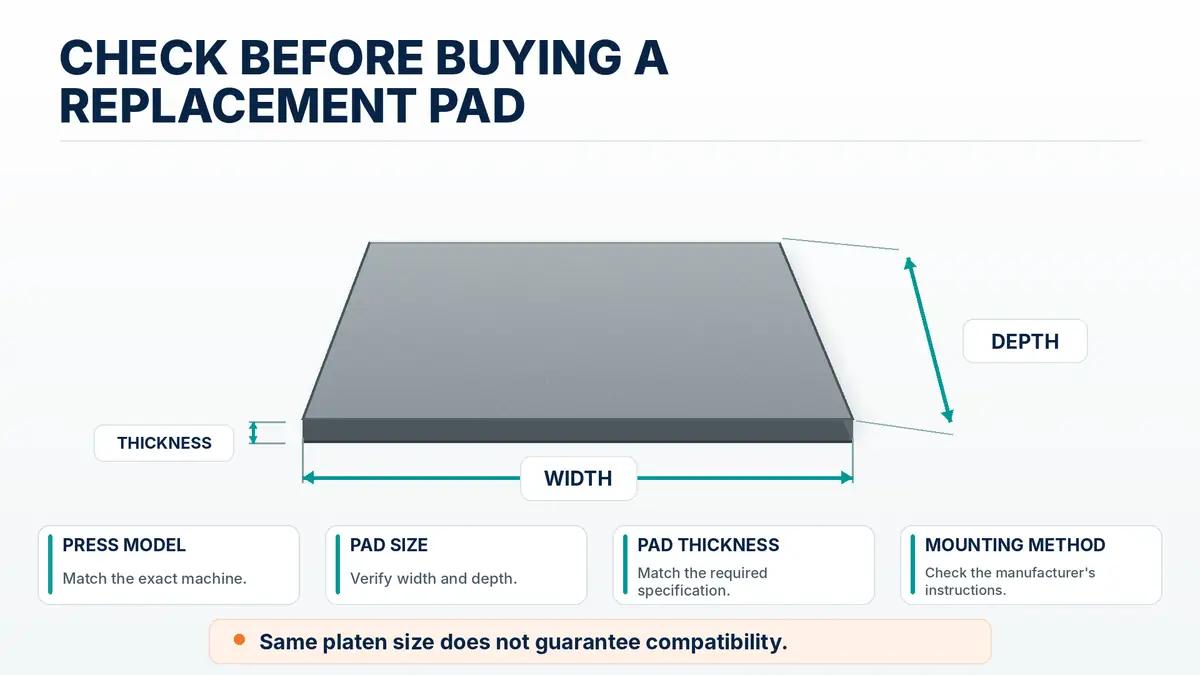
Match the replacement to the exact heat press model, not just the advertised platen dimensions. Two machines with the same pressing area can use different silicone thicknesses, materials, or mounting methods.
Replacement compatibility checklist
| Specification | What to verify | Why it matters |
|---|---|---|
| Manufacturer and model | Exact brand, series, and model number | Identifies the intended part |
| Platen dimensions | Width and depth in inches | Determines pad footprint |
| Pad thickness | Original manufacturer specification | Can affect closed geometry and contact |
| Pad construction | Manufacturer-approved silicone material | Ensures suitability for the machine |
| Temperature rating | Compatibility with operating conditions | Avoids unsuitable replacements |
| Mounting method | Bonded, removable, or integrated assembly | Determines the permitted installation method |
| Part number | Original or approved equivalent | Reduces ordering mistakes |
Match pad thickness before ordering
Silicone pad thickness is not universal. Heat Press Nation lists different pad thicknesses for some of its press series. Buying by width and length alone can therefore be insufficient. Do not stack unapproved silicone sheets over a damaged pad to compensate for an unknown thickness difference. Ask the manufacturer when the original specification is unclear.
Silicone pad versus pressing pillow
A lower silicone platen pad is part of the press’s supporting surface. A pressing pillow is a removable accessory used for some garments with seams, zippers, or raised areas when permitted by the equipment and transfer instructions. A pressing pillow does not automatically replace a damaged lower pad. Foam cover pads and specialty silicone sheets may also serve different functions.
Replace the pad or the entire lower platen?
| Repair option | When to consider it |
|---|---|
| Silicone pad only | Damage is limited to the pad and the model supports approved pad replacement |
| Complete lower platen assembly | The manufacturer specifies an assembly or its supporting platen is damaged |
| Authorized service | Alignment, electrical, structural, or mechanical problems are suspected |
Check part availability and warranty conditions before disassembly. If the machine itself needs replacement, the heat press buying guide explains which platen sizes, mechanisms, and features matter when choosing equipment.
How to Replace a Heat Press Silicone Pad Safely
The correct replacement procedure depends on the machine. Some pads are bonded with specified adhesive, while others are removable components or parts of a complete lower platen assembly. Work on the pad only when your manufacturer allows owner replacement and provides model-specific instructions. Otherwise, use an authorized technician.
Step 1: Identify the approved replacement method
Before removing anything, confirm whether the job is a removable-pad swap, replacement of a complete lower platen assembly, an approved adhesive-bonded procedure, or service-only work. Do not assume a pad can be peeled off because it looks like a separate layer.
Step 2: Disconnect power and let the machine cool
Switch off the heat press, disconnect it from electricity, and let it cool completely. Follow the manual’s instructions for securing movable parts. Do not work beneath an unsupported platen. If the job requires electrical disassembly or removal of safety-critical parts, stop and obtain qualified service.
Step 3: Verify the replacement before removal
- Confirm the exact machine model and compatible part number.
- Measure the intended platen width and depth.
- Check the manufacturer’s specified silicone thickness.
- Verify material and operating-temperature suitability.
- Confirm the approved mounting method and required hardware or adhesive.
- Check any warranty or service restrictions.
For a manufacturer-approved bonded installation, a dry fit may help check alignment before any specified adhesive is applied. Do not trim a pad unless the instructions explicitly permit trimming.
Step 4: Remove the old pad using the model instructions
Follow the manufacturer-approved removal process. Adhesive-bonded pads may require particular tools or cleaning materials. Insta Graphic Systems, for example, publishes a procedure involving old-pad removal, lower-platen cleaning, and installation with a specified high-temperature adhesive. That example is not permission to use the same adhesive or removal method on a different brand.
Do not improvise with blades, abrasive tools, solvents, heat guns, or excessive force. These methods may damage the lower platen or create additional hazards.
Step 5: Prepare the mounting surface
Where an approved bonded-pad method applies, follow its cleaning and surface-preparation requirements. The mounting surface may need to be free of residue and completely dry. Read the cleaner and adhesive safety instructions, including ventilation, handling, and protective equipment requirements.
Step 6: Install the new pad
Follow the instructions supplied for the replacement component. For a permitted adhesive-bonded procedure, these may cover adhesive placement, alignment, and how to prevent trapped air. Removable components may require a specified seating or fastening procedure. Never substitute household glue, ordinary spray adhesive, tape, or unverified sealant.
Step 7: Allow the required curing or settling time
For adhesive installations, do not return the press to service until the manufacturer-required cure is complete. There is no universal curing time. Record the required conditions and finish time. Do not heat the machine to accelerate curing unless the approved instructions specifically call for it.
Step 8: Inspect before switching the press on
Check that the pad is seated, aligned, secure, and free of obvious raised areas or air gaps. Confirm that nothing interferes with platen movement and any required cure is complete. If the installation appears uneven or unsafe, stop before attempting a production transfer.
Common Silicone Pad Replacement Mistakes to Avoid
| Mistake | Why it matters | Better approach |
|---|---|---|
| Buying by platen size alone | Thickness or mounting can differ | Match model and approved part number |
| Using generic foam | Material may be unsuitable | Use the specified silicone component |
| Choosing an unverified adhesive | Bond and heat resistance may be inadequate | Follow the manufacturer’s adhesive requirements |
| Installing over residue | Pad may not seat evenly | Use approved surface preparation |
| Skipping cure requirements | Bond may be incomplete | Follow the specified time and conditions |
| Changing pressure without recording it | Makes retesting hard to interpret | Record original and new settings |
| Replacing the pad when a mechanism is broken | Does not correct a mechanical fault | Arrange appropriate inspection |
More pressure is not always the solution
Tightening the press further after installing a new pad can introduce additional transfer problems. Use the pressure, heat, and time specified for the exact transfer and substrate. See the guide to common heat press mistakes that ruin transfers for the broader application issues.
Do not skip inspection of the replacement
Even a new pad can be the wrong size, incorrectly seated, or unsuitable for the model. Check it before installation and again afterward. A new component does not guarantee consistent contact.
How to Check the Heat Press After Replacing the Pad
Your first task after replacement should be a controlled equipment check, not a customer order. Follow the manufacturer’s commissioning or return-to-service requirements.
Check 1: Inspect the pad and platen
With the press cool, confirm the pad lies flat and is secured as required. Look for lifting edges, displaced sections, or visible damage. The pad must not interfere with safe opening and closing.
Check 2: Recheck contact consistency
Use the manufacturer’s approved pressure or contact check. Record mechanical pressure-control settings before changing them. Where appropriate, compare several platen areas, not only the center. A paper test may identify an uneven-contact pattern but cannot report calibrated pressure.
Check 3: Verify temperature separately
Replacing the lower pad does not prove the heating platen is accurate. If earlier transfers showed temperature-related defects, investigate that issue separately rather than compensating with arbitrary heat increases.
Check 4: Make a trial transfer
Use an appropriate spare blank or garment and follow its actual application instructions. Record the transfer, substrate, pressure setting, pressing time, temperature, and any localized defects. If the problem persists in the same place, the old pad may not have been the only cause.
Check 5: Keep the maintenance record
Save the original part details, replacement number, installation date, and trial results. They will help if a symptom returns or a technician needs the service history. The heat press settings calculator may help organize transfer settings, but supplier instructions remain authoritative.
Free Silicone Pad Inspection & Replacement Checklist
Before ordering a pad or opening your machine, use the one-page US Letter worksheet to document the condition of the original pad and confirm the replacement requirements.
- Heat press make, model, and platen dimensions
- Original and replacement pad thickness or part number
- Visible wear and damage observations
- Mounting and compatibility checks
- Approved adhesive or fastening requirements, where applicable
- Required cure or settling conditions
- Post-replacement inspection and test-transfer notes
Keep the completed sheet with the heat press maintenance records. A compatible new silicone pad can be worthwhile when the existing pad is damaged, but it cannot correct a mechanical or heating problem. Verify the part first, follow the specific installation instructions, and test the machine before returning to production.