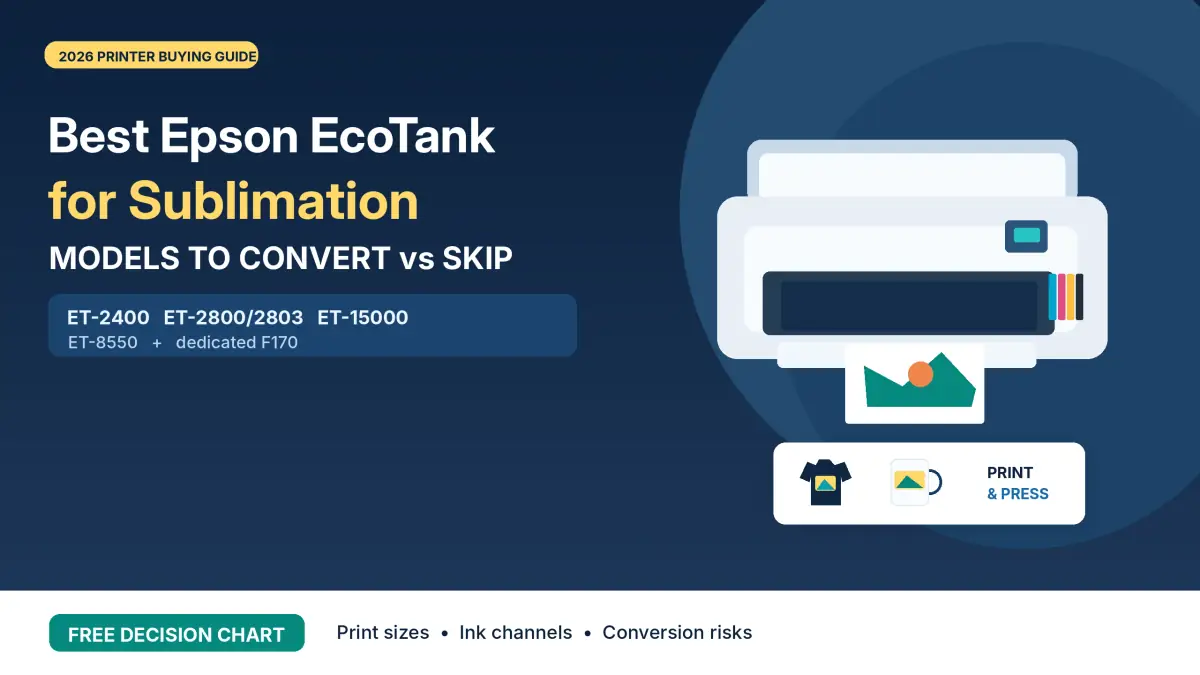
Best Epson EcoTank for Sublimation 2026: Models to Convert vs Skip

The best Epson EcoTank for sublimation depends on your transfer size, budget, and willingness to use an unofficial ink-conversion workflow. The ET-2400 and ET-2800/2803 are models to investigate for small projects; the ET-15000 handles wider 13 × 19-inch sheets. The six-channel ET-8550 requires a more specialized plan.
None of these EcoTanks is sold by Epson as a sublimation printer. Conversion requires suitable third-party ink, a compatible setup and acceptance of associated support and warranty risks. If you want an Epson printer designed for dye sublimation without conversion, compare the SureColor F170.
Best Epson EcoTank for Sublimation: Quick Comparison
Start with paper width and the number of ink channels, then verify the exact-model ink and color-management setup. This table includes commonly discussed EcoTank conversion candidates and one purpose-built Epson alternative.
| Printer | Supported sheet size | Ink channels | Conversion consideration |
|---|---|---|---|
| ET-2400 | Up to 8.5 × 14 in | 4, CMYK | Budget-focused candidate |
| ET-2800/2803 | Up to 8.5 × 14 in | 4, CMYK | Standard-format candidate |
| ET-2850 | Up to 8.5 × 14 in | 4, CMYK | Additional office convenience |
| ET-4800 | Up to 8.5 × 14 in | 4, CMYK | Office-oriented features |
| ET-15000 | Up to 13 × 19 in | 4, CMYK | Wide-format candidate |
| ET-8550 | Up to 13 × 19 in | 6 channels | Specialized ink and ICC plan |
| SureColor F170 | 8.5 in wide | 4, CMYK | Dedicated dye-sub; no conversion |
Paper size is not the same as printable image size. The ET-15000, for example, feeds 13 × 19-inch sheets through its rear tray, but it cannot print borderlessly at that size. Margins, paper type and driver settings reduce the usable image area.
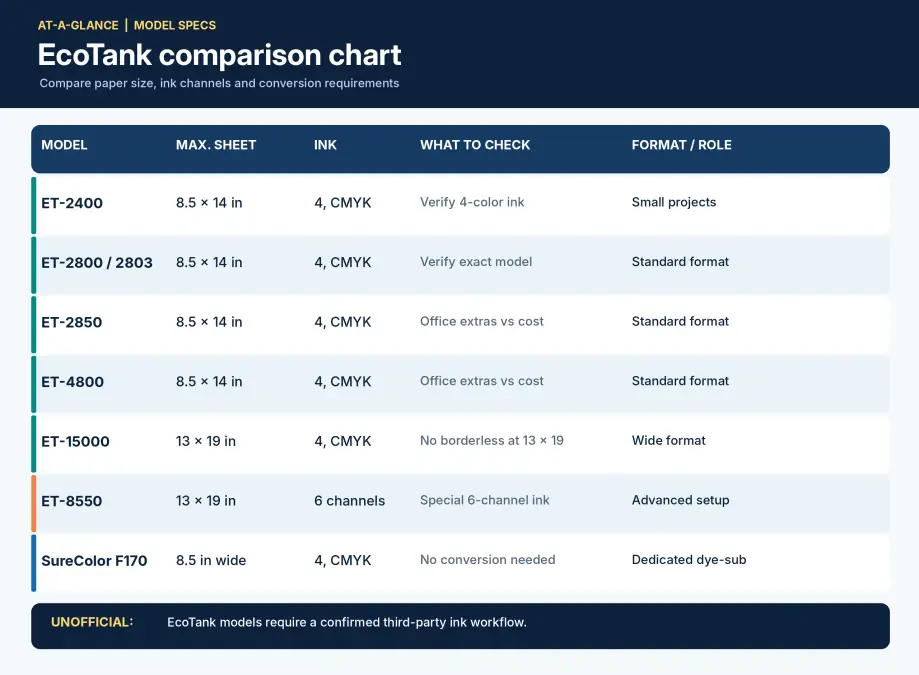
Free printable: Download the two-page Epson conversion decision chart for model comparisons, a pre-purchase checklist and a startup-cost worksheet.
All EcoTank conversion assessments below refer to unofficial third-party workflows. Check your chosen ink supplier’s compatibility instructions before purchasing a printer specifically to convert.
Which Epson EcoTank Models Are Practical Conversion Candidates?
Four-channel EcoTank models are common conversion candidates because their CMYK layout aligns with many third-party sublimation ink sets. That similarity does not guarantee compatibility; confirm the printer, ink formulation and settings together.
ET-2400: Budget-Focused Setup
The ET-2400 is worth investigating when the original printer purchase price matters more than office features. Its four-color system and legal-size paper support cover many mugs, coasters, ornaments, small apparel designs and compact decorative blanks.
The trade-off is its basic feature set and 8.5-inch paper width. If you only print sublimation transfers, extra office features may not add value. Confirm the exact-model ink and setup instructions before filling a new printer.
The official Epson ET-2400 support page contains the original printer documentation.
ET-2800 and ET-2803: Standard-Format Conversion
These closely related four-channel EcoTanks offer a standard desktop format. Their paper width suits small products and many compact shirt designs, but large single-piece apparel graphics may require a wider printer.
Rather than assuming one model number has better sublimation output, compare purchase terms and verify the exact model against your ink supplier’s instructions. Our ET-2800 vs ET-2803 comparison explains their practical differences.
ET-2850: When Office Convenience Matters
The ET-2850 uses four ink channels and supports legal-size paper. It includes additional office convenience, such as automatic two-sided printing for supported media. Those features do not inherently improve sublimation transfer quality.
Investigate it when its price, availability and confirmed ink setup make sense. Avoid paying more solely for office functions that a dedicated sublimation workflow will not use.
ET-4800: Office Features Versus Sublimation Needs
The ET-4800 adds business-oriented features such as an automatic document feeder and fax capability. It remains a standard-width, four-color printer; these extras do not make it a wider or more color-accurate sublimation machine.
Compare the complete conversion cost with simpler models. If the machine will only print transfers, the extra office hardware may have little practical value.
ET-15000: A Wide-Format Conversion Candidate
The ET-15000 becomes relevant when your artwork exceeds standard paper width. Epson specifies support for 13 × 19-inch sheets through its rear feed and borderless printing up to 11 × 17 inches.
Its four-channel CMYK layout avoids the ET-8550’s extra-channel planning, but conversion remains unofficial. Budget for suitable ink, paper, color management and workspace. Larger paper does not automatically improve the color of a small design.
See our ET-15000 sublimation guide for more on this model’s specifications and conversion considerations.
Which Epson Models Should You Reconsider or Skip?
More complicated ink arrangements, a previously filled ink system and unverified model support can increase conversion risk. Reconsider these situations before buying equipment solely because a model has attractive photo-printing specifications.
ET-8550: Six-Channel Conversion Requires Additional Planning
The ET-8550 has six physical ink channels in its original photo-printing system: Black, Photo Black, Gray, Cyan, Magenta and Yellow. Epson’s specifications describe a pigment-black channel and five dye-based channels in its original ink system.
A conventional four-color CMYK sublimation kit does not automatically supply a suitable six-channel conversion. Confirm how every channel will be filled and managed, and whether the ink supplier provides appropriate color-management support.
Its original photo-printing capabilities do not guarantee better sublimation color after conversion. For the detailed buying decision, read our ET-8550 vs ET-15000 comparison.
Previously Used EcoTanks Filled With Regular Ink
A printer already filled with ordinary ink presents additional uncertainty. Replacing the ink visible in the tanks does not necessarily remove ink remaining in internal tubes or the printhead.
Conversion of a used machine is not always impossible, but cleaning and residual-ink concerns complicate the process. An unused printer avoids that specific problem when buying a machine for a dedicated sublimation setup.
New or Unverified EcoTank Models
A newly released printer is not automatically suitable for sublimation because it uses Epson inkjet technology. Driver behavior, ink formulation, delivery components and maintenance requirements may differ from older models.
Before buying, get exact-model compatibility information from an ink supplier. A generic “works with Epson” label is not enough evidence for a dependable conversion workflow.
Can All Epson Printers Be Converted to Sublimation?
No. You cannot assume every Epson printer can be converted to sublimation. A compatible printhead is only one requirement. The complete system needs suitable ink and ink delivery, functional drivers, reliable media feeding and a workable color-management process.
- Confirm that the ink supplier explicitly supports your exact model.
- Check that the ink arrangement accounts for every physical channel.
- Confirm the paper size and feeding method your projects require.
- Find reliable driver, print-setting and ICC-profile guidance.
- Read the model-specific warranty and maintenance information.
Use these criteria rather than treating all EcoTanks or all Epson inkjet printers as interchangeable. Our sublimation ink guide explains what to check when comparing ink products.
Four-Color vs Six-Color EcoTank Conversion
Four-channel CMYK printers and six-channel photo models have different requirements. Extra photo channels were designed around the printer’s original ink system, not automatically around third-party sublimation ink.
| Factor | Four-channel EcoTank | Six-channel ET-8550 |
|---|---|---|
| Ink channels | CMYK | Black, Photo Black, Gray, CMY |
| Ink supply | Model-compatible CMYK set | Compatible plan for all six channels |
| Setup | Fewer channels to configure | Additional channel mapping |
| ICC profiles | Match model, ink and settings | Match entire six-channel setup |
| Troubleshooting | Four channels to inspect | Six channels to inspect |
The presence of six channels is not proof of better transfer color. Printed results depend on ink, paper, profile, driver settings and the substrate after pressing. Our ICC-profile guide explains why borrowing a profile from another ink and printer combination can give unreliable results.
What Does EcoTank Conversion Actually Cost?
Add the equipment and setup expenses before comparing printers. An inexpensive machine can still become costly if it needs additional supplies, repeated test prints or more time spent troubleshooting.
| Expense | What to include |
|---|---|
| Printer | Actual current purchase price and delivery |
| Sublimation ink | Complete exact-model-compatible ink set |
| Setup supplies | Filling and handling materials required by the supplier |
| Paper | Sizes and quantities used in your projects |
| Color management | Any profile or calibration expense |
| Testing | Paper, ink and blanks used during setup |
| Heat press | Equipment required for your chosen products |
| Maintenance | Supplies, failed prints and anticipated downtime |
Total startup cost = printer + ink + setup supplies + paper + heat press + testing allowance. If you already own a compatible heat press, count only the additional expenses required by the new printer.
Do not infer a universal cost per transfer from cartridge or ink-bottle capacity. Ink coverage, cleaning, paper waste and reprints all matter. Our ink cost per print calculator can use your real ink prices and measured consumption.
Converted EcoTank vs Epson SureColor F170
A converted EcoTank is a general-purpose printer using an unofficial third-party workflow. The Epson SureColor F170 is sold specifically for dye sublimation and uses Epson’s designated ink and setup.
| Factor | Converted EcoTank | SureColor F170 |
|---|---|---|
| Original purpose | Document or photo inkjet | Dye sublimation |
| Conversion needed | Yes | No |
| Ink system | Compatible third-party sublimation ink | Epson-designated dye-sub ink |
| Color setup | Depends on conversion workflow | Designed for Epson dye-sub system |
| Warranty | Third-party ink-related damage may be excluded | Applicable Epson warranty |
| Paper width | Depends on EcoTank model | 8.5 inches |
| Main trade-off | Conversion responsibility and support risk | Narrower paper format |
The F170 is relevant when you want an Epson-supported sublimation printer and do not need wide-format output. A converted EcoTank may offer a different equipment cost or paper width, but you must manage ink and color compatibility.
See our SureColor F170 settings and ink-cost guide for model-specific details.
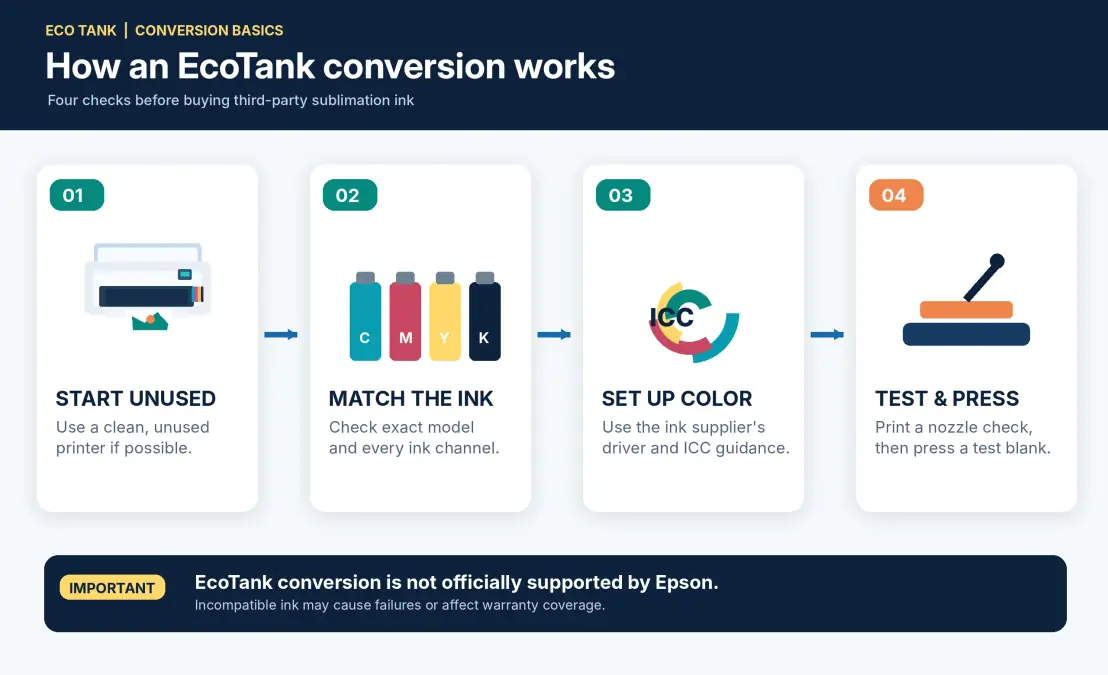
Before You Convert an Epson EcoTank
Check the entire workflow before putting any replacement ink into the printer. Compatibility, paper handling and warranty questions are easier to resolve before the machine has been filled.
Pre-Conversion Checklist
- Confirm the exact model and maximum paper size.
- Check whether the printer has previously been filled with regular ink.
- Verify the third-party ink supplier supports the model and every required channel.
- Obtain suitable print-setting and color-management instructions.
- Review warranty terms and any third-party ink exclusions.
- Confirm paper-feeding and heat-press requirements for your products.
- Plan a nozzle check and a small test-print routine.
Understand the Warranty Risk
Epson’s warranty excludes certain damage associated with unsuitable ink and ink-delivery systems. That does not mean every unrelated component automatically loses coverage the moment third-party ink is used. The actual terms and the cause of a failure matter.
Review the warranty for your specific model and region before conversion. Do not assume that an ink supplier’s compatibility claim creates Epson warranty coverage.
Plan the First Test Prints
Follow the ink supplier’s setup process and confirm every channel prints correctly. Run a nozzle check before altering multiple color settings. Once the pattern is complete, print a suitable reference and press it onto the intended substrate.
Evaluate the finished transfer, not just the image on sublimation paper. If colors are inaccurate, check the ink, printer settings and ICC-profile combination before making uncontrolled adjustments.
Which Epson Should You Choose for Your Projects?
Use your main product and required sheet width to narrow the options. Features that do not solve a production problem should not drive the purchase.
| Main work | Models to investigate | Key question |
|---|---|---|
| Small crafts, mugs and coasters | ET-2400, ET-2800/2803 | Is the complete four-channel setup compatible? |
| Standard shirt graphics | ET-2800/2803, ET-2850 | Does the artwork fit within usable width? |
| Larger apparel transfers | ET-15000 | Do you need 13 × 19-inch paper? |
| Specialized six-channel work | ET-8550 | Is every channel and ICC-profile workflow supported? |
| No DIY conversion | SureColor F170 | Is its 8.5-inch width sufficient? |
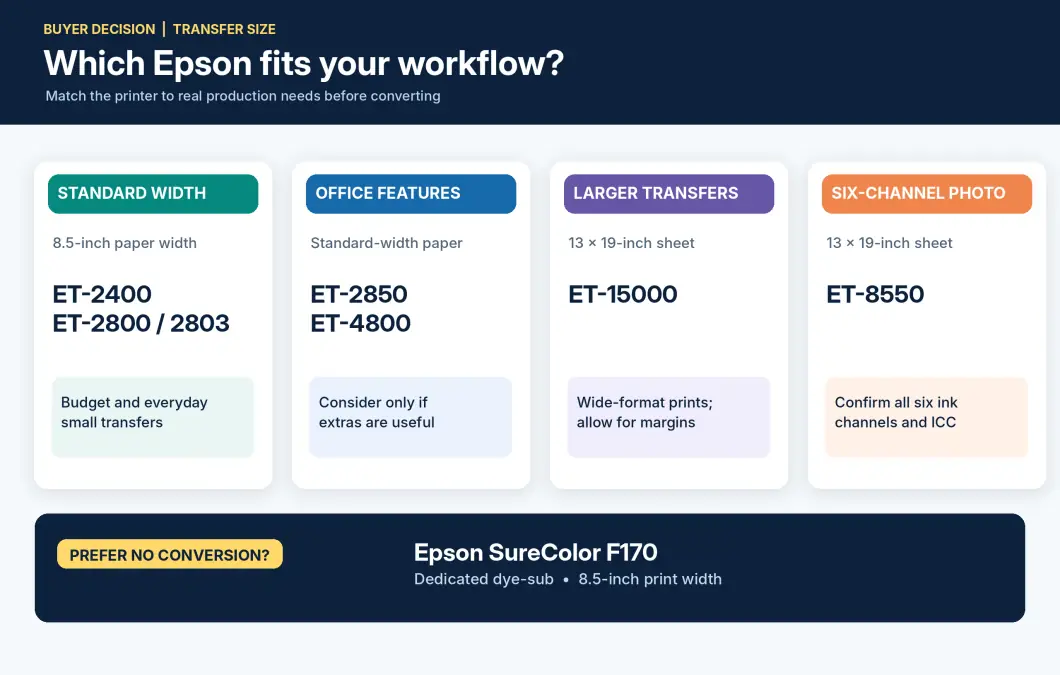
A wide-format printer does not improve a small mug design merely because it accepts larger sheets. Conversely, a standard-width printer cannot create one unbroken transfer wider than its supported image area. Our sublimation paper-size guide helps match sheet dimensions to common products.
Frequently Asked Questions
Which Epson EcoTank models can be converted to sublimation?
Commonly discussed unofficial conversion candidates include the ET-2400, ET-2800/2803, ET-2850, ET-4800 and ET-15000. The ET-8550 needs a specialized six-channel plan. Verify the exact model with an appropriate third-party ink supplier; Epson does not sell these EcoTanks as sublimation printers.
Is the ET-2400 suitable for sublimation?
Its four-channel system and standard-width paper handling make it a model to investigate for a budget conversion. Confirm exact-model third-party ink compatibility and suitable setup instructions before filling it.
Are the ET-2800 and ET-2803 different for sublimation?
They have closely related four-channel layouts and similar supported paper formats. Choose based on documented model differences, availability, purchase terms and the ink supplier’s exact compatibility guidance rather than assuming one has inherently better sublimation output.
Can the ET-15000 print 13 × 19-inch sublimation transfers?
The ET-15000 supports 13 × 19-inch sheets through its rear feed, but it does not support borderless printing at that size. The actual printable area is smaller because of margins. Ink and paper must also suit the conversion.
Can the ET-8550 use ordinary four-color sublimation ink?
A standard four-bottle CMYK kit alone does not account for six physical ink channels. The model needs a documented channel arrangement and compatible profile workflow. Do not fill the remaining channels without a plan from the ink supplier.
Can I convert an EcoTank that already contains regular ink?
It may be possible, but residual ink inside the tanks, tubes and printhead adds cleaning and compatibility risks. Starting with an unused printer avoids that particular issue.
Does sublimation conversion void the Epson warranty?
Epson excludes specified damage caused by inappropriate or third-party ink systems. Whether a particular repair is covered depends on the model’s warranty terms and the cause of the failure. Do not assume automatic blanket cancellation or guaranteed coverage.
Is the Epson F170 an EcoTank printer?
No. The SureColor F170 is a purpose-built Epson dye-sublimation printer, not a converted EcoTank. It uses Epson-designated sublimation ink and is intended for an 8.5-inch-wide media workflow.
Can a converted EcoTank still print ordinary documents?
It can put text or graphics on ordinary paper, but sublimation ink is formulated for heat-transfer production rather than normal office printing. Do not expect it to behave like the original Epson document-ink system or repeatedly switch between ink types.
Choosing an Epson EcoTank for Sublimation
The best Epson EcoTank for sublimation is the model whose paper format, ink channels and documented third-party conversion process match your projects. Investigate the standard-width four-channel printers for smaller transfers and the ET-15000 when you need larger sheets. The ET-8550 needs additional ink and color-management planning; the F170 avoids unofficial conversion altogether.
Before purchasing, download the conversion decision chart, verify the exact ink setup and calculate the complete startup cost. Those checks matter more than an attractive original photo-printing specification.