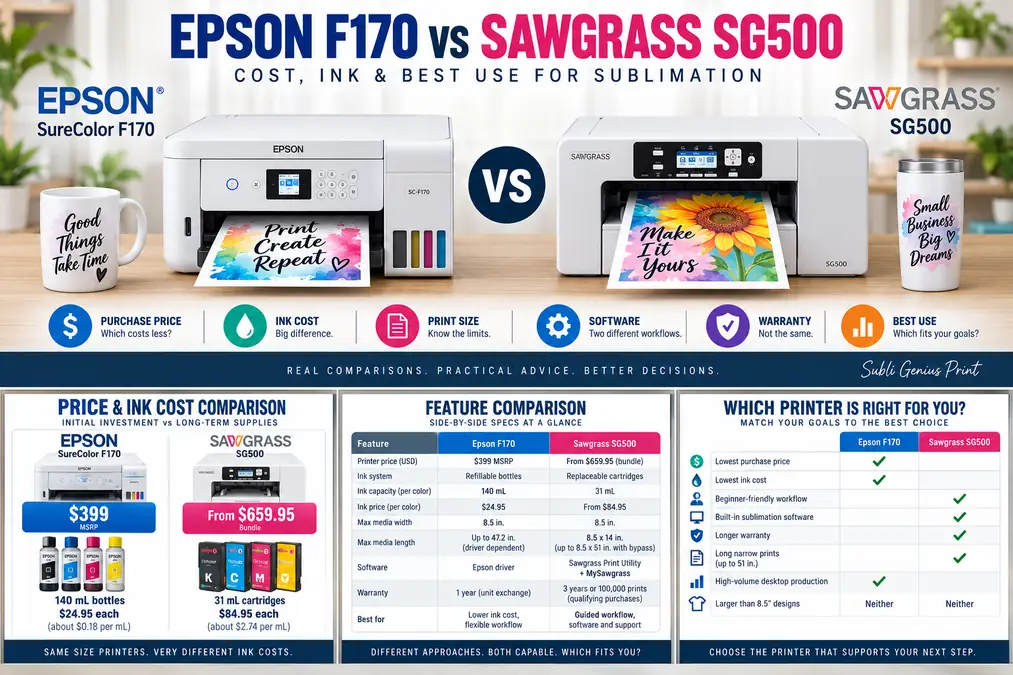
Epson F170 vs Sawgrass SG500: Cost, Ink & Best Use

The Epson F170 vs Sawgrass SG500 decision comes down to running cost versus workflow support.
The Epson SureColor F170 is the stronger choice when low genuine-ink cost and a lower entry price matter most. The Sawgrass SG500 costs more to buy and refill, but its package includes sublimation-focused print software, color presets, training, and a longer current warranty.
Both are purpose-built desktop dye-sublimation printers. Neither requires converting a regular inkjet printer.
Here is the quick decision before getting into the details.
| Choose | Best fit |
|---|---|
| Epson SureColor F170 | Lower purchase price, inexpensive genuine ink, straightforward desktop sublimation |
| Sawgrass SG500 | Guided color workflow, included sublimation software, training, stronger warranty coverage |
| Neither | You regularly need prints wider than 8.5 inches |
For a broader look at other sizes and budgets, compare them with our best sublimation printers.
Epson F170 vs Sawgrass SG500 at a Glance
The biggest differences are not print width or basic connectivity. Both are compact 8.5-inch-class printers. The important differences are ink economics, bundled software, support, and warranty.
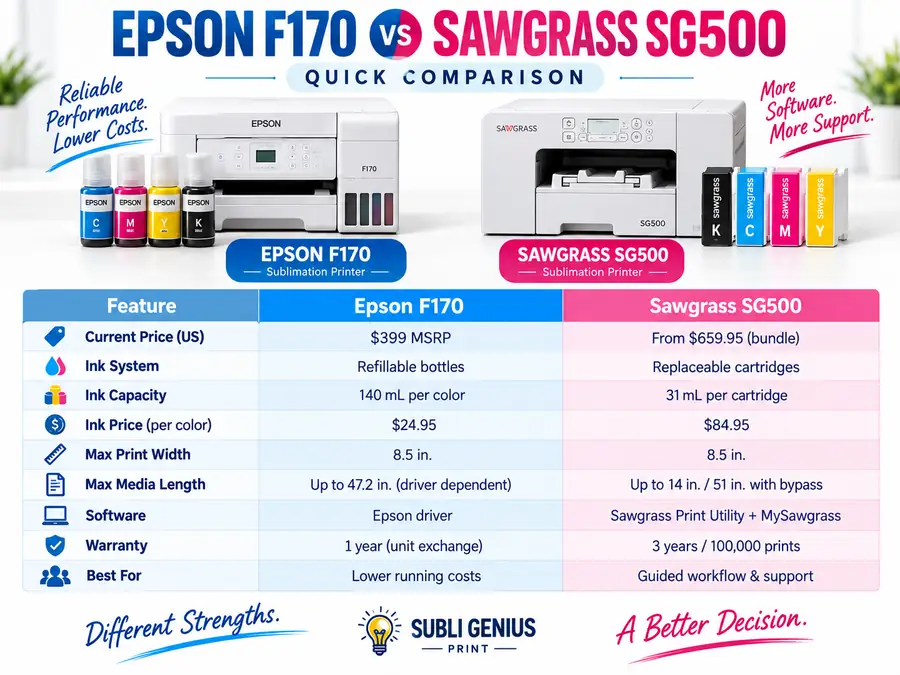
| Feature | Epson SureColor F170 | Sawgrass SG500 |
|---|---|---|
| Current US price reference | $399 MSRP | From $659.95 for current SubliJet bundle |
| Ink system | Refillable bottles | Replaceable cartridges |
| Ink capacity | 140 mL per color | 31 mL per cartridge |
| Current genuine ink price | $24.95 per 140 mL bottle | From $84.95 per 31 mL cartridge |
| Colors | CMYK | CMYK with SubliJet UHD |
| Maximum media width | 8.5 in. | 8.5 in. |
| Standard/main tray length | Up to 47.2 in. media supported by Epson | Up to 14 in. |
| Longer-print option | Driver/application dependent, up to 8.5 x 47.2 in. media | Up to 8.5 x 51 in. with optional bypass tray |
| Paper capacity | Up to 150 sheets | Not the main buying advantage |
| Print management | Standard Epson driver workflow | Sawgrass Print Utility |
| Design platform | Use your preferred software | MySawgrass included |
| Connectivity | USB, Wi-Fi, Wi-Fi Direct, Ethernet | USB, Wi-Fi, Ethernet |
| Standard warranty | 1-year unit exchange | 3 years or 100,000 prints for qualifying current purchases |
| Best reason to buy | Low ink cost | Integrated sublimation workflow |
Pricing checked September 10, 2026. Epson currently lists the F170 at a $399 MSRP and specifies four 140 mL T49M ink bottles. Sawgrass currently lists its SG500 SubliJet bundle from $659.95 with a full 31 mL ink set, 100 transfer sheets, software, training, and warranty coverage.
Bottom line: Buy the F170 for operating-cost control. Buy the SG500 if the extra software, training, and warranty support are worth paying more for.
Which Printer Costs Less to Buy?
The Epson F170 has the lower starting price based on current manufacturer pricing.
Epson lists the SureColor F170 at an MSRP of $399. The printer comes configured as a dye-sublimation machine and uses Epson’s T49M sublimation inks.
Sawgrass currently lists the SG500 SubliJet bundle from $659.95 in its US store. The package includes:
- SG500 printer
- Four 31 mL ink cartridges
- 100 sheets of transfer media
- MySawgrass
- Sawgrass Print Utility
- Live setup and training
- Current 3-year printer warranty
That makes a direct price comparison slightly imperfect. Epson’s $399 figure is the printer MSRP, while Sawgrass is promoting a more complete sublimation bundle.
Even after accounting for those extras, the F170 leaves more room in a starter budget for a heat press, blanks, paper, replacement ink, and other supplies.
What the Price Difference Means for a Small Shop
A lower printer price matters most when equipment is only one part of the startup budget.
A new sublimation seller may still need:
- A heat press
- Mug or tumbler equipment
- Transfer paper
- Blanks
- Heat tape
- Protective paper
- Design software
- Packaging
- Replacement supplies
Paying more for the SG500 makes more sense when you place real value on the guided software ecosystem and support.
If you already know how to prepare artwork, manage color, and set up a sublimation workflow, the F170’s lower equipment and ink costs become harder to ignore.
Bottom line: The F170 wins on entry price. The SG500 gives you more bundled workflow support for its higher price.
Epson F170 vs SG500 Ink Cost
Ink cost creates the largest financial difference between these two printers.
Epson currently sells its genuine T49M dye-sublimation ink in 140 mL bottles for $24.95 per color. A four-color replacement set therefore costs about $99.80 at Epson’s listed pricing.
Sawgrass currently lists its 31 mL SubliJet UHD cartridges from $84.95 each in its US store.
Using those listed capacities and starting prices:
| Ink comparison | Epson F170 | Sawgrass SG500 |
|---|---|---|
| Ink per color | 140 mL | 31 mL |
| Listed price per color | $24.95 | From $84.95 |
| Approx. price per mL | $0.18 | From $2.74 |
| Approx. four-color replacement | $99.80 | From $339.80 |
Those numbers make Epson ink roughly 15 times cheaper per milliliter using the current manufacturer-listed starting prices.
That does not mean every F170 print costs exactly one-fifteenth as much to print.
Cost per milliliter and cost per finished transfer are different measurements. Ink coverage, cleaning cycles, artwork, print settings, media, wasted prints, and maintenance can all affect actual consumption.
A manufacturer also does not provide a universal “prints per cartridge” figure that applies to every sublimation design. A small chest logo and an 8.5 x 11-inch photo use very different amounts of ink.
For a closer look at the Epson system itself, see our Epson SureColor F170 settings, specs, and ink cost guide.
Why Sawgrass Ink Costs More
Sawgrass sells the SG500 as a matched printing ecosystem. The printer, SubliJet inks, transfer media recommendations, profiles, and Sawgrass Print Utility are built to work together.
Its cartridges are also simpler to replace than manually pouring bottled ink.
That convenience has a significant consumable cost.
For an occasional hobby user, the total amount of ink used may be low enough that the difference does not control the buying decision. A business printing orders every week will feel the difference much sooner.
Bottom line: The F170 has a major advantage in genuine ink cost. High-volume desktop users should pay close attention to this difference.
Print Size: F170 vs SG500
Neither printer is a true wide-format machine.
The Epson F170 supports media up to 8.5 inches wide, and Epson lists a maximum sheet media size of 8.5 x 47.2 inches. Epson notes that maximum printable length can depend on the application, operating system, and driver or RIP being used.
The Sawgrass SG500 prints up to 8.5 x 14 inches from its standard setup. An optional bypass tray extends the supported length to 8.5 x 51 inches.
| Project | F170 | SG500 |
|---|---|---|
| Mugs | Good fit | Good fit |
| Small signs | Good fit | Good fit |
| Mousepads | Good fit | Good fit |
| Small apparel graphics | Good fit | Good fit |
| Tumbler wraps | Possible within 8.5-inch width | Possible within 8.5-inch width |
| Long narrow designs | Up to supported long-sheet workflow | Optional bypass tray is useful |
| Large adult shirt fronts | Width can become limiting | Width can become limiting |
| 11 x 17 designs | No | No |
| 13 x 19 designs | No | No |
The optional SG500 bypass tray is useful for long designs, but it does not make the printer wider. Your design is still limited to an 8.5-inch media width.
The same limitation matters with the F170. Long media can help with narrow wraps and repeated graphics, but an 8.5-inch print width can still be restrictive for larger apparel artwork.
If wider designs are becoming normal production work, moving to a larger printer usually makes more sense than constantly designing around an 8.5-inch limit.
Which Is Better for Tumblers and Mugs?
Both printers are well suited to many mug and narrow drinkware transfers because those designs generally fit within an 8.5-inch print width.
The decision is less about the printer and more about:
- Required wrap dimensions
- Paper size
- Your press or oven
- Blank coating
- Artwork placement
The SG500’s optional long-media capability can help when producing repeated narrow graphics or certain longer layouts.
The F170 can also work with long sheet media according to Epson’s published specifications, although the application and driver affect maximum printable length.
Neither printer gives you the wider sheet size needed for every oversized drinkware or apparel workflow.
Software and Color Management
The Sawgrass SG500 has the clearer advantage for users who want sublimation-specific print software included with the printer.
Sawgrass Print Utility includes profiles and product presets intended to simplify print setup. Presets can select product and print settings, although Sawgrass still tells users to verify print quality, media size, and paper type.
Print Utility also supports features such as:
- Product presets
- Spot color replacement
- Gang printing
- Quick Print folders
- Material-based pressing guidance
- Common graphics file formats
Sawgrass states that Print Utility and MySawgrass are free for Sawgrass users. A separate MySawgrass+ subscription exists for additional design content, but it is not required to use the basic printing software.
Epson F170 Software Workflow
The F170 uses a more conventional printer-driver workflow.
Epson’s current Windows support package lists the F170 printer driver and Epson Software Updater. You can create artwork in Photoshop, Affinity Designer, Canva, Silhouette Studio, CorelDRAW, or another application and then print through the Epson driver using the appropriate color-management workflow.
The F170 therefore gives experienced users plenty of freedom, but it does not package the same type of beginner-oriented sublimation print utility that Sawgrass provides.
That difference can matter during the first few months of printing.
Which Software Approach Is Better?
Choose the SG500 if you want more guidance between finished artwork and the printer.
Choose the F170 if you are comfortable managing print settings yourself and prefer working directly from your existing design software.
The Sawgrass approach can reduce setup decisions. The Epson approach gives you a simpler hardware-and-driver relationship without tying your normal design workflow to one platform.
Bottom line: SG500 wins for guided sublimation software. F170 works well for users who already understand printer settings and color management.
Maintenance and Ink Restrictions
Both printers perform routine maintenance, and both need to remain in usable condition to prevent print-quality problems.
The more important buying difference is the ink system.
Epson F170
Epson specifies genuine T49M dye-sublimation ink bottles for the F170. The printer uses refillable tanks rather than small replaceable ink cartridges.
That gives the F170 its major consumable-cost advantage.
If an F170 begins producing missing lines or weak colors, a nozzle check should come before repeatedly running cleaning cycles. Our Epson F170 nozzle check and head-cleaning guide explains the diagnostic sequence.
Sawgrass SG500
Sawgrass states that its printers are designed to use Sawgrass inks and warns that installing non-Sawgrass ink could affect warranty coverage. Sawgrass also advises against changing between different Sawgrass ink systems after a printer has already been loaded because residual formulations can mix.
That creates a more controlled ecosystem, but it also limits your flexibility to shop around for inexpensive ink.
For SG500 print-quality problems, use a diagnostic workflow before assuming the cartridge itself is bad. Our Sawgrass SG500 nozzle check and head-cleaning guide covers that process.
Epson F170 vs Sawgrass SG500 Warranty
Sawgrass has the stronger standard warranty based on current US manufacturer terms.
Epson lists the F170 with a standard one-year unit-exchange warranty and toll-free support.
Sawgrass states that SG500 and SG1000 printers purchased on or after October 1, 2025 are covered for three years or 100,000 prints, whichever limit applies under its warranty terms. The warranty applies to the original purchaser.
| Warranty factor | Epson F170 | Sawgrass SG500 |
|---|---|---|
| Standard period | 1 year | 3 years for qualifying current purchases |
| Print-count limit stated | Not presented that way on Epson product page | 100,000 prints |
| Original-purchaser restriction | Check warranty terms | Yes |
| Support emphasis | Unit exchange and phone support | Warranty plus setup/training ecosystem |
A longer warranty does not prove that one printer is mechanically more reliable than another. It simply gives the buyer more manufacturer-backed coverage under the stated terms.
That distinction matters. Reliability claims should come from controlled failure-rate data, not the length of the warranty.
Bottom line: Sawgrass provides substantially longer current standard warranty coverage.
Epson F170 vs SG500 for a Sublimation Business
The right business printer depends on what is limiting your operation.
| Business priority | Better choice | Why |
|---|---|---|
| Lowest startup cost | F170 | Lower listed printer price |
| Lowest genuine ink cost | F170 | 140 mL bottles are much cheaper per mL |
| Guided print setup | SG500 | Sawgrass Print Utility provides sublimation presets |
| Longer standard warranty | SG500 | Current qualifying purchases receive 3 years/100,000 prints |
| Training for a new operator | SG500 | Current bundle includes live setup/training |
| Existing professional design workflow | F170 | Easy to integrate with normal driver-based printing |
| Long narrow transfers | SG500 | Optional bypass supports up to 8.5 x 51 inches |
| Large apparel designs | Neither | 8.5-inch width is restrictive |
| Frequent production with tight margins | F170 | Ink economics become more important as volume rises |
| Simple all-in-one ecosystem | SG500 | Printer, inks, software, media guidance, and support are closely integrated |
Best for a New Hobby User
The F170 makes sense when budget is the main concern and you are willing to learn printer settings.
Its lower initial price also leaves more money for a decent heat press, which can have a larger effect on finished sublimation results than paying extra for printer software.
The SG500 may be easier for someone who prefers guided presets and manufacturer training rather than learning color-management settings from scratch.
Best for an Etsy or Small Sublimation Seller
The decision becomes more financial once orders are regular.
A seller producing mugs, tumblers, small apparel designs, ornaments, coasters, or similar products can use either printer effectively.
The F170’s low ink cost becomes increasingly attractive as order volume grows.
The SG500’s advantage is workflow consistency. Presets, software, and training can be valuable when a shop wants a defined process that another employee or family member can learn.
Best for Higher Desktop Production Volume
The F170 is generally the stronger economic choice when you are printing often but still working within an 8.5-inch width.
Ink volume is the reason.
Each Epson color bottle contains 140 mL compared with 31 mL in a standard SG500 SubliJet cartridge. Current manufacturer pricing also heavily favors Epson per milliliter.
If production grows enough that print width becomes the bottleneck, neither model is the ideal upgrade. A larger-format printer deserves consideration.
Is the Epson F170 Cheaper to Run Than the SG500?
Based on current genuine ink pricing, the Epson F170 has a major ink-cost advantage.
Epson currently lists each 140 mL T49M bottle at $24.95. Sawgrass lists 31 mL SubliJet UHD cartridges from $84.95.
Actual cost per finished print still depends on ink coverage, maintenance, artwork, and waste, so it would be misleading to claim one fixed cost per transfer.
Which Printer Has Cheaper Ink?
The Epson F170.
Using current manufacturer-listed prices, Epson ink works out to about $0.18 per mL, while Sawgrass SubliJet UHD starts around $2.74 per mL.
Use that figure as a consumable comparison, not as a guaranteed cost-per-print calculation.
Which Printer Has Better Software?
The SG500 has the stronger built-in sublimation software ecosystem.
Sawgrass Print Utility provides product presets, color-management tools, spot-color replacement, print-layout features, and pressing information. Sawgrass also provides MySawgrass as part of its ecosystem.
The Epson F170 relies more heavily on your existing design software and the Epson printer driver.
Experienced users may prefer that freedom. Beginners who want more guidance may prefer Sawgrass.
Can the Epson F170 and SG500 Print Tumblers?
Yes, both can print transfers for many sublimation tumblers as long as the required transfer fits the printer’s 8.5-inch media width.
The printer creates the transfer. A tumbler press or suitable sublimation oven applies it to the blank.
Check your exact tumbler template before buying either printer if full-wrap size is important.
Does the SG500 Print Larger Than the F170?
Not in width. Both are limited to approximately 8.5-inch-wide media.
The SG500 supports up to 8.5 x 14 inches in its standard configuration and up to 8.5 x 51 inches with the optional bypass tray. Sawgrass documents that extended-length capability directly.
Epson lists sheet media up to 8.5 x 47.2 inches for the F170 and notes that maximum printable length depends on the application, operating system, and driver or RIP.
The SG500’s bypass is a convenient long-media solution, but neither printer becomes wide format.
Which Has the Better Warranty?
The SG500 has the longer current standard warranty.
Qualifying SG500 printers purchased on or after October 1, 2025 receive a warranty of three years or 100,000 prints under Sawgrass’s current terms. Epson lists a one-year standard unit-exchange warranty for the F170.
Warranty conditions can change, so verify the current terms when purchasing.
Is the F170 or SG500 Better for a Growing Business?
Choose the F170 when growth means printing more of the same small-format products and controlling consumable costs.
Choose the SG500 when growth depends more on a standardized workflow, guided color management, training, and longer warranty support.
Choose a larger printer when growth means larger apparel graphics or wider products.
That last point matters more than brand loyalty. Once an 8.5-inch print width starts forcing you to resize, tile, or turn down profitable jobs, the better investment may be moving up a printer class rather than choosing between two machines with the same basic width limitation.
For more Sawgrass model context, compare the SG500 with the rest of the Sawgrass sublimation printer lineup.
Epson F170 vs Sawgrass SG500: Which Should You Buy?
The Epson SureColor F170 is the better value for most cost-conscious sublimation businesses working within an 8.5-inch print width.
Its $399 MSRP, 140 mL refill bottles, and current $24.95 genuine-ink price give it a substantial operating-cost advantage. It is especially attractive when you already know how to handle artwork, printer settings, and color management.
The Sawgrass SG500 is worth the higher cost when support and workflow simplicity matter more than ink economics. Sawgrass Print Utility, MySawgrass, live training, product presets, and the current 3-year/100,000-print warranty create a more guided environment for a new operator.
The decision is straightforward:
Buy the F170 for lower costs and workflow flexibility. Buy the SG500 for software, support, and a more tightly managed sublimation ecosystem.
If either printer’s 8.5-inch width already feels restrictive for the products you plan to sell, skip both and compare a larger model before spending money on a machine you may quickly outgrow.
Pricing and manufacturer terms checked September 10, 2026. Prices, bundles, availability, software features, and warranty terms can change. Verify current manufacturer information before purchasing.